This is the sequel post to the
first part
in which I mainly covered some elements of the specification wrt the “on-link”
flag and the IPv6 subnet model.
In short each IPv6 address has an associated flag which determines if the host
considers the respective address to be part of “a network where neighbors
exist”. If this is the case ND is performed to talk to them, otherwise all
communication with other hosts on that prefix is sent to the router. This flag
is NOT set for DHCPv6 addresses (and, btw, just to make this clear already,
there’s no way of setting it as part of the DHCP configuration procedure either)
so communication with hosts with the same DHCPv6 provided prefix is supposed to
go through a router, which in turn is very different (behavior) from the IPv4
world.
At the end of the first part we had a configuration state which led to two global addresses on both systems involved, a DHCPv6 provided one and another one generated as part of the SLAAC process, which can create operational issues of all kinds (improper source address selection, hindered troubleshooting etc.). Furthermore such a setting does not reflect “the operational DHCPv4 model” which we envisaged as the ultimate goal of our exercise. I had finished that post along the lines: “we then have to get rid of the SLAAC address”.
Considering that the SLAAC address is generated based on the prefix information
option (PIO) contained in router advertisements one might be tempted to
conclude: “if possible configuration-wise, why not remove that bit of
information from the router advertisements?”.
(we think:) Unfortunately some sources suggest exactly that.
Let’s give it a try. On Cisco this is done by the following command:
Router(config)#int vlan100
Router(config-if)#ipv6 nd prefix 2001:db8:6:6::/64 no-advertise
Router(config-if)#exi
Here is the outcome:
Windows
IPv6 Address. . . . . . . . . . . : 2001:db8:6:6:40f5:46c0:f0ed:4168
Link-local IPv6 Address . . . . . : fe80::f9ca:18b6:7015:cca6%13
Default Gateway . . . . . . . . . : fe80::1%13
Linux
eth0: <BROADCAST,MULTICAST,UP,LOWER_UP> mtu 1500 qlen 1000
inet6 2001:db8:6:6:94e:e384:7d17:4ed4/64 scope global
valid_lft forever preferred_lft forever
inet6 fe80::3aea:a7ff:fe85:c926/64 scope link
valid_lft forever preferred_lft forever
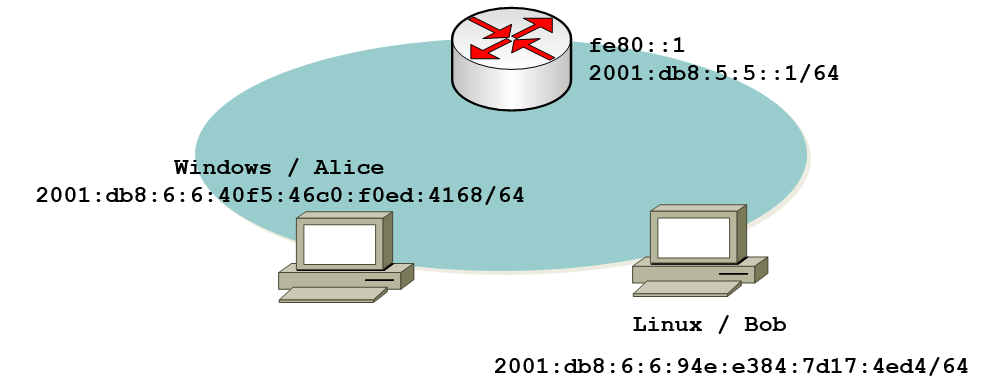
Now, can Alice communicate with Bob?
D:\ping 2001:db8:6:6:94e:e384:7d17:4ed4
Pinging 2001:db8:6:6:94e:e384:7d17:4ed4 with 32 bytes of data:
Reply from 2001:db8:6:6:94e:e384:7d17:4ed4: time=2ms
Reply from 2001:db8:6:6:94e:e384:7d17:4ed4: time<1ms
Reply from 2001:db8:6:6:94e:e384:7d17:4ed4: time<1ms
Reply from 2001:db8:6:6:94e:e384:7d17:4ed4: time=1ms
Hooray! There’s only one (“managed”) global IPv6 address left and the hosts can communicate with each other, by means of it. We have achieved what we wanted (“DHCPv4 like network model”), right?
Well… not really, sorry guys! Go read the packets, Luke, and let’s determine what exactly happens on the network:

Apparently (and not surprisingly), again the initial echo request is not sent to the “neighboring DHCPv6 client”, but to the router. This leads to the following overall communication sequence:
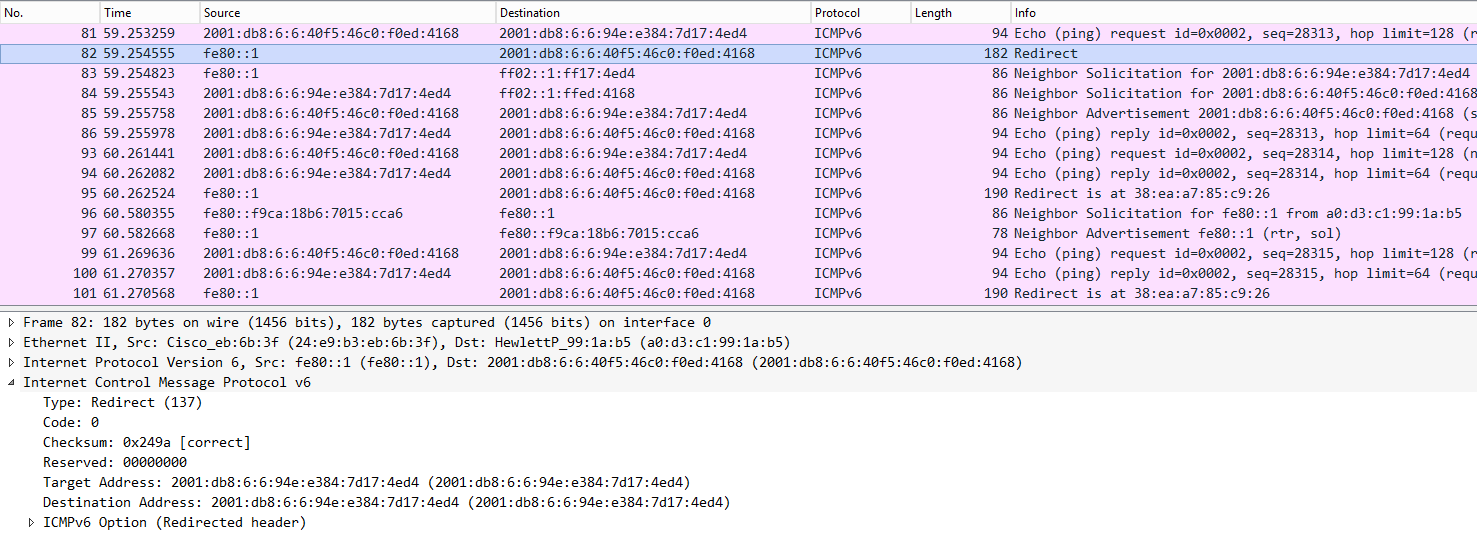 So,
what happens can be broken down to:
So,
what happens can be broken down to:
– Alice sends first ping to the router (given DHCPv6 prefix is not considered
“on-link).
– the router gracefully informs her that, from its understanding of the
topology, this is not the optimal path. this notification happens by means of an
ICMP redirect (type 137).
– some mutual neighbor solicitations are performed.
– based on the information learned from the ICMP redirect, Alice and Bob
communicate in a direct manner (at least as long as “the redirected routing
information is considered valid”).
Now, you might reply: “what’s the big deal about this? I don’t care what happens
in the background, as long as it works…”.
In case you’re tempted to think along those lines, may we kindly suggest you
discuss this with those guys doing daily troubleshooting in your organization’s
desktop (or VoIP ;-)) networks? Alternatively those guys responsible for systems
connected to some “layer 3 concentrator device” over slow links will give you a
big smile when informing them about this (default) behavior. Not to forget those
old guys who have painfully learned to (mis-) trust the correct processing of
ICMP redirects by various flavors of operating systems in the past…
Turns out that just clearing the prefix information from the router
advertisements did not produce the desired result which still is “we just want
the DHCPv6 network to have the same properties/behavior to what we did before
with DHCPv4”.
Fortunately there’s another tweak that can be performed. Looking carefully at
RFC 4861
*Neighbor Discovery for IP version 6 (IPv6) *we
realize that the actual generation of a SLAAC address is only performed once the
“autonomous address configuration” (in short: “A-flag”) is set, within the
prefix information option (PIO). If we can send router advertisements including
PIO with the A-flag cleared, but the on-link flag left intact, we might be able
to trick the receiving node into acting like this: “well, the router just
informed me there’s a local prefix. I’m not supposed to use this info for
generating an address but I still learned that this prefix [which
co-incidentally is the same as the DHCPv6 prefix…] is on-link, that is a
network with neighbors”.
On Cisco this can be configured by the following command (note that we remove the previously configured approach first):
Router(config)#int vlan100
Router(config-if)#no ipv6 nd prefix 2001:DB8:6:6::/64 no-advertise
Router(config-if)#ipv6 nd prefix 2001:db8:6:6::/64 2592000 86400 no-autoconfig
Router(config-if)#exi
[for the moment I leave it up to the reader to figure the details of the above approach from the command reference].
The relevant part of the router advertisement now looks like this:
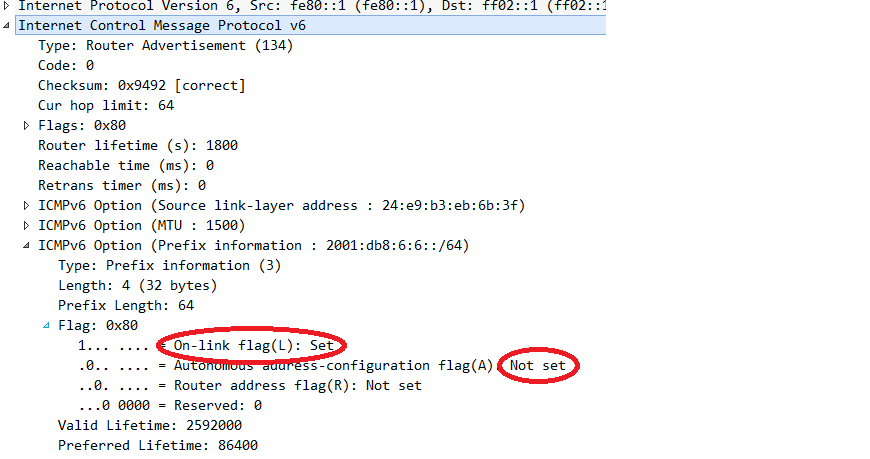
Performing another ping from Alice to Bob and looking at the network packets gives this picture:
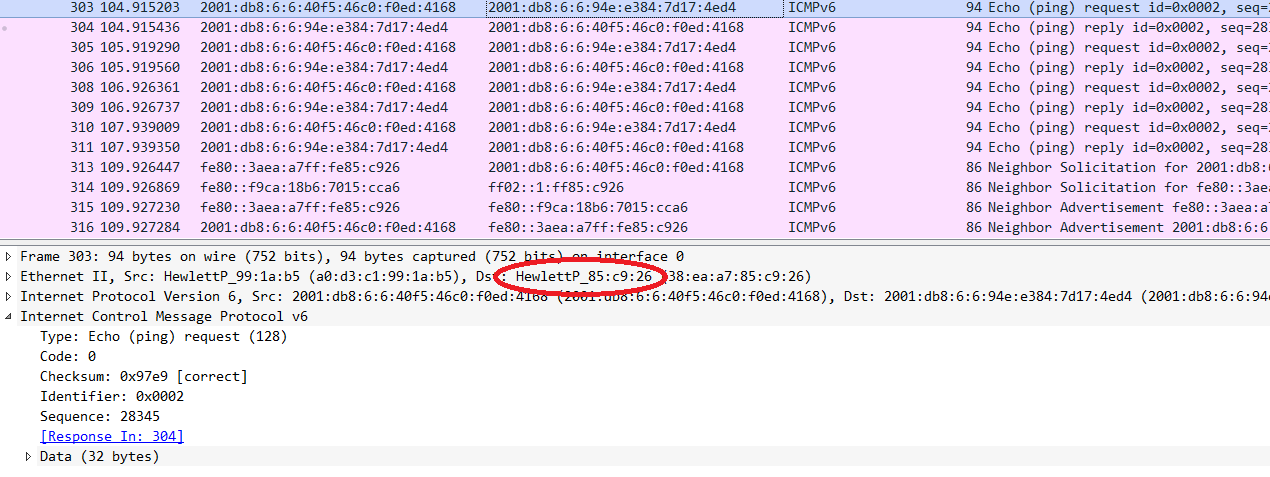
So we’ve finally managed to reach a setting where DHCPv6 provisioned notes behave the same way as their DHCPv4 couterparts. However, to do so we had to gain a detailed understanding of the intricacies of DHCPv6 and to perform some fine-tuning on the L3 infrastructure. I’d like to point out two main take-aways for the moment:
– DHCPv6 is very different from DHCPv4 (which can be applied to the relationship
between IPv6 and IPv4, too ;-)).
– if you strive to employ DHCPv6 in an operations model similar to DHCPv4 you
have to perform some tweaking on the routers serving the respective nodes’
segments. And, of course, these routers must support the relevant configuration
knobs. If they don’t, be very careful. Else your network might exhibit a
somewhat unexpected behavior and those guys responsible for operations &
troubleshooting those segments will not be happy about that…
There might be a third part of this series discussing pros & cons of DHCPv6
flavors in different enterprise settings. In any case I will give a talk on
“Operating DHCPv6 in a Secure & Reliable Way” at the
Troopers 2015 IPv6 Security Summit.
For today, I wish everybody a great weekend and thanks! for reading