When conducting pentests of Bluetooth devices or whilst working on Bluetooth related research, we often use Bumble. In this Blogpost I will present a solution to capture a live stream of Bumble Bluetooth traffic in Wireshark.
Bumble is a fully featured Bluetooth stack, written entirely in Python. What makes it extremely powerful for security assessments and research is the level of control it provides. It can simulate certain conditions, including errors, with a level of precision that most Bluetooth stacks don’t offer. However, sometimes you not only need control, you also need visibility.
For Bluetooth, this often means you want to inspect the HCI traffic your host stack exchanges with the controller. Bumble offers convenient debug logging that pretty-prints every HCI message to your terminal. That’s a quick and easy solution, but once your script generates a bit more traffic, your terminal will be flooded with messages and leave you wishing for some proper filtering capabilities.
If you do Bluetooth testing with your host Bluetooth stack, you may be used to pulling up Wireshark for this purpose. With Bumble, this is not always straightforward. If you use it with a dedicated USB Bluetooth dongle, there will be no HCI socket on your system that Wireshark could capture from.
Fortunately, Bumble has support for pluggable HCI traffic sniffers. Until recently there was just one built-in sniffer that writes sniffed traffic to a btsnoop file. The format is compatible with Android HCI snoop files, which Wireshark knows how to read. So that made analysis of connections in Wireshark possible, but it lacked the possibility to have a live stream of HCI messages.
The Solution
The logical move to improve this situation was to implement an HCI snoop class that directly streams packets to Wireshark.
So, I implemented a PcapSnooper class that writes PCAP messages to a named pipe which is then read by a small Wireshark extcap script. The PCAP messages conform to the DLT_BLUETOOTH_HCI_H4_WITH_DIR format, which encodes HCI packets and their direction (host<->controller).
If you aren’t familiar with extcap, it is Wireshark’s plugin interface for external capture tools, allowing them to appear seamlessly alongside native network adapters. This mechanism enables our script to pipe traffic directly into the packet log, treating the Bumble stream just like a physical interface.
So the overall concept is pretty simple:
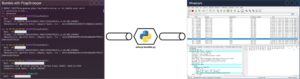
Bumble(PcapSnooper) -> FIFO -> extcap-bumble.py -> Wireshark
Native support in Bumble
The PR to support this natively has been accepted. As of Bumble version v0.0.224, the PcapSnooper class is built-in. This means you don’t need to patch Bumble manually to get the PCAP formatted stream needed for the pipe.
How to use this
- Install the extcap script: Copy extcap-bumble.py from the repo to your Wireshark extcap directory (usually ~/.local/lib/wireshark/extcap/, /usr/lib/wireshark/extcap/, or /Applications/Wireshark.app/Contents/MacOS/extcap/ on MacOS) and make it executable.
- Start Wireshark: You’ll see a new interface called Bumble HCI. Start capturing on it.
- Run Bumble: Use the environment variable BUMBLE_SNOOPER to enable the snooper and point it to the named pipe when running your Bumble script:
BUMBLE_SNOOPER=pcapsnoop:pipe:/tmp/bumble-extcap uv run example.py
NOTE: You can freely set the FIFO path here, but for now it’s hard coded to /tmp/bumble-extcap in extcap-bumble.py.
Instead of using the environment variable, you can manually use the PcapSnooper class in your own scripts. Check the run_device_with_snooper example on how that would be done.
The repo containing all code and a little documentation is at:
https://github.com/willnix/bumble-wireshark
Caveats
- The FIFO handling is a bit fragile:
- Wireshark must always be started before Bumble to open the FIFO.
- Stopping the capture or ending the bumble script may produce errors in Wireshark.
- Right now it does not work on Windows because:
- Python does not support named pipes on Windows out-of-the-box
- Python files are not runnable on Windows, so the extcap script would need a .bat wrapper
I hope this will be as useful to others as it is to us.
Happy hacking!
Frieder