Hi everybody,
This is the second entry in our research diary on IP cameras. If you haven’t
done so yet, you should read the first entry in advance. This time we focused
more on analysis and exploitation.
Another entry vector
After running a vulnerability scan on both devices, it was revealed that the M1033 has multiple buffer overflow vulnerabilities (CVE-2012-5958 to CVE-2012-5965), which are readily exploitable via Metasploit. This gave us another shell (in addition to the root shell mentioned in the last post), though this time it was not a root shell. By using the find command, we searched for executables having the setuid or setgid bit set. We hoped to use one of those to escalate privileges. To do so yourself add the parameter -perm -4000 to find and it will search for files having the setuid bit set. If you try that on your own unix-like device, for example it should yield /bin/passwd which is perfectly reasonable as you’re able to change your password without being root.
However, we soon found that the system is running with BusyBox. Going in line with the deprecated Linux kernel 2.6 and boa webserver, the Busybox running on the system is version 1.1.3. According to the git repository the release of that version dates back to 2006. Even the latest firmware contains the same version. Although only few CVEs exist for BusyBox, the CVE-2011-2716 looked quite interesting: before version 1.20 (released 2012) BusyBox contained a vulnerability in its DHCP client, which could lead to code execution.
(Mis)using DHCP to attack
Again Metasploit seems to be our friend here, as it offers a DHCP server to
exploit the ShellShock vulnerability. The problem with ShellShock is the fact
that environment variables were evaluated and containing functions executed. So
if an attacker was able to put arbitrary code into such environment variables,
the code would execute every time bash is started. For example, this is possible
via DHCP where the server can tell a client its hostname. The vulnerability in
BusyBox is similar: the DHCP client accepts any hostname, domain or nisdomain
without validating the input. Therefore, a DHCP server can send packets which
contain shellcode to the according fields.
Unfortunately, the Metasploit module is a bit limited: the payload tries to put
the shellcode into the crontab, which didn’t work in this case. To adapt the
payload to our likings, we had to build our own DHCP server where we used scapy
as a base. Scapy lets you easily build your own data packages with minimal
effort and you don’t have to work on the bit level by yourself. For example, a
DHCP offer packet could look like this:
dhcp_offer = Ether(src=localmac, dst="ff:ff:ff:ff:ff:ff") \
                             / IP(src=str(localip), dst=str(network.broadcast_address)) \
                             / UDP(sport=67, dport=68) \
                             / BOOTP(chaddr=[mac2str(dhcpsmac)], xid=localxid, yiaddr=str(clientip), siaddr=str(localip), op=0x02) \
                             / DHCP( options=[("message-type", "offer"),
                                              ("server_id", str(localip)),
                                              ("lease_time", lease_time),
                                              ("subnet_mask", str(network.netmask)),
                                              ("router", str(localip)),
                                              ("hostname", myhostname),
                                              ("NIS_domain", nisdomain),
                                              ("domain", domain),
                                              ("param_req_list", "pad"),
                                              "end"])
Now with full control over the payload it seems that BusyBox is not inflicted by the ShellShock vulnerability. Still the camera accepts our arbitrary packets and puts them into the according variables. We were able to verify this with the above UPnP exploit:
> hostname
ls >> /tmp/ernw.dhcp
> uname -a
Linux echo "ernw" >> /tmp/ernw.dhcp 2.6.35 #1 PREEMPT Tue Sep 11 09:48:42 CEST 2012 armv6l unknown
Unfortunately at this point we were not able to bring our code to execution.
Honorable Mentions
Further vulnerability research revealed a command injection in the cameras web interface. It was reported and disclosed by OrwellLabs who seem to do quite some research on IP cameras. The advisory can be found here. We’d like to point out the huge list of affected devices/firmware versions as well as the timeline with Mirai and its recent derivates in mind.
TL;DR: yet another root shell
ONVIF for the Masses
The Open Network Video Interface Forum was started in 2008 with the goal to
specify and implement a global standard for the interface of IP-based physical
security products.
The core standard can be found
here and
specifies the implementation of a SOAP web service. In the case of the cameras
it is used to retrieve video feeds as well as configuring the device. There are
already free and commercial solutions to manage IP surveillance devices out
there which shows that this interface is not only relevant in our lab
environment. But while testing the web service effectively we encountered some
minor obstacles.
As this web service uses a digest authentication based on a timestamp and a
random nonce it is rather annoying to run semi-automated tests against the
implementation. Which is why the digest calculation had to be automated.
Fortunately, the Portswigger Burp Suite offers a well-documented extension
interface so a first quick and dirty implementation was done in no time. But
what’s the point in changing the extension source code every time you need to
change credentials or the extension’s scope which is why we dove into the
wonderful mysteries of GUI programming. The Burp extension interface offers
several language environments. Namely Java, Ruby and Python. As Python is our
weapon of choice most of the times, it was here as well. And if you never
experienced the joy of debugging GUI written by hand rather than a GUI builder
let us tell you that it is even way more adventurous while using a Java library
out of a Python interpreter. But eventually we came to a usable outcome:
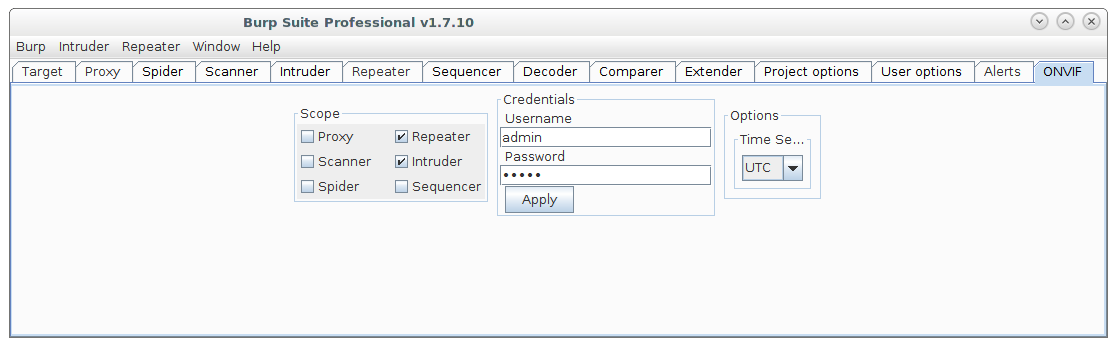
Of course this could be done in a way simpler way, e.g. with the existing Python
Scripter extension mentioned in this
blog post.
But the goal here was not only to build a usable Burp extension, but maybe
develop a blank canvas to build your own extensions with a predefined set of GUI
elements to choose from in a hurry. We think it is a good idea to aid you guys
out there in building your own extensions for the special problems a web
application pentester may encounter and can’t find a satisfying solution for.
The ONVIF extension as well as the canvas will be available at our
github in the near future.
On a side note we found out, that at least the implementation of AXIS, has a
replay attack prevention. This means your timestamp in the authentication header
has to be within 5 seconds of the camera’s clock. So in order to be able to
authenticate with the SOAP service one has either to be in sync with the camera
or disable the replay protection, which can be done in the web interface (Setup
> SystemOptions > Advanced > PlainConfig > Webservice > “Enable replay
attack protection”). If, for whatever reason, you do not have access to the web
interface you can check the time set up on the camera via the
GetSystemDateAndTime call which does not need any authentication.
so long
Benjamin and Pascal