Recently we took a look on Ciscos XMPP client, called Cisco Jabber. The Client is used in combination with Ciscos Unified Communication Server (CUCM) and Ciscos Unified Presence Server (CUPS). Only the latter one is used for XMPP communication.
We built a small lab setup with this components (CUCM, CUPS and the Win7 Client) and watched the client working.
First the client connects to a web service at https://CUPS:8443/EPASSoap/service/v80. We intercepted this connection with the Burp Proxy and had no problems getting into the SSL. Inside we found a SOAP request containing the users authentication credentials and a SOAP response with a onetime password, which is used for authentication in the XMPP stream later on. Phew, the users credentials _and_ unlimited onetime passwords _that_ easy? Thanks Cisco!
Next we simply sniffed the XMPP communication:
<?xml version=‘1.0’ ?><stream:stream to=‘domain.not.set’ xmlns=‘jabber:client’ xmlns:stream=‘http://etherx.jabber.org/streams' xml:lang=‘en’ version=‘1.0’>
<stream:stream xmlns:stream=‘http://etherx.jabber.org/streams' xmlns=‘jabber:client’ xml:lang=‘en-US.UTF-8’ id=‘1C5A9228B1’ from=‘domain.not.set’ version=‘1.0’><stream:features><starttls xmlns=‘urn:ietf:params:xml:ns:xmpp-tls’><required/></starttls></stream:features>
<starttls xmlns=‘urn:ietf:params:xml:ns:xmpp-tls’/>
<proceed xmlns=‘urn:ietf:params:xml:ns:xmpp-tls’/>
.h….?…..k..j..:..9..8..5………….g..@..4..3..2../.
………………~..P…./.ZfhF…[.k.R..Wi4.
….Q…M..Q,..4………%/.|……‘ww.PH…w…l…
oM.dB.Y<;.BWh&..K..>..4.5…………………..0.
..0……….P …. J.h……0
Data sent by the client is displayed in red and data sent by the server is displayed in blue. As XMPP is a XML based protocol, we can easily read the messages exchanged in the beginning. In the first message the client requests a stream to out lab domain ‘domain.not.set’. The second message assigns a stream to the client with the stream id ‘1C5A9228B1’ and also signals that TLS is required for further communication, which is signaled in the next two messages. After that the TLS handshake occurs and we see the binary TLS messages. This messages can be read in wireshark, if decoded as SSL, and contain the client and server hello. After the TLS handshake the hole stream is encrypted and not longer readable.
So far so good. After simply sniffing the communication we got in a Man-in-the-Middle position via ARP spoofing and built a simple xmpp_proxy to modify the XMPP data on the fly. We tried to simply strip the STARTTLS message from the client [remember IMAP ? (-: ] but that didn’t succeed, as the server is waiting for a STARTLS and does not go on without.
The next thing to do was get a MitM in the TLS stream as well. So we enhanced our xmpp_proxy to act on the starttls packet and set up two different TLS streams, one to the client and one to the server. This worked out quite well, even better than expected, given that I just used some random cert found on my hard disk for the server side. Here is what it looked like:
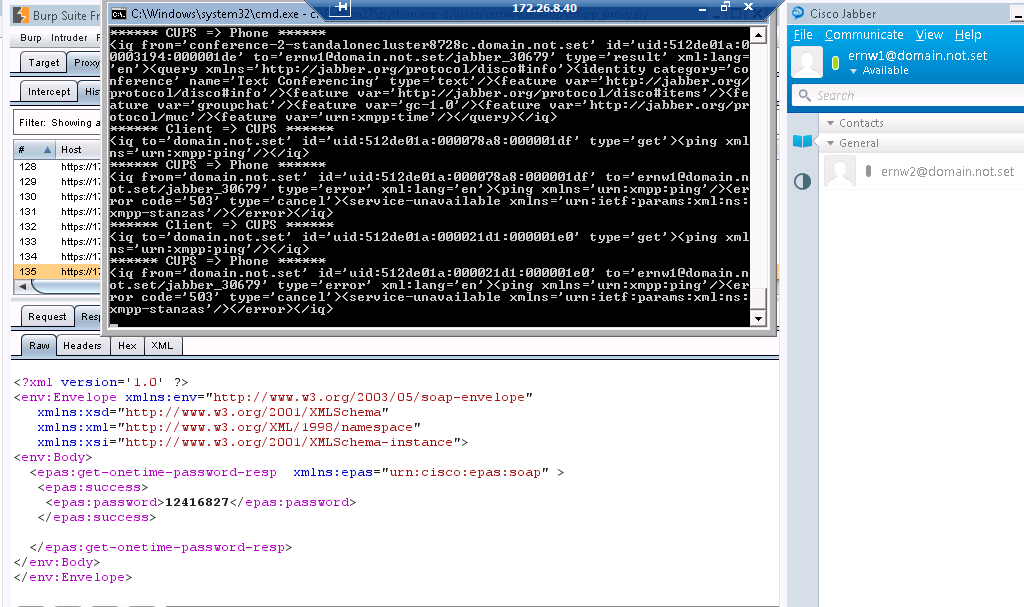
You see the Burp Proxy with the onetime password in the back, the xmpp_proxy with clear text XMPP in the front and the happily connected Cisco XMPP Client on the right.
So all in all this was a quite easy one 😀
cheers
/daniel