After the basic iCloud discussion in this post, I would like to add some more technical information. The following items are just a loose compilation of facts about the mentioned controls which allow the restriction of iCloud usage. The basic iCloud usage, consisting of backup, document sync, and photo stream, can be deactivated using the most recent version of the iPhone Configuration Utility:
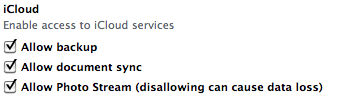
Since there are no default settings for these values, it is necessary to include the disabled entries in existing configuration profiles.
Another new functionality which can be deactivated using configuration profiles
is Siri. Even though this
functionality is not directly related to the iCloud at first glance, it still
bears a big threat potential. Looking at the
SLAs of the iPhone 4s,
the following paragraph gets relevant:
“When you use Siri, the things you say will be recorded and sent to Apple to
process your requests. Your device will also send Apple other information, such
as your first name and nickname; the names, nicknames, and relationship with you
(e.g., “my dad”) of your address book contacts; and song names in your
collection (collectively, your “User Data”).”
So Siri also uses cloud-based services in the background. The following
screenshot shows the option to disallow the usage of
Siri: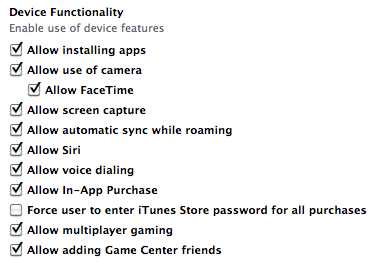
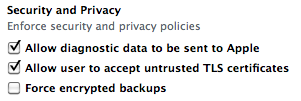
Thinking of this privacy relevant submission of data, another new option of the most recent tool version gets relevant: “Allow diagnostic data to be sent to Apple”. The two checked options in the following screenshots are also new features of the most recent version of the configuration utility:
That’s it for the short configuration option compilation of today, have a great week everybody,
Matthias