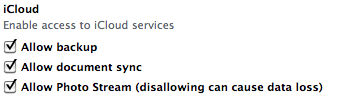
After the basic iCloud discussion in
this post, I would like to
add some more technical information. The following items are just a loose
compilation of facts about the mentioned controls which allow the restriction of
iCloud usage. The basic iCloud usage, consisting of backup, document sync, and
photo stream, can be deactivated using the most recent version of the
iPhone Configuration Utility:
Since there are no default settings for these values, it is necessary to include
the disabled entries in existing configuration profiles.
A few days ago (on 10/12/2011) Apple launched its new cloud offering which is
called — who would have guessed 😉 — iCloud. Since we’re performing quite some
research in the area of cloud security, we had a first look at the basic
functionality and concepts of the iCloud. Its main features include the
possibility to store full backups of Apple devices (at least, an iPhone, iPad or
iPod touch running iOS 5 or a Mac running OS X Lion 10.7.2 is required), photos,
music, or documents online. The data to be stored online is initially pushed to
the cloud storage and then synchronized to any device which is using the same
iCloud account. From this moment on, all changes on the cloudified data is
immediately synchronized to the iCloud and then pushed to all participating
devices. At this point, most infosec people might start to be worried a little
bit: The common cloud concept of centralized data storage on premise of a third
party does not cope well with the usual control focused approach of most
technical infosec guys. The resulting concerns can be attributed to several main
cloud computing related risks (which are proposed by
ENISA and actually very valuable
work: