A while ago we started researching Bluetooth Auracast security and wrote about some of our insights. Back then we released the Auracast Hacker’s Toolkit that allowed scanning, listing, and dumping Auracast broadcasts. The main goal was to be able to capture over-the-air packets in order to brute-force the Broadcast Code. Along with this blog post we’re releasing an updated version of the toolkit. This time we implemented proper sniffing capabilities. If you’re interested in the details, feel free to read on. If not, grab your nRF52840 USB dongle, flash the firmware, start sniffing, and load the captures in our Auracast Packet Visualizer.
Before diving into the technical details, we first need to clarify what we mean by sniffing Auracast. Due to the properties of Broadcast Isochronous Streams (the technical term for Auracast), there are various interpretations of what sniffing could mean.
In general, Auracast is intended for public audio broadcast. So isn’t sniffing just listening in on that public broadcast? Yes. But only kind of.
There are mainly three aspects that make this a more nuanced issue:
- Bluetooth Host vs Controller abstraction
- Retransmission and Pre-Transmission
- Encryption
Moreover, a sniffer’s required output depends on its purpose. Our goal was to be able to observe the Auracast over-the-air traffic in order to understand what’s actually going on, but also to analyze, visualize, and understand how attacks against the broadcasts affect them. That’s a different goal from simply subscribing to a broadcast.
In this blog post, we will briefly go over the points that make sniffing BIS complicated, describe what they are, and how we tackle them in the sniffer. But before that, let me briefly explain what Broadcast Isochronous Streams are. This is just a very brief overview of the parts required to understand the sniffer. We cover Auracast itself in much more detail in part 1 of our Auracast series.
Broadcast Isochronous Streams
Auracast, or Broadcast Isochronous Streams, look very interesting over-the-air. Depending on the configuration and the number of individual streams in a group, a complex combination of timing intervals, redundancy via retransmission, and frequencies (i.e., the Bluetooth channels) make up the stream.
Every PDU timeline graphic in this post is a screenshot by the Auracast Packet Visualizer, a tool that I built for exactly this purpose: visualizing how an Auracast stream looks over-the-air. It visualizes captured (or simulated) BIS PDUs as a timeline. More details on the tool will follow later.
This screenshot shows an Auracast Broadcast that consists of two streams (left and right audio channel). The upper packets are part of the first audio stream, the lower ones part of the second. We will get to the different colors later on.
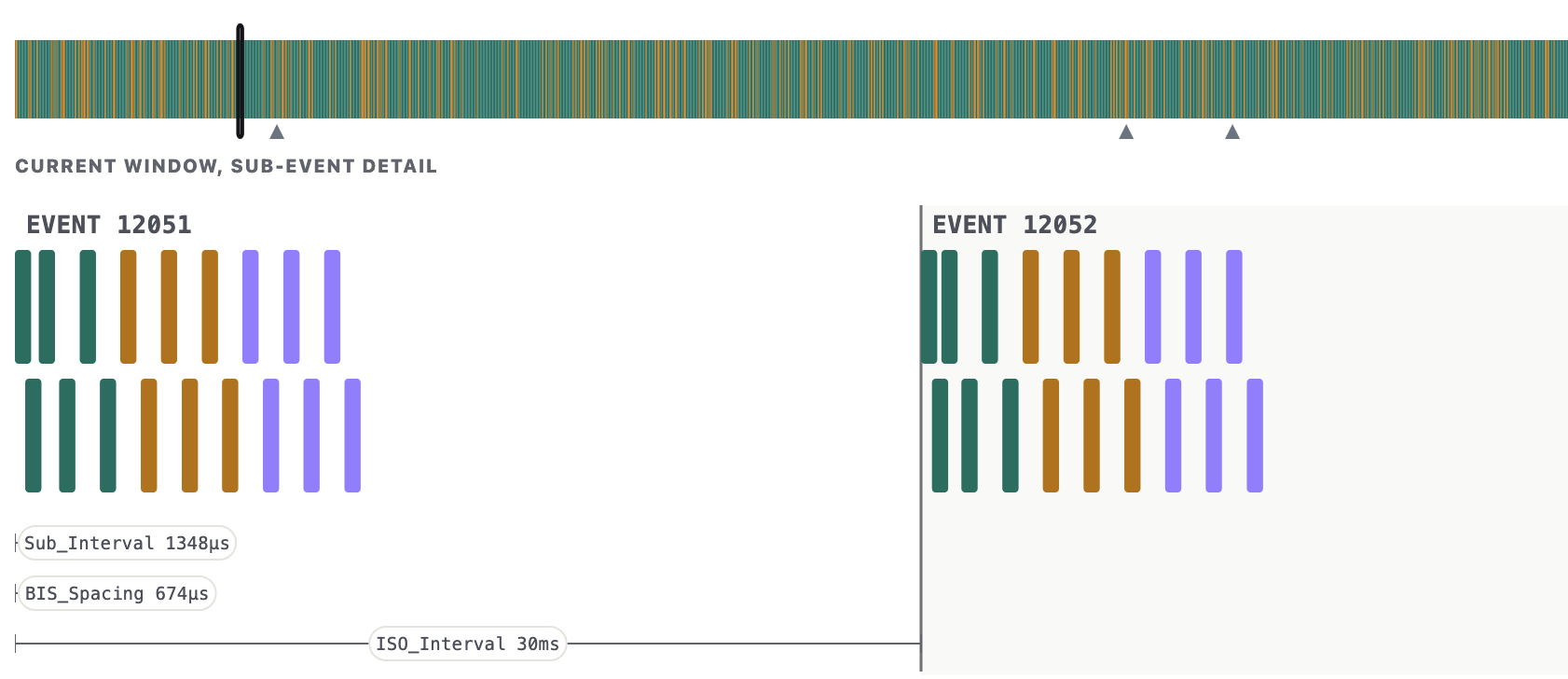
Any receiver of the Auracast stream will piece a subset of these PDUs together to form a stereo audio stream. Auracast guarantees synchronized audio for all its channels, which is a great feature for true wireless stereo headphones.
One important aspect of an Auracast stream, and one that we necessarily need to capture, is the BIGInfo.
BIGInfo
The BIGInfo data structure contains all information that is required to subscribe to an Auracast stream. BIG stands for Broadcast Isochronous Group. Such a group can then contain individual BIS (Broadcast Isochronous Streams). A group can, for example, be an audio stream with two BISes. One for the right audio channel, and the other one for the left audio channel. So the BIGInfo packet is an information structure for a Broadcast Isochronous Group. This includes the anchor point, where the next BIG event (i.e., group of audio packets) arrives, and the interval of packets.
Regardless of whether the Auracast stream is encrypted or not, the BIGInfo packets are in plain text. That means you will always be able to receive the information necessary to follow the broadcast. Whether you can decrypt it is another question.
BIGInfos are transmitted via periodic advertisements, an advertising concept introduced in Bluetooth 5.0. As the name implies, BIGInfos are transmitted periodically during the lifetime of a broadcast.
BIS PDUs
Once synchronized to an Auracast stream, the actual audio data is transmitted via BIS PDUs. Each stream (BIS) in the group (BIG) transmits at least one PDU per BIG Event. To increase throughput, multiple PDUs can be sent per BIG event. To increase reliability, individual PDUs can be retransmitted or even pre-transmitted. We will get to that later.
Each PDU does not only arrive at a specified time, but also on a specific Bluetooth LE channel. The BIGInfo specifies the channel map, and a channel selection algorithm is used to derive a specific channel for a given PDU.
There are two types of PDUs: data PDUs, which carry the audio encoded with the LC3 codec, and control PDUs, which transmit commands via opcodes.
Control PDUs specify different opcodes. One such command is BIG_TERMINATE_IND. A
PDU that is sent to indicate the end of a broadcast. Another one is
BIG_CHANNEL_MAP_IND. This tells the receivers which of the Bluetooth LE data
channels are actually used. This can change during the stream. For example, due
to other activity in the 2.4 GHz frequency band. The sender can choose to
exclude certain channels from the channel map. This is also reflected in an
updated BIGInfo packet.
Sniffing Auracast
So what are our requirements for Auracast sniffing? Ideally, we would like to be able to sniff everything that’s going on over-the-air. So that means receiving all transmitted events and subevents of the BIG. Including all BISes, if there are multiple, like in the case of a stereo audio stream. This helps us to debug and monitor during Auracast attacks, but also to visualize and understand what actually happens during an Auracast broadcast.
The following sections will briefly cover the challenges we had when designing the sniffer.
Host vs. Controller Abstraction
Architecturally, Bluetooth is divided into a Bluetooth Controller and a Bluetooth Host. Typically, these roles are fulfilled by the operating system and the Bluetooth chip or Bluetooth dongle, respectively. They communicate via the Host-Controller-Interface (HCI) with different types of protocols on either side.
The abstraction between what the controller sees and what the host sees has arguably the biggest impact on Auracast sniffing. The host only receives valid BIS SDUs or SDU fragments. It never learns about pre-transmissions or retransmissions. The host receives HCI ISO Data Packets from the controller.
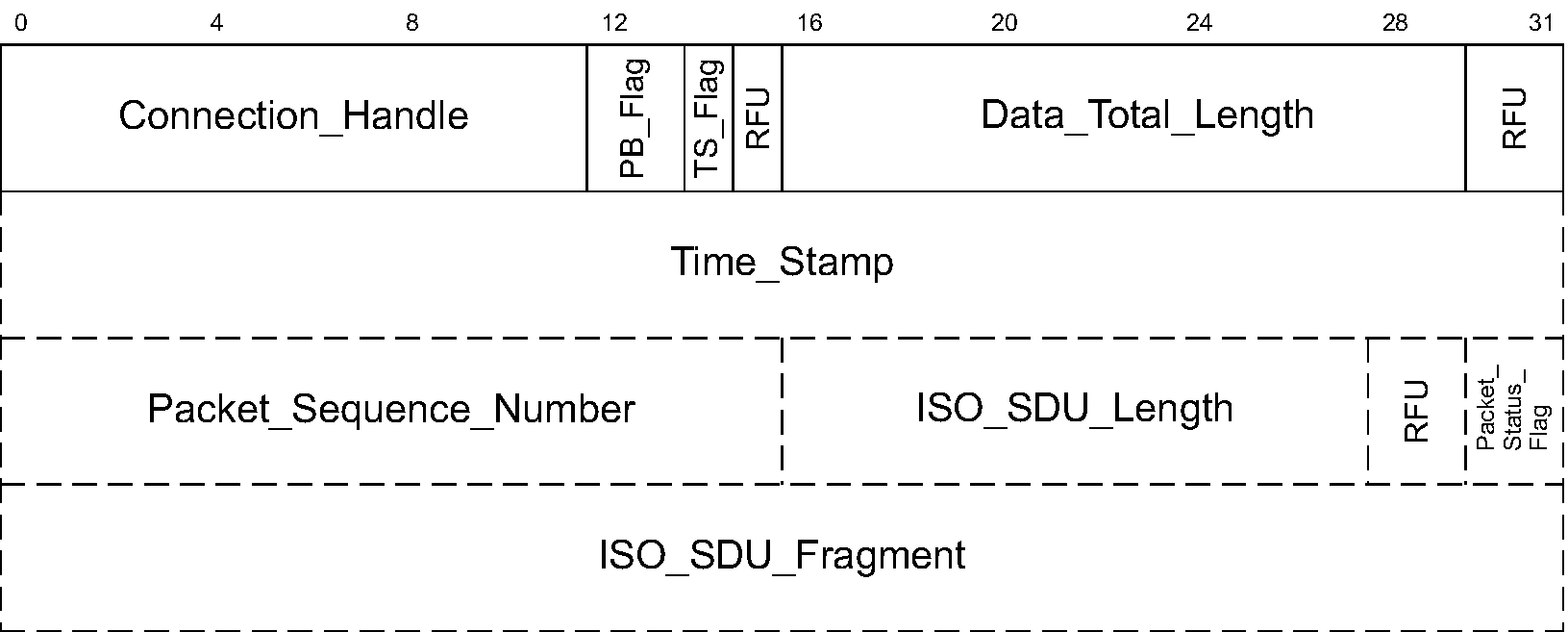
These packets contain the SDUs and a lot of meta information that is not communicated over the air. For example, the time stamp and the sequence number are calculated on the controller upon reception. The information when and on which channel a packet arrives determines its sequence number. They are never communicated over-the-air.
The actual over-the-air BIS PDUs look very different. LLID, CSSN, and CSTF are controller-only values and never forwarded to the host.

This means that, on the host side, we don’t really know what is going on over the air. If we were just interested in the broadcast content, we could stop here. We could record these ISO HCI packets and do something with the (audio) data. However, if we want to see the actual Link Layer packets, we need to go down the stack and look at the Bluetooth controller and its Link Layer implementation.
This means that to build a sniffer, we have to touch the controller firmware. We cannot do this via the host.
There aren’t many open source Bluetooth Low Energy Controller implementations. One approach could be to do patch the firmware of a commercial product, which is what our colleague Dennis Mantz did in internalblue. The easier option for us is to use Zephyr. The open source RTOS brings a BLE controller implementation that works on Nordic’s nRF devices.
With Zephyr, we can “easily” patch the controller code to record all Link Layer BIS PDUs and forward them to the host. This allows us to observe the over-the-air BIS PDUs.
That solves part of the problem. However, merely forwarding all received PDUs is actually not enough to capture all PDUs we’re potentially interested in. This is due to PDU retransmission and pre-transmission.
Retransmission and Pre-Transmission
Depending on the configuration of the stream, we will have to catch more PDUs than a default receiver would normally catch during regular operation. For example, if the stream is configured like the one in the screenshot below, the transmitter transmits three times as many PDUs as required. This is because each PDU is pre-transmitted once, and retransmitted once.
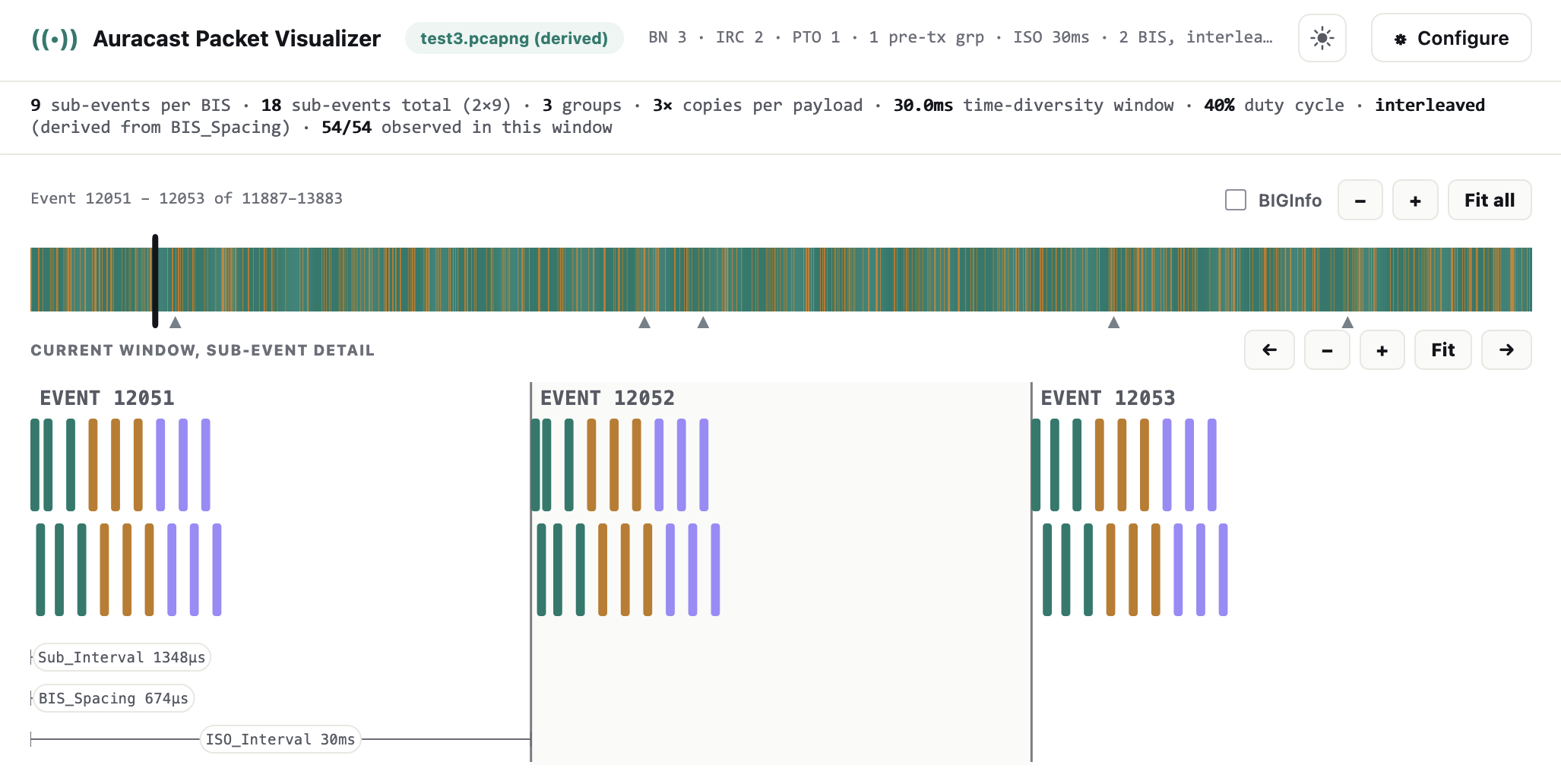
This is the default configuration of a Samsung S23 Auracast stream. There are 18 subevents per BIG event. One retransmission per PDU and one pre-transmission per PDU (transmitting the three subevents of the next BIG event). The green PDUs are the original transmissions, followed by the orange PDUs, which are the retransmission. The last subevents are the purple-colored pre-transmissions.
During normal operation, a receiver would likely only capture 6 or 7 of these PDUs. More specifically, a healthy receiver would try to capture pre-transmissions. For synchronization purposes, it might also catch the first PDU in the BIG. For every pre-transmitted PDU it misses, it would then try to capture either the “normal” transmission or the retransmission of the PDU, giving it two additional chances to receive it.
For a standard Auracast receiver, a capture would look as follows. Capturing one normal PDU transmission (green) and three pre-transmissions (purple). In the very first event, the receiver has to catch the normal transmissions as these are the earliest ways to catch the PDUs.
So to receive all PDUs, we have to patch the controller’s BIS PDU receive logic. Regardless of whether a full burst (i.e. all three PDUs) has been received or not, the receiver needs to continue capturing. With very large streams, this might cause issues. However, for the Samsung S23 stream with 18 PDUs, the sniffer achieves pretty high coverage, only missing a few PDUs now and then.
Encryption
We did not talk about encryption up until now. And that is because encryption theoretically does not really change anything about the current approach. Whether encryption is enabled or not, we can capture all these PDUs, including pre- and retransmissions. However, the Bluetooth controller does a MIC check upon arrival of the PDU. If that MIC does not match, it discards the PDU.
If we do not know the Broadcast Code, i.e., the encryption key 1, the MIC check will fail. A simple solution is to patch the controller in two ways:
- Make it believe the broadcast is unencrypted. This causes it to skip the MIC check.
- Increment the size of the expected PDU by the number of bytes the MIC takes up.
This approach is what we did back in the original toolkit where we dumped encrypted BIS PDUs to crack them with biscrack (see part 1 for more information).
Unless we crack the Broadcast Code with biscrack, the PDU encryption also prevents us from properly decoding the audio stream. But this is not a concern we had for our sniffer. However, the encryption also introduces another interesting problem. As a sniffer, we will miss channel map update control PDUs. This means whenever the broadcaster changes the current channel map, we will miss the update and therefore derive a wrong channel hopping sequence. For a brief sniff this is not an issue, however, depending on how often the transmitter sends channel map updates, we eventually lose synchronization to the stream.
A potential solution to this is to take the current channel map from the BIGInfo whenever an encrypted control PDU arrives. While we will not be able to decrypt the PDU, we can obtain the current channel map in plain text from the BIGInfo.
Auracast Hacker’s Toolkit
The Auracast Hacker’s Toolkit got a little upgrade to support Auracast sniffing as described in the previous sections. Instead of dumping raw PDUs via the serial interface, we introduced a second serial interface for packet capturing. Released with the toolkit is also a Wireshark extcap that can parse the capture output.
An unencrypted Auracast stream, sniffed and shown in Wireshark, looks like this:
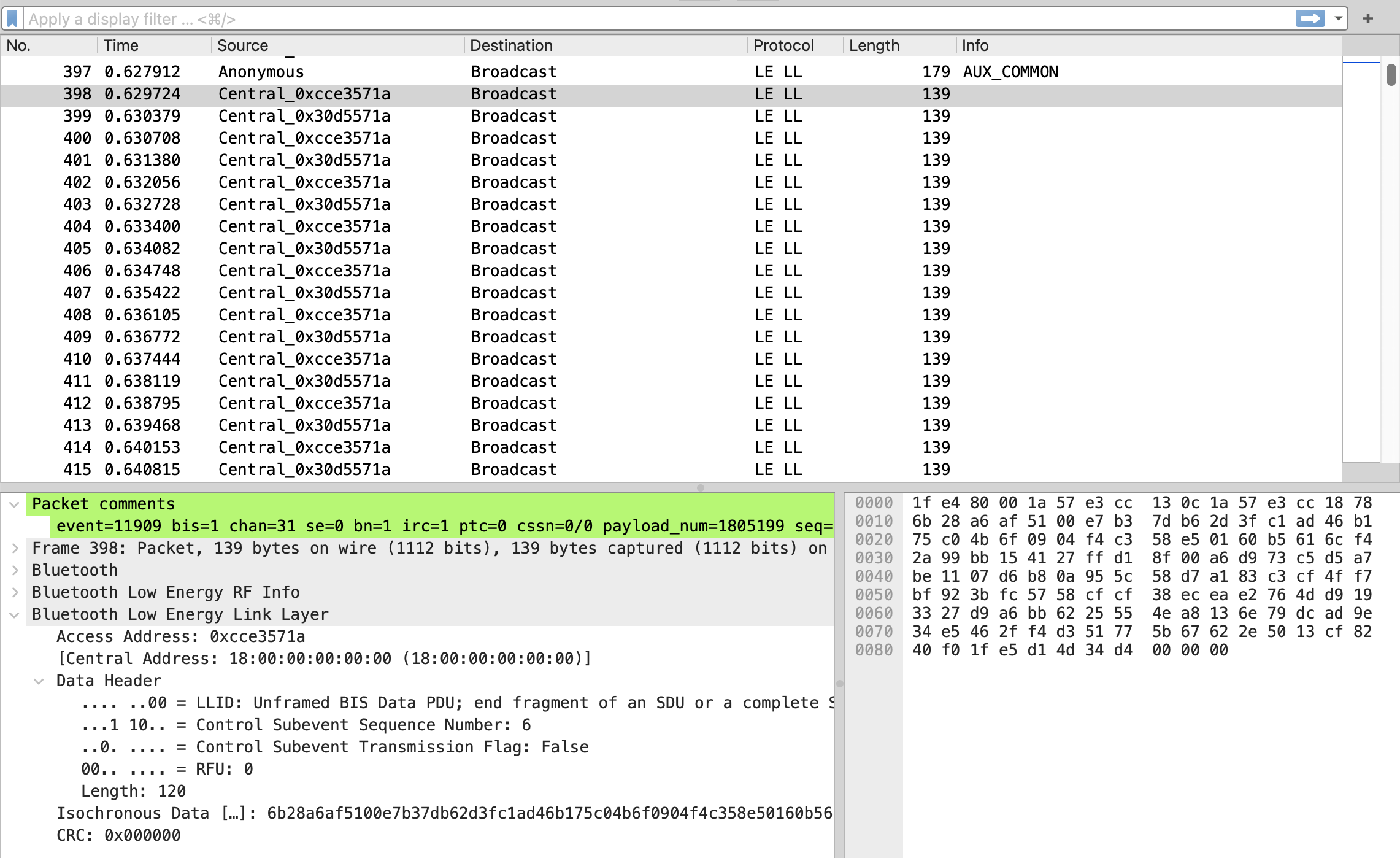
There’s one BIGInfo packet at the top, followed by multiple BIS PDUs. There are packet comments for each packet for all the information that is not part of the PDU itself but part of the LL state: the channel number, the PDU number, whether it is a repeated PDU.
By default, the sniffer will receive PDUs like a normal Auracast receiver,
meaning that it only captures PDUs such that all SDUs are received. Remember
the screenshot with just the green and
purple PDUs from above? If you want to receive
all PDUs, you can set greedy sniffing mode via sniff greedy on. Then the
captures look like the other screenshot with all PDUs,
green, orange, and
purple.
But there are some limitations here. Depending on the complexity of the broadcast and the number of subevents, the sniffer might not capture all PDUs. So there is some packet loss to be expected. This is just a hardware limitation, as receiving all these PDUs and forwarding them via USB is a lot of work for the dongle. But we get pretty good coverage with our Samsung S23 real-world example.
The toolkit also contains some more (partially unfinished) features that we will describe in a future blog post (stay tuned for BISQuit).
You can find it on GitHub along with a more detailed description of the command line interface.
Auracast Packet Visualizer
You’ve seen a screenshot of this before. In order to help myself understand Auracast, its rather complex PDU layout, and thinking about the effects of attacks, I remember trying to draw Auracast PDUs on paper. Now with a proper over-the-air packet capture, and the help of an LLM, it was rather easy, but extremely helpful to create a tool that visualizes the captured packets, and does some analysis on which PDUs have been captured.
This is the Auracast Packet Visualizer, a small web app to visualize Auracast packet captures or simulated PDU layouts based on a BIG configuration. By default, it creates a simulated Auracast stream. You can tweak the parameters and see how this affects the PDUs, the spacing, and the packet layout. Here, it creates a 2-BIS sequential stream with BN=4, IRC=2, PTC=1, and PTO=1.
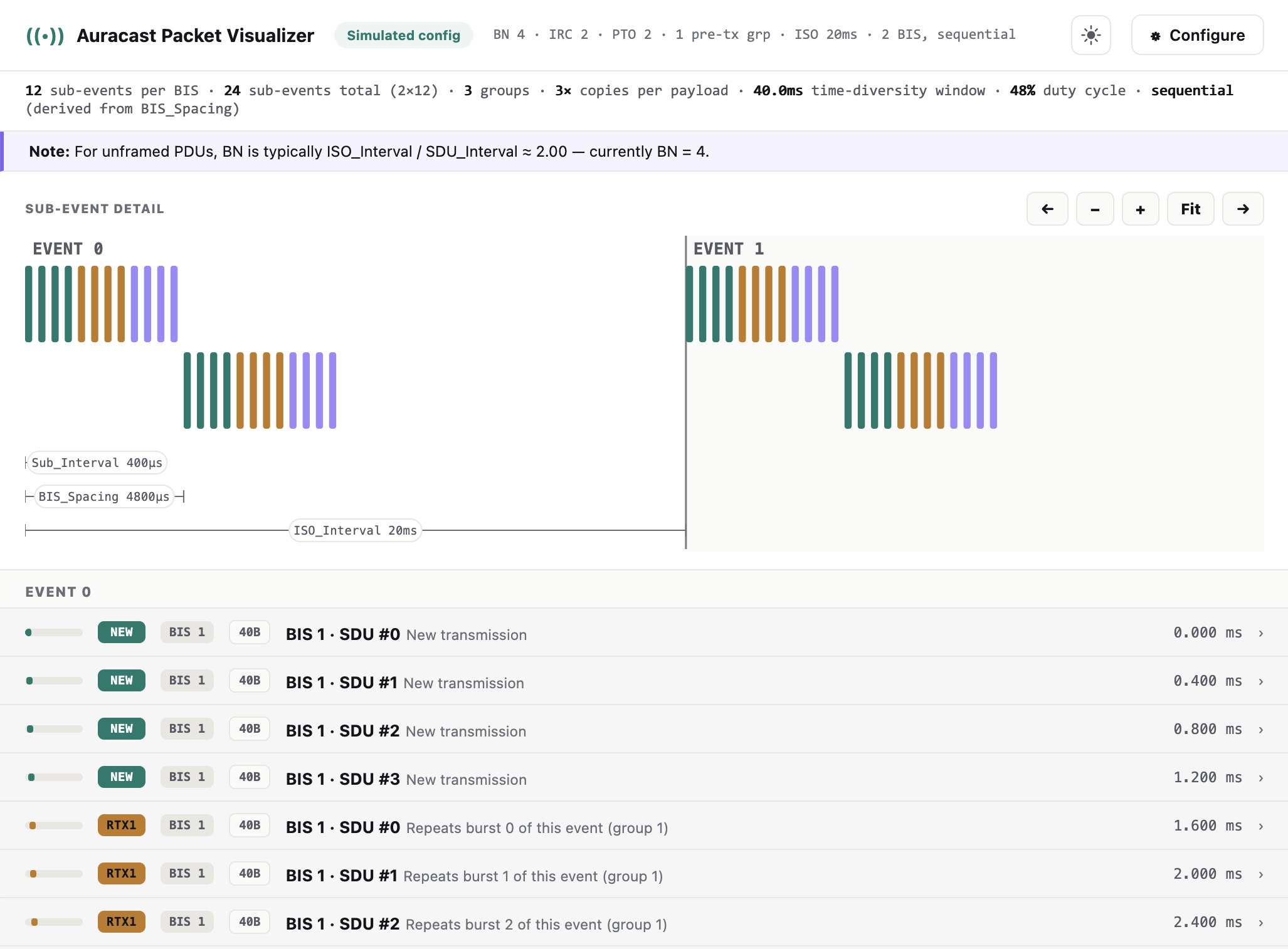
In comparison, a real captured broadcast originating from a Samsung S23 looks a bit different. Here we have an interleaved broadcast and the PDUs don’t look perfectly aligned, because these are real over-the-air captured packets.
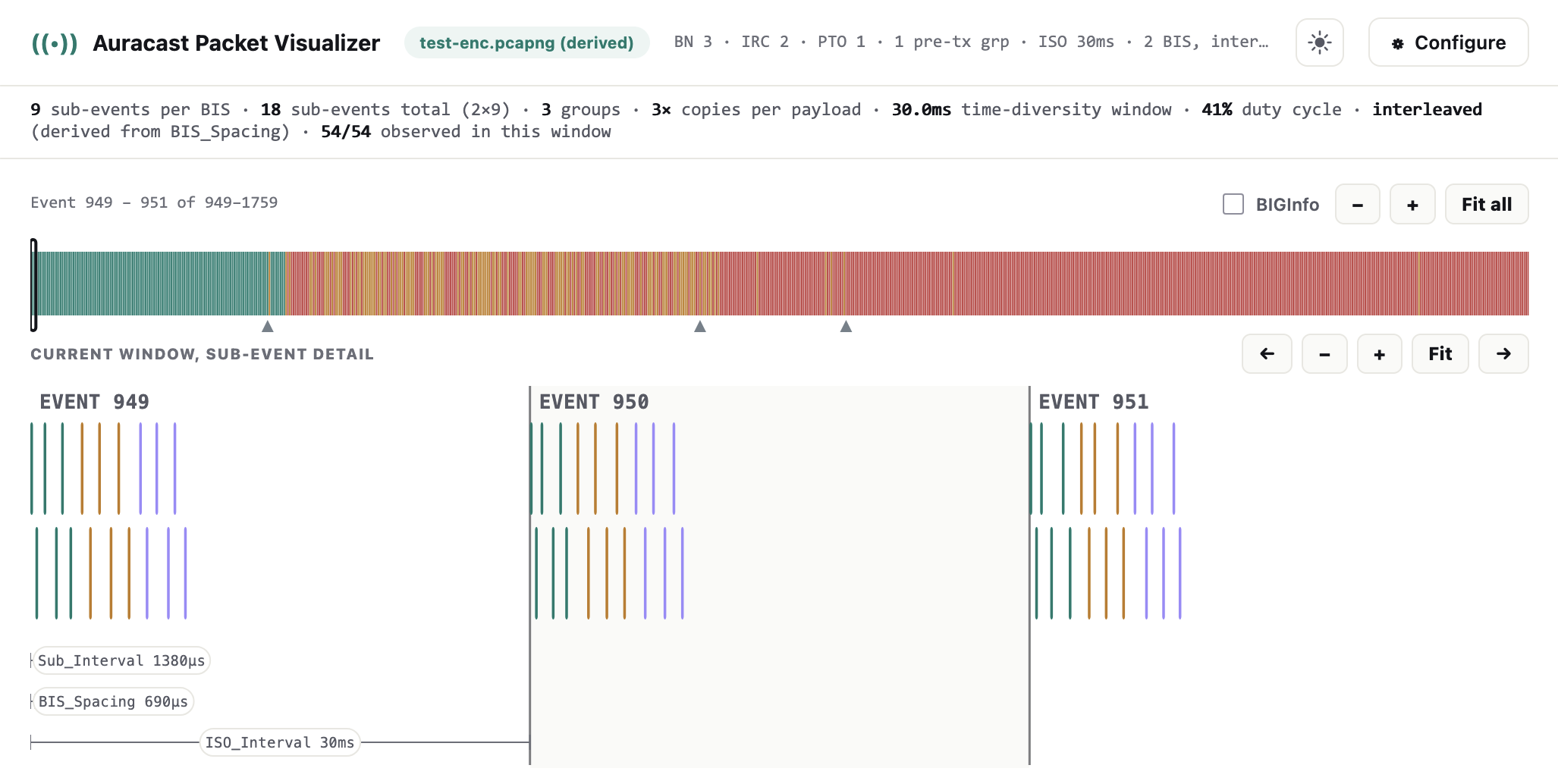
We can also see in the timeline above the PDU graph that some events are orange. These are BIG events where we weren’t able to capture all PDUs, but enough PDUs to have at least one copy of each SDU. Missing SDUs, i.e., where we lost the pre-transmission, the actual transmission and the retransmission are colored red. So the greedy sniffer coverage above is pretty good. There are only a few BIG events where single PDUs were missed. But each burst, or SDU, was observed at least once.
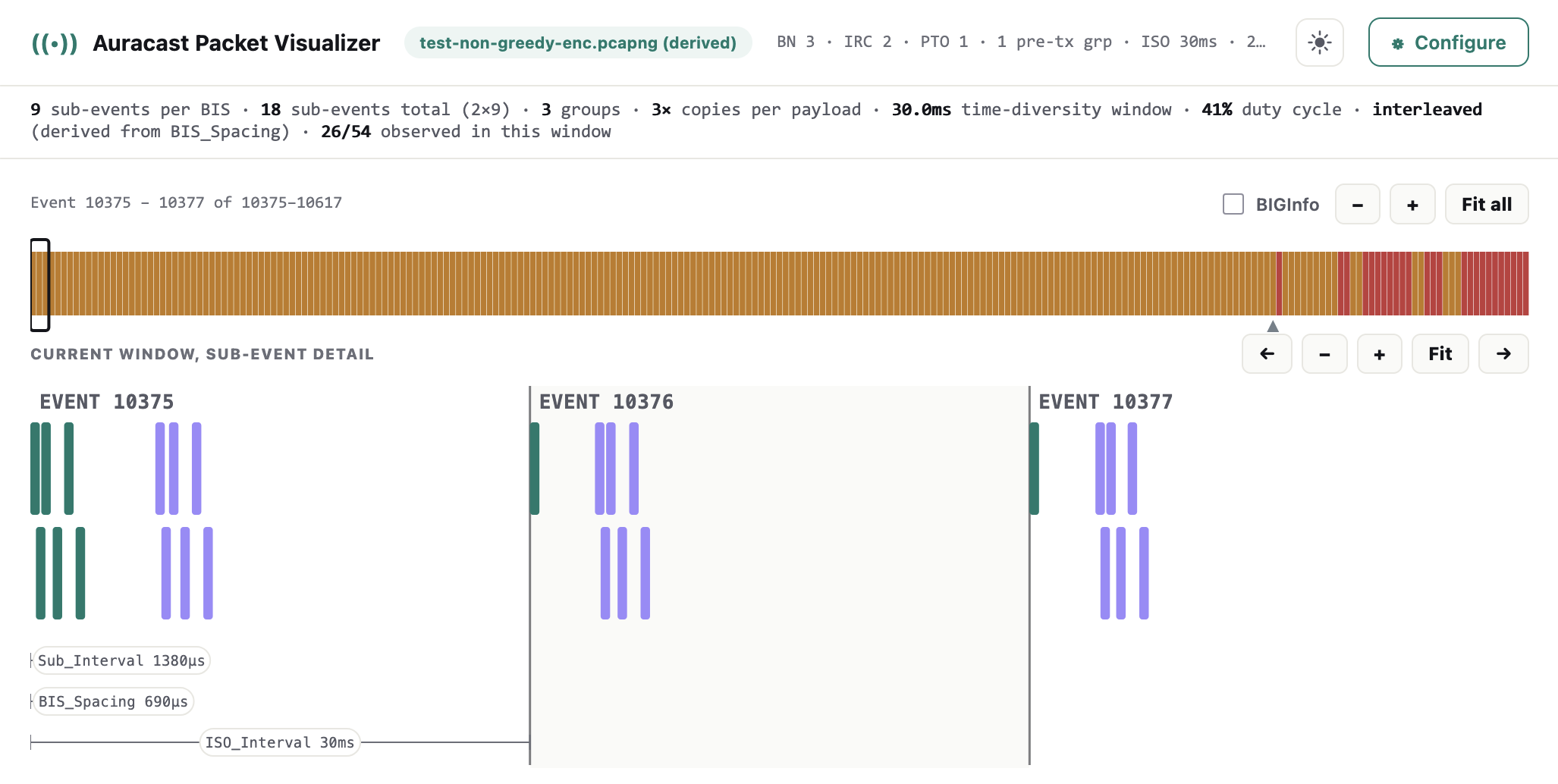
The screenshot below shows an encrypted BIS. After the first channel map update PDU (indicated by the small arrow below the timeline), we can see that the sniffer starts to miss PDUs. Over time, as more channel map updates arrive, the sniffer coverage degrades even further. This is due to the channel map update issue mentioned above. This is something we will fix in an upcoming update with the explicit BIGInfo approach.
I hope this tooling can be helpful for both researchers and developers to create new applications or do some more security research on Bluetooth Auracast. It’s a pretty cool technology and, in my opinion, hasn’t yet gotten the attention it deserves.
Let me know if you find this helpful or have other ideas and requirements for the toolkit!
ERNW has multiple Bluetooth security experts. If you’re interested in a Bluetooth security assessment, feel free to contact us.
We have also published other Bluetooth-related research: