As part of our Bluetooth Audio security research, we found a security vulnerability in Apple’s Beats Studio Buds’ pairing mechanism. The devices were found vulnerable to an insecure Bluetooth pairing window in which an attacker could pair with the earbuds without user interaction and establish a valid Bluetooth bonding. This would allow an attacker to eavesdrop on the victim through the earbuds’ microphone, play audio on the device, or track the device via Bluetooth Low Energy.
Apple fixed this in Beats Firmware Update 1B211 on June 16th 2026, referencing a previous CVE of ours: CVE-2025-20701. This surprised us, as we assumed this to be a separate issue. More on that in the advisory section below.
During our Bluetooth headphone research last year, we found out that Apple also sells some Beats headphone models with a MediaTek Bluetooth chip. While we found that they expose the same service UUIDs via BLE GATT, unlike many other devices, they were in fact not found to be vulnerable, as they enforce pairing for Bluetooth Classic connections and do not respond to the RACE protocol. In fact, reversing the firmware indicated that they disabled the RACE protocol entirely. This initially ruled out the devices from the type of vulnerability we were occupied with at the time, however, we found that the pairing process of the Beats Studio Buds is still flawed.
Summary
While a device needs to be paired with the Beats to communicate with them, there exists a short window when the Beats Studio Buds are powered on, i.e., when the case is opened, in which an unauthenticated, previously unpaired Bluetooth device can pair with the Beats Studio Buds. The Studio Buds accept the pairing without requiring any user interaction and establish a bonding with the attacker. As a result, this window only needs to be caught once. After the bonding, the attacker is permanently authenticated and can reconnect to the Beats at any time.
While the attack window is short, it is also frequent, occurring each time a user opens the case of the earbuds. The attacker just needs to be fast enough when a user opens their earbud case to win a connection race and establish an authenticated connection. That turns out to be, perhaps surprisingly, very much feasible because BLE-based device discovery is slow compared to a dedicated Bluetooth Classic connection attempt.
This attack requires the attacker to be in possession of the Beats’ Bluetooth Device Address. Below, we show why this is not a difficult requirement to fulfill, especially in the case of a Bluetooth audio device. We’ll use a classic Bluetooth hacking device - the Ubertooth!
Once authenticated, an attacker can do various things with the target’s earbuds. In the following we describe two attacks and demonstrate one of them. Firstly, the attacker can establish an audio connection. This means the attacker can send audio data to the victim. More importantly, the attacker can also receive data from the victim, via the earbuds’ microphone, essentially eavesdropping on the victim. While such an attack does not go unnoticed, as the victim’s audio connection will drop, attack scenarios where the victim is not currently listening to music are conceivable, albeit limited.
As a second attack, we extract the device’s Identity Resolving Key (IRK) by using
a proprietary Apple protocol: the AAP protocol. This attack has implications for
the victim’s privacy. An attacker can use the IRK to easily track and identify
the victim over a longer period of time. This also enables much less invasive
tracking than continuously trying to connect to the device to check whether it
is present. More on that below.
We were only able to confirm this vulnerability for the Beats Studio Buds, as this was the only device available to us. Apple also only mentions this model as an affected device. Apple’s AirPods are not affected. They have an entirely different chipset and firmware.
Attacking the Device
Determining the Bluetooth Device Address
It is possible to obtain the Bluetooth Device Address of a Beats target device using a sniffer device such as the Ubertooth One. As the Beats Buds are Bluetooth audio devices, the number of packets in the air is rather high. This makes the discovery of the device much more convenient than for many other Bluetooth devices.
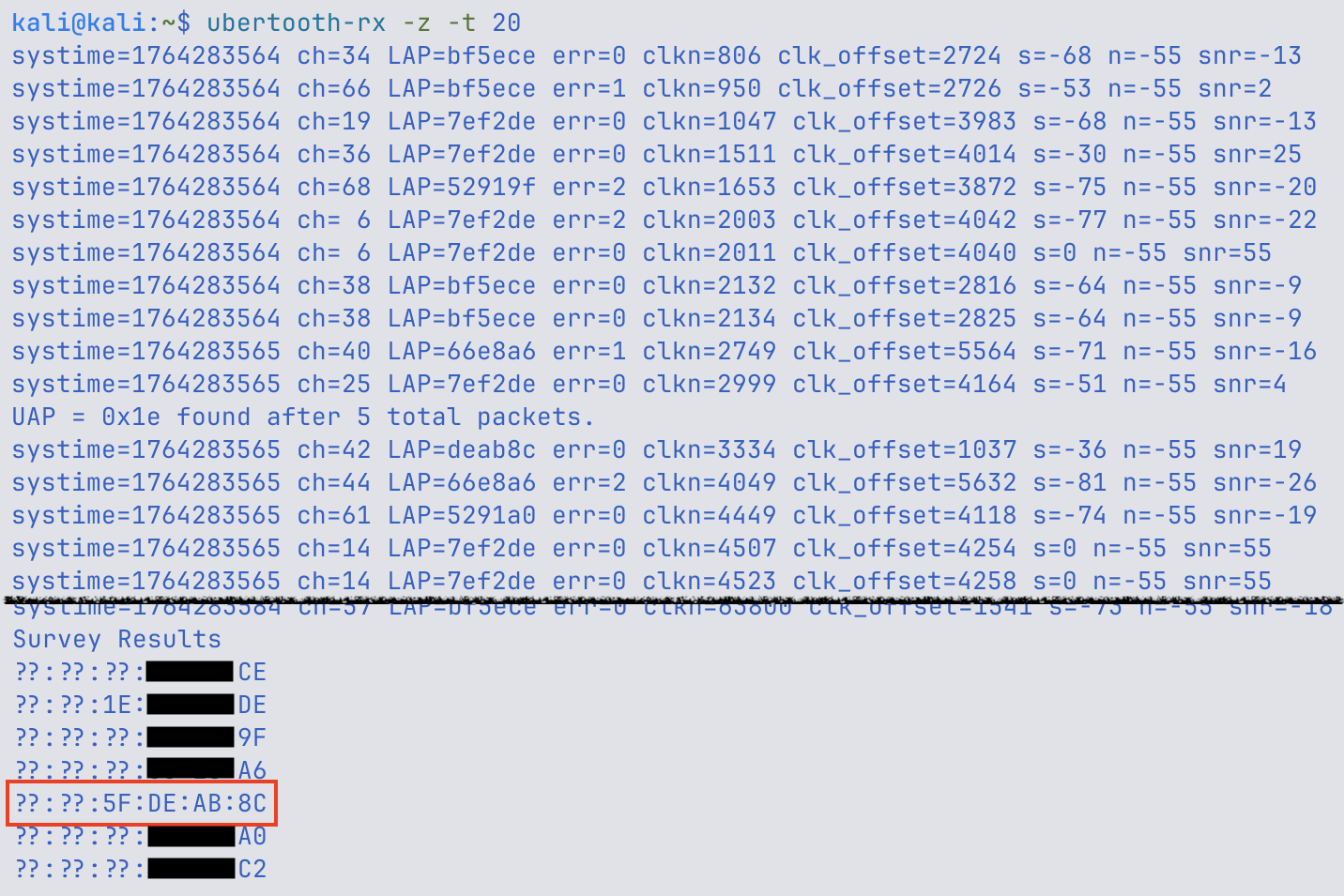
The screenshot above shows a 20-second discovery run of the Ubertooth One. The
device identifies the Beats Buds with the required 4 bytes of the Bluetooth
address as ??:??:5F:DE:AB:8C. Even the UAP (Upper Address Part) is identified.
Via cross-referencing with the Bluetooth vendor OUI list,
it is possible to identify that this is an Apple device. The two upper bytes are
not strictly required to connect to the device. Depending on the environment,
this might suffice to identify the target device.
Connection Race Window
There exists a short window after the Beats power on and before a previously paired device reconnects. In this window, it is possible to authenticate to the device via Secure Simple Pairing in No Input/No Output mode. The Beats accept the pairing without any user interaction and establish a bonding. As a result, this window only needs to be caught once. After the bonding, the attacker can reconnect to the Beats at any time.
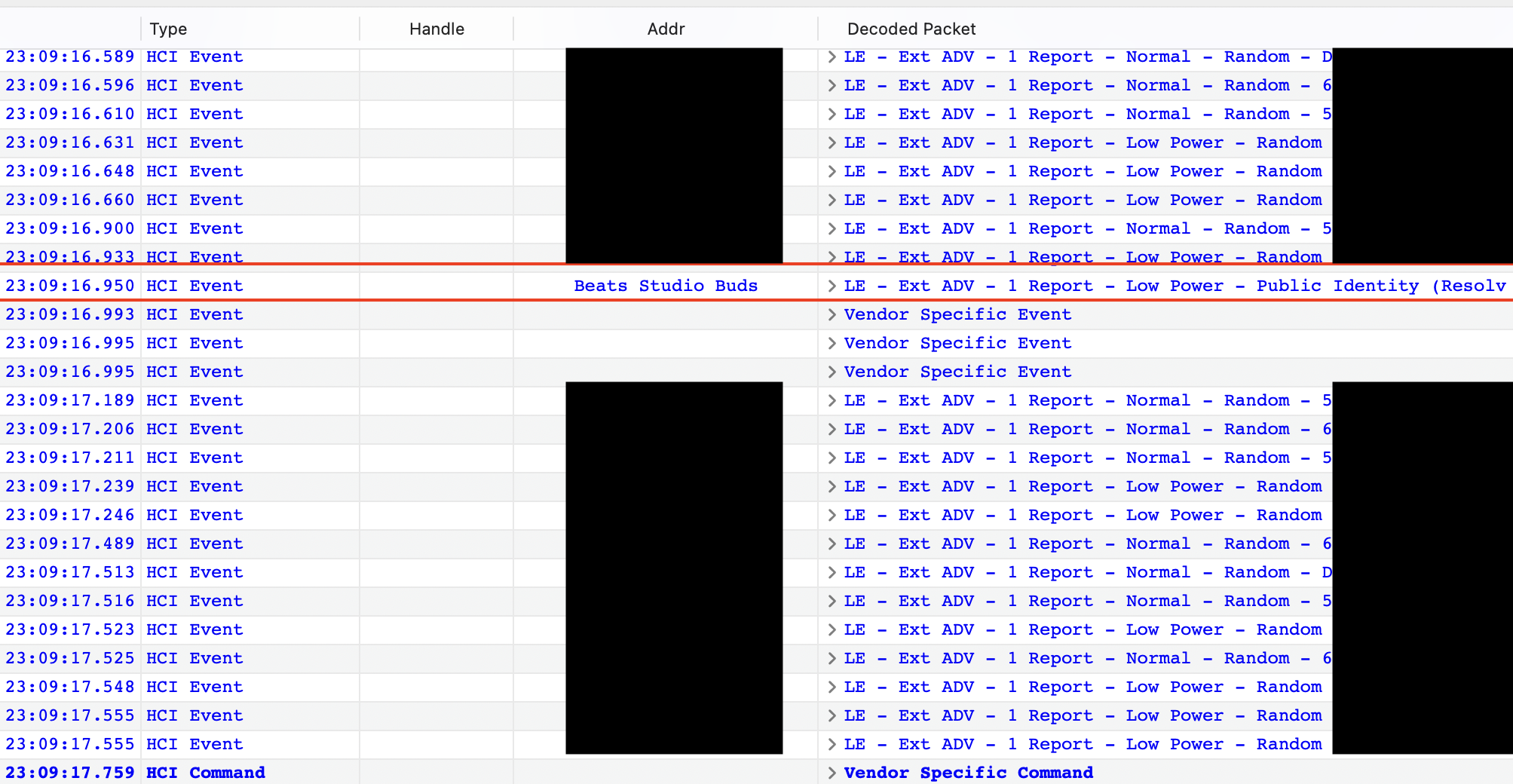
The following screenshots show this process. The first packet log is from the macOS device that the Beats are paired with, essentially the device owner. The packet marked in red is the first advertisement packet from the Beats that the device sees. This appears briefly after the case of the earbuds is opened.
In the next screenshot we can see that the attacker creates a connection roughly one second later, which is even before the Mac itself recognizes the Beats and tries to initiate a connection.
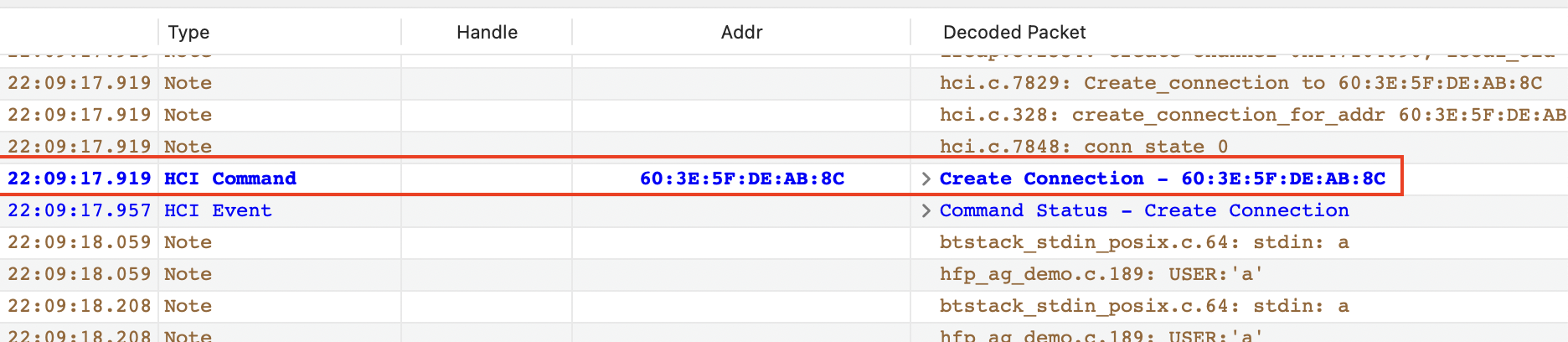
Don’t mind the one-hour offset in the time. Something about time zones and different tooling…
The following screenshot then shows the pairing between the attacker device and the Beats device. The devices conduct a Secure Simple Pairing without any user interaction, as the attacker is acting as a No Input/No Output (NINO) device. The Beats accept this and a Link Key is exchanged, thus bonding the devices.

Once the attacker disconnects from the Beats, the Beats Studio Buds immediately create a connection to the benign macOS device, as shown below.

Eavesdropping or Sending Audio
Once we have established an authenticated connection, we can use the HFP protocol to send or receive audio. As mentioned above, the validity of this type of attack is circumstantial, but valid attacks are possible in principle.
Eavesdropping after the initial pairing window issue will likely only work for a few seconds. The victim will try to connect their device after realizing the connection was unsuccessful. This gives the attacker only a short time frame to listen in.
Later on, the attacker can use the bond to reconnect to the device again. In case the victim is actively using the earbuds, they will notice the connection drop and reconnect, again leaving only a short window to listen in. Earbuds are likely not left out of the case for a long time. But a scenario where someone puts their earbuds on the table during a conversation might be one where an attacker can effectively eavesdrop on the conversation.
The much more interesting attack is the following.
IRK Extraction with AAP
This part took me back to my university times. I first encountered Apple’s AAP protocol during my master’s thesis a few years ago. AAP (Apple Audio Protocol? Apple AirPods Protocol?) is a proprietary L2CAP-based Bluetooth protocol that is used to set up and configure Apple Bluetooth audio devices. It can do things like configure noise-cancelling or set up MagicPairing.
In the following example, we demonstrate that it is possible to extract the
target device’s IRK by using the AAP protocol. As mentioned, the protocol has
many more capabilities and the successful pairing also implies other access.
However, we wanted to highlight the implications with regard to the user’s
privacy.
The IRK is used to “recognize” private BLE devices. It can be used to derive the
public device address from a Resolvable Private Address (RPA). These addresses
typically rotate every 15 minutes to prevent malicious actors from tracking
users. With the knowledge of the IRK, however, it is possible to resolve the RPA
to the public address, thereby circumventing this privacy control.
While the attacker could also use the already known Bluetooth Classic address to track the victim, this would require them to attempt to connect to the device at regular intervals. This requires active involvement and might be recognized by the victim, as their original connection will drop. Tracking via BLE advertisements is much less invasive and easier to automate.
This screenshot shows a proof-of-concept script that connects to the Beats Buds
and extracts the IRK via the AAP protocol.
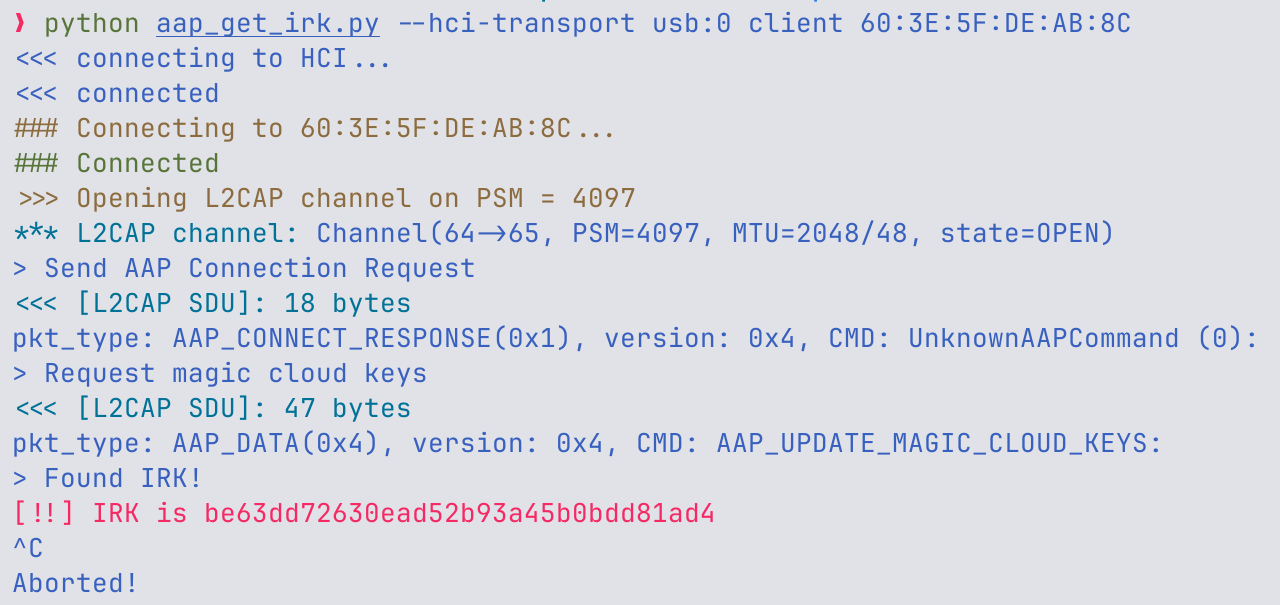
The screenshot below shows that this is the IRK value that the Mac also received
during the initial pairing.

The IRK can now be used to resolve RPAs and thus potentially track the Beats via
BLE. Bumble has a scanning script that
implements this feature. To scan for the device, the following command line
can be used:
uv run bumble-scan --irk be63dd72630ead52b93a45b0bdd81ad4Apple’s Advisory
Apple’s advisory does show some curiosities. Firstly, from our perspective it’s not necessarily the same issue as the CVE they are mentioning, although it might be the same root cause. CVE-2025-20701 is a general lack of required authentication; this is just a small window where authentication is not required. The behavior of the other vulnerable devices was quite different.
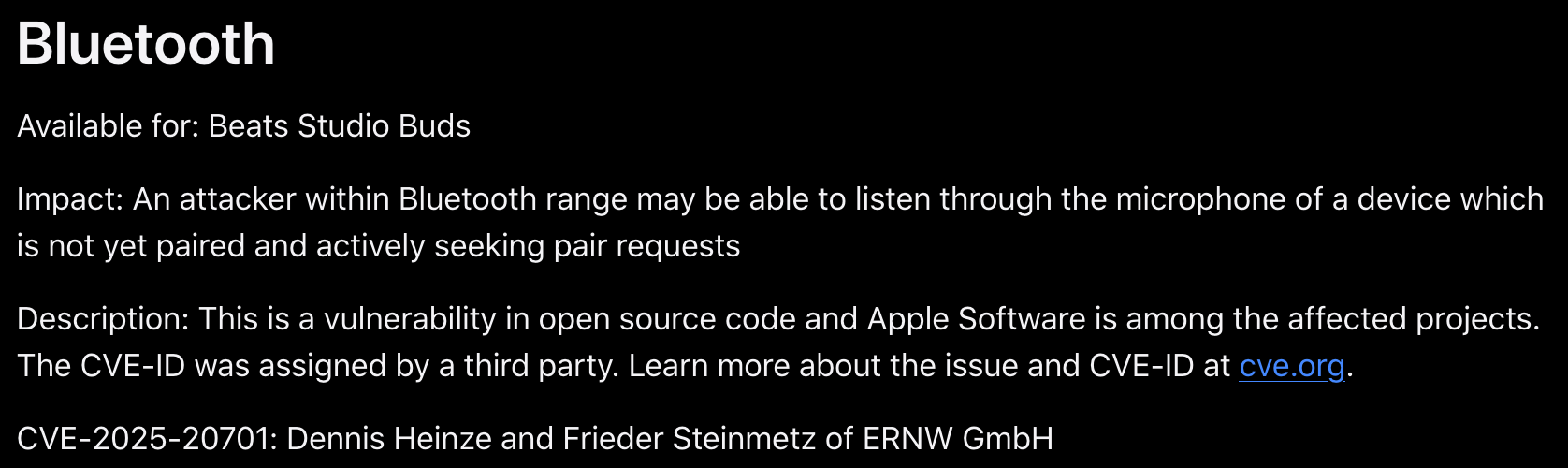
But more importantly, they refer to the vulnerable code as open source code, which is not really true. If they do consider this to be CVE-2025-20701, then the vulnerable code is the Airoha SDK, which is not an open source project.
In the end, both details don’t really make a difference for end users, but they were interesting to us, and we felt we should mention them for completeness’ sake.
Timeline
Below is the timeline of the disclosure.
| Date | Description |
|---|---|
| November 28th 2025 | Disclosure and write-up submitted to Apple. |
| June 16th 2026 | Apple releases advisory and firmware update. |
| August 14th 2026 | ERNW releases blog post with details. |
If you want to learn more about ERNW’s work in the area of Bluetooth security research you may find these posts interesting:
- CVE-2025-20908: Use of insufficiently random values in Samsung’s Auracast implementation
- Using the Raspberry Pi Pico W as a Bluetooth Dongle
- Security Advisory: Airoha-based Bluetooth Headphones and Earbuds
If you would like an assessment of your Bluetooth device, feel free to contact us.