This is the first post in a 4-part blog series that accompanies ERNW White Paper 80: Token Theft in Microsoft Entra ID - An Analysis of Controls. Over the next four posts, we’ll walk through how token-based attacks work, put important Microsoft defenses gaining relevance in this context, Continuous Access Evaluation and Token Protection, through empirical testing, and check where Entra ID still deviates from OAuth 2.0 best practices. This post sets the stage: why token theft matters, and how attackers actually get their hands on a token.
Why This Matters Now
Active Directory has been the backbone of enterprise identity for decades, and its weaknesses are well understood: insecure defaults, sprawling misconfigurations, and a long list of well-documented attack paths from Kerberoasting to Golden Ticket (see MITRE ATT&CK Matrix). But identity is moving. According to a 2025 Bitkom study, 90% of German companies now use cloud services, up from 81% the year before, and the share of applications running entirely in the cloud grew from 38% to 47%.
Microsoft traditionally prioritizes usability, out-of-the-box functionality, and backward compatibility over IT security, meaning that the consistent implementation of security-by-default principles proceeds only gradually. That trade-off didn’t go away with the move from Active Directory to Entra ID, as evidenced by proprietary SSO concepts like PRT, FOCI and BroCI. We will also see throughout this series that the strongest protections against token theft, Conditional Access, Token Protection, and risk-based Identity Protection, are neither enabled by default nor included in the base license, but are gated behind premium Entra ID tiers (P1/P2) and separate products like Intune or Microsoft Defender for Endpoint.
That shift changes the ground rules for authentication. On-premises AD relies on Kerberos and NTLM, while cloud identity in Entra ID runs on OAuth 2.0 and OpenID Connect, using access, refresh, and ID tokens, typically JSON Web Tokens (JWTs). New protocols mean new attack surface.
The numbers back this up. In its latest report, Top Threats to Cloud Computing 2026, the Cloud Security Alliance (CSA) ranks Identity and Access Management (IAM)-related threats as the number one risk to cloud environments, even ahead of AI-Enhanced Attacks in second place, despite AI currently dominating the security conversation.
Unlike an on-premises AD tucked behind a VPN, Entra ID is reachable from anywhere on the internet by design, and a single compromised identity can unlock every connected resource provider behind it. Microsoft’s own Digital Defense Report 2024 puts the number of daily identity attacks against Entra ID at over 600 million. And the stakes can be severe: at the end of 2025, the security researcher Dirk-jan Mollema disclosed CVE-2025-55241, a critical flaw involving so-called Actor Tokens that allowed Global Admin access to any Entra ID tenant worldwide. In August 2026, Microsoft disclosed CVE-2026-69836, a maximum-severity (CVSS 10.0) unauthenticated remote code execution flaw in Entra ID itself, caused by unsafe deserialization of untrusted data.
Token theft has moved from a niche technique to a primary attack vector against Entra ID. Storm-2372 has run a device code phishing campaign against governments and critical industries since August 2024 (Microsoft Security Blog), Storm-2945 hijacked hotel captive portals worldwide to harvest SSO tokens (Microsoft Security Blog), and AiTM campaigns like the “code of conduct” phishing operation intercept tokens the moment MFA succeeds rather than trying to defeat it (Microsoft Security Blog).
What used to require custom tooling has since become a commodity: open-source reverse-proxy frameworks like Evilginx and Modlishka, and Phishing-as-a-Service (PhaaS) platforms like EvilProxy, Tycoon2FA and Kali365, now let even low-skilled attackers run these attacks at scale.
Commodity infostealers add further reach: Malware-as-a-Service (MaaS) families like StealC, delivered via loaders like Amadey, harvest session tokens and cookies from infected devices by the thousands, feeding an underground economy that resells access to ransomware operators, significant enough that Microsoft’s Digital Crimes Unit, together with Europol, took down over 200 StealC and Amadey C2 domains in June 2026 alone (Microsoft Security Blog).
What connects all of these is the target: not the password, but the token issued after successful authentication.
From Passwords to Tokens
Most attacks against cloud identities (approx. 97% according to MDDR25) are still classic password attacks: password spraying, credential stuffing, brute force. But as MFA adoption and enforcement increase, these techniques are losing effectiveness, pushing attackers toward workarounds like MFA fatigue or SIM swapping.
This is also where token-based attacks come in. Rather than targeting the password, they target what the password produces: the token issued after a successful, MFA-verified sign-in that has already satisfied Conditional Access policy requirements.
This matters because of when Entra ID actually checks your Conditional Access policies. OAuth 2.0 Access tokens in Entra ID are implemented as bearer tokens: possession alone is enough to access a resource in the context of the user, regardless of how strong the original authentication was. Requirements like MFA, device join, and device compliance are all evaluated once, during authentication, when Entra ID decides whether to issue a token in the first place. When that access token is later presented to a resource provider, only the access token itself is validated (signature, expiry, permissions), not the policies that originally governed the session. Conditional Access is not re-evaluated at this stage.
Crucially, this isn’t just an access token problem. If the original sign-in used a strong, phishing-resistant method, a FIDO2 security key such as a YubiKey, from a device that was Entra ID joined and compliant, those properties carry over into the issued refresh token as well. This is also stated in the Microsoft documentation for primary refresh tokens: “When an MFA-based PRT is used to request tokens for applications, the MFA claim is transferred to those app tokens. This functionality provides a seamless experience to users by preventing MFA challenge for every app that requires it.” This means the refresh token carries the deviceid claim, referencing the compliant, joined device, and the amr claim, reflecting the strong authentication method, e.g. "amr": ["rsa", "mfa"]. We can’t confirm this directly, since refresh tokens are encrypted by Microsoft, but the same claims are visible in the resulting access token, as can be seen in the screenshot below.
The practical consequence: steal that refresh token, and you inherit everything it was granted, including MFA and device compliance, without ever proving device state or re-authenticating. Even strict Conditional Access policies (phishing-resistant MFA, compliant device, hybrid/Entra ID join) stay satisfied on every subsequent token request, as long as no re-evaluation trigger intervenes, things like risk-based re-authentication or a sign-in frequency policy. Absent one of those triggers, the stolen token is effectively as trusted as the legitimate session it was created from.
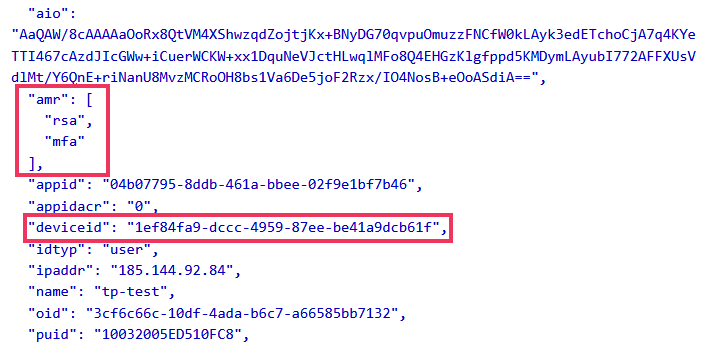
Figure 1: Access Token Claims (AT requested using PRT on Entra-joined device with ROADtoken)
How Attackers Actually Get the Token
There isn’t one way to steal a token, there’s a whole toolbox, and it keeps growing.
Direct token theft. OAuth public clients are the prime target here, especially browser-based applications such as single-page applications (SPAs) like the Azure Portal, which run entirely in the browser and have nowhere secure to store tokens: they end up in local storage, session storage, or cookies, exposed to XSS and infostealer malware. Native Microsoft 365 desktop apps aren’t immune either: Microsoft Teams caches tokens on disk under AppData\Local\Microsoft\TokenBroker\Cache, and while Windows DPAPI encrypts them, that protection evaporates the moment an attacker has code execution as the user. Public tooling (AzTokenFinder, OAuthBandit, SpecterBroker) already automates extracting these tokens from disk. Attackers don’t even need a token to already exist: SSO mechanisms tied to the Primary Refresh Token (PRT) let them request fresh tokens in the victim’s context on demand, without any knowledge of their credentials, for example, using Dirk-jan Mollema’s tools roadtx and ROADtoken.
Adversary-in-the-Middle (AiTM) phishing. As MFA made classic password phishing less useful, attackers evolved. AiTM phishing proxies the entire sign-in flow between the victim and the real Microsoft login page in real time, relaying credentials and MFA approvals (e.g. SMS codes or TOTPs) as they happen and capturing the resulting token. Frameworks like Evilginx made this attack accessible at scale. The one thing that stops it cold: phishing-resistant authentication like passkeys, which cryptographically bind the sign-in to the legitimate origin, so a proxy domain simply doesn’t match. That said, though, recent Black Hat USA 2026 research from Michael Grafnetter shows that passkey implementations can also be complex and carry their own vulnerabilities.
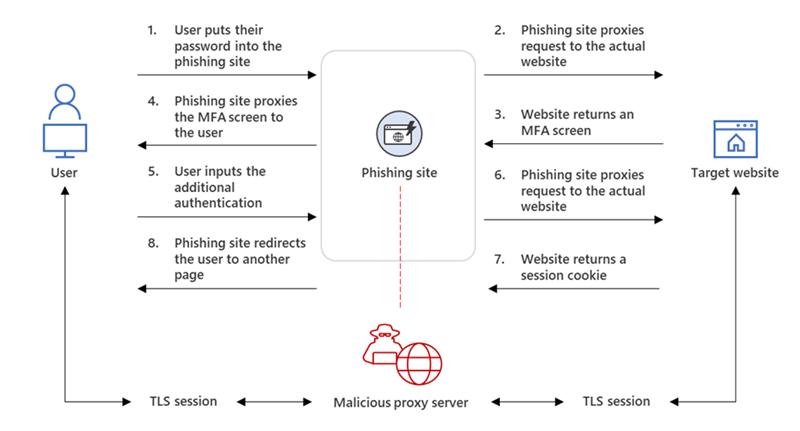
Figure 2: Flow of an AiTM attack
Device code phishing. The OAuth 2.0 Device Authorization Grant was designed to let input-limited devices (think smart TVs) authenticate via a second device. Attackers repurpose it: they start the device authorization flow on their own machine, then social-engineer the victim into entering the resulting code on the real Microsoft login page and completing MFA normally. The victim did everything right, but the resulting access and refresh tokens land on the attacker’s device, not theirs. Crucially, this bypasses phishing-resistant MFA too, since it doesn’t attack authentication at all, it abuses the authorization flow around it.
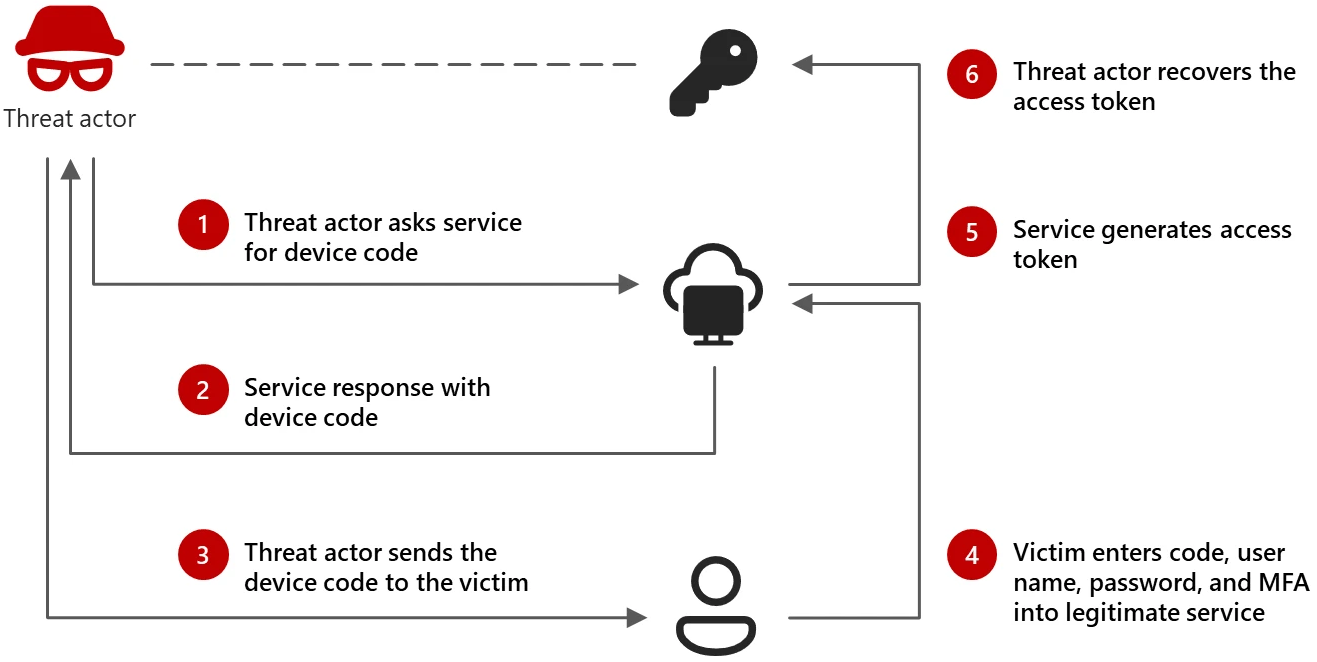
Figure 3: Flow of device code phishing
Consent phishing. Instead of stealing a token directly, the attacker tricks the user into granting an OAuth application broad permissions via the consent screen. Microsoft has progressively hardened the default configuration for user consent. While users could originally grant any application any permission, this model has been restricted so that consent may only be granted to selected applications from verified publishers, and only for low-impact permissions. In a further tightening, Microsoft now manages which permissions are eligible for end-user consent at all. Permissions excluded by this policy require admin consent instead. The Microsoft-managed policy (“Let Microsoft manage your consent settings”) is now the default for new tenants. One exception is popular mail clients, for which users can still consent to a defined set of applications and Mail permissions. As user consent has become a narrower target, attackers will likely shift their focus to the admin-consent path. Instead of an ordinary user, attackers may target high-privileged IT staff or small-business owners who hold administrative roles and can approve high-impact permissions on behalf of the organization.
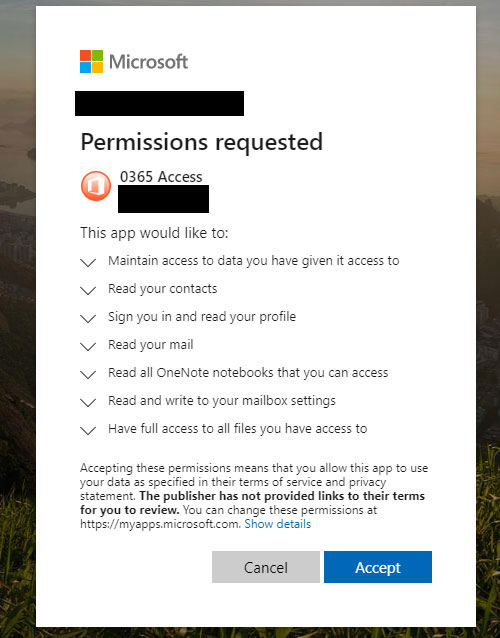
Figure 4: Example consent screen of a fake app ‘0365 Access’
ClickFix and its variants. A newer social-engineering pattern where a fake error message convinces the victim to “fix” the problem themselves, typically by pasting an obfuscated command into the Windows Run dialog. Variants exist for Windows File Explorer’s address bar (FileFix), terminals (TerminalFix), and fake failed downloads (DownloadFix). ClickFix campaigns have been analyzed by Huntress, showing its use in delivering infostealer malware, including LummaC2 and Rhadamanthys, by concealing the final malware stages within an image using steganography.
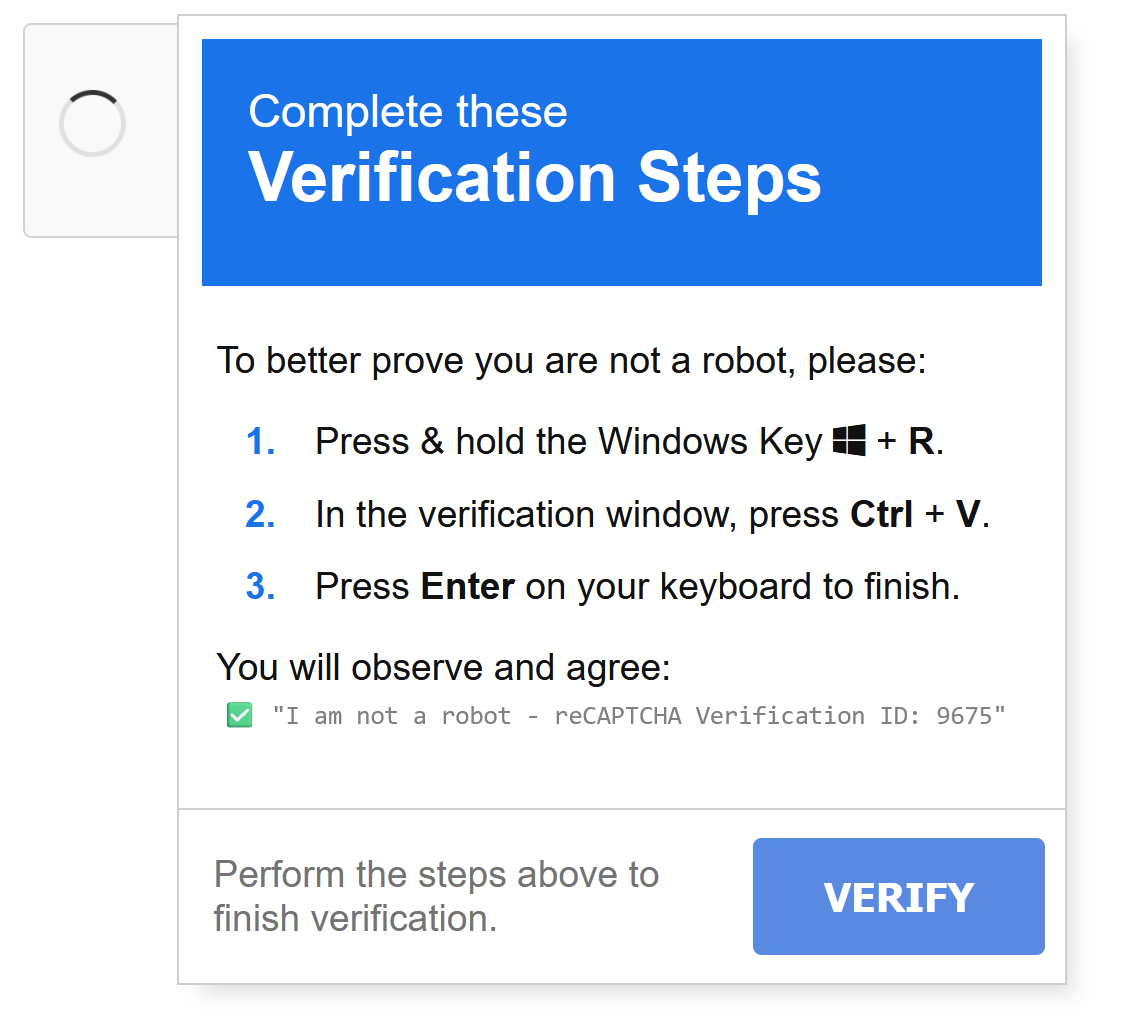
Figure 5: Example of a classic ClickFix attack
ConsentFix. The newest *Fix variant, first documented by Push Security in December 2025, combines the ClickFix copy-paste pattern with a legitimate OAuth Authorization Code flow instead of a malicious command. The victim is lured into starting an Authorization Code flow for a trusted public client (e.g. the Azure CLI, whose redirect_uri of http://localhost is allowlisted), signs in normally, and then copy-pastes the resulting (error-page) localhost URL back to the attacker’s site, handing over an authorization code the attacker can exchange for tokens with an MFA claim. This localhost redirect is permitted in the first place because Azure CLI is a public client installed natively on the device, which, per the OAuth 2.0 for Native Apps standard, is allowed to open a local port to receive the authorization code. Since no service is actually listening on that port during the attack, the browser shows an error page instead, leaving the code visible in the URL for the victim to copy.
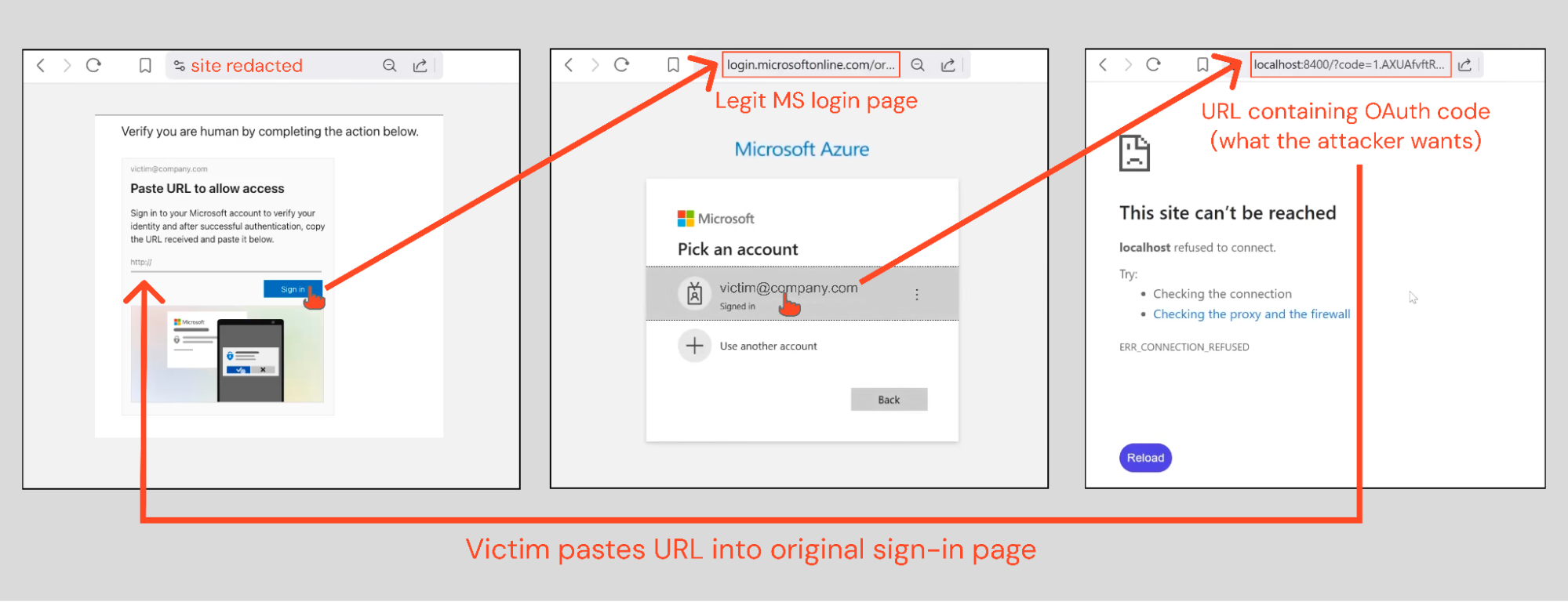
Figure 6: Example of a ConsentFix attack
Following the initial disclosure, the ConsentFix technique was quickly refined by security researcher John Hammond, who replaced the original implementation’s copy-and-paste flow with a more polished drag-and-drop interaction, referred to as ConsentFix v2. Separately, Fabian Bader and Dirk-jan Mollema identified a wider range of Microsoft first-party applications potentially vulnerable to ConsentFix, most of which have a redirect_uri of http://localhost, of which 11 apps also have known Conditional Access bypasses.
Microsoft also shortened the authorization code lifetime from 10 minutes to 1 minute, as observed by Nestori Syynimaa, likely an attempt to mitigate the ConsentFix attack, given that the technique was documented in December 2025 and the change followed in January 2026. This defense proved insufficient as well, however, once the attack was automated.
Building on both the original technique and Hammond’s v2 implementation, a member of the XSS criminal forum, a Russian-language forum strongly suspected to have Russian state involvement, released a further evolution, ConsentFix v3, as a publicly promoted criminal toolkit. Unlike the earlier proof-of-concept implementations, ConsentFix v3 automates the entire attack chain: it allows operators to provision phishing infrastructure, generate believable personas for victim interaction, and manage email campaigns, while automatically exchanging the captured OAuth authorization code for session and refresh tokens. This automation is achieved by combining legitimate SaaS and open-source services, including Cloudflare Workers for hosting, ZoomInfo for target identification, and Dropbox for payload/PDF hosting, with Pipedream used as a webhook-based exfiltration channel that programmatically completes the code-for-token exchange as soon as the victim submits the URL, removing the need for manual attacker intervention.
Unlike the Device Code flow, there is no way in Entra ID to block the Authorization Code flow. This would also make little sense, since it is the most widely used OAuth 2.0 grant. PKCE does not protect against this attack either, since it is not the OAuth authorization code of another application that is intercepted, but rather the OAuth flow itself that is initiated by the attacker.
How To Fight Back
No single control closes off every technique above, so we recommend following Microsoft’s defense-in-depth strategy against token theft as a starting point, which groups countermeasures into three categories:
- Minimize risk: harden devices and reduce the attack surface so that a successful theft becomes harder to pull off in the first place, for example device compliance and endpoint hardening through Intune and Microsoft Defender for Endpoint (MDE), phishing-resistant authentication, restricting the device code flow via Conditional Access, and blocking access to malicious sites with Defender SmartScreen or Global Secure Access web content filtering.
- Detect and mitigate: assume a token will eventually be stolen, so catch it fast, through Entra ID Protection risk detections such as Anomalous Token, Attacker in the Middle, or Unfamiliar sign-in properties, Microsoft Defender for Cloud Apps anomaly detections such as Impossible travel activity and Activity from infrequent country, Microsoft Defender XDR’s BEC-related detections such as Business Email Compromise (BEC) related credential harvesting attack and Suspicious phishing emails sent by BEC-related user, Conditional Access policies that force step-up reauthentication for risky sign-ins or sensitive operations, and Continuous Access Evaluation’s (CAE) critical event evaluation, which revokes a session in near real time once a critical signal fires, such as a password reset, account disablement, or high user risk detected by Identity Protection.
- Protect against replay: limit what a stolen token is actually worth, even after theft. Token Protection cryptographically binds a refresh token to the device it was issued to, rejecting bearer-style replay from anywhere else. CAE plays a second, distinct role here too: alongside critical event evaluation, its Conditional Access policy evaluation scenario synchronizes network-location policies directly into CAE-capable resource providers (Exchange Online, SharePoint Online, Teams), so a token replayed from outside a trusted network is rejected instantly, independent of any detected risk signal. That’s why CAE belongs in both categories, even though Microsoft’s own diagram below files it solely under “Detect + Mitigate”: one scenario reacts to a signal, the other structurally blocks replay outside allowed networks, which is exactly what “protect against replay” describes.
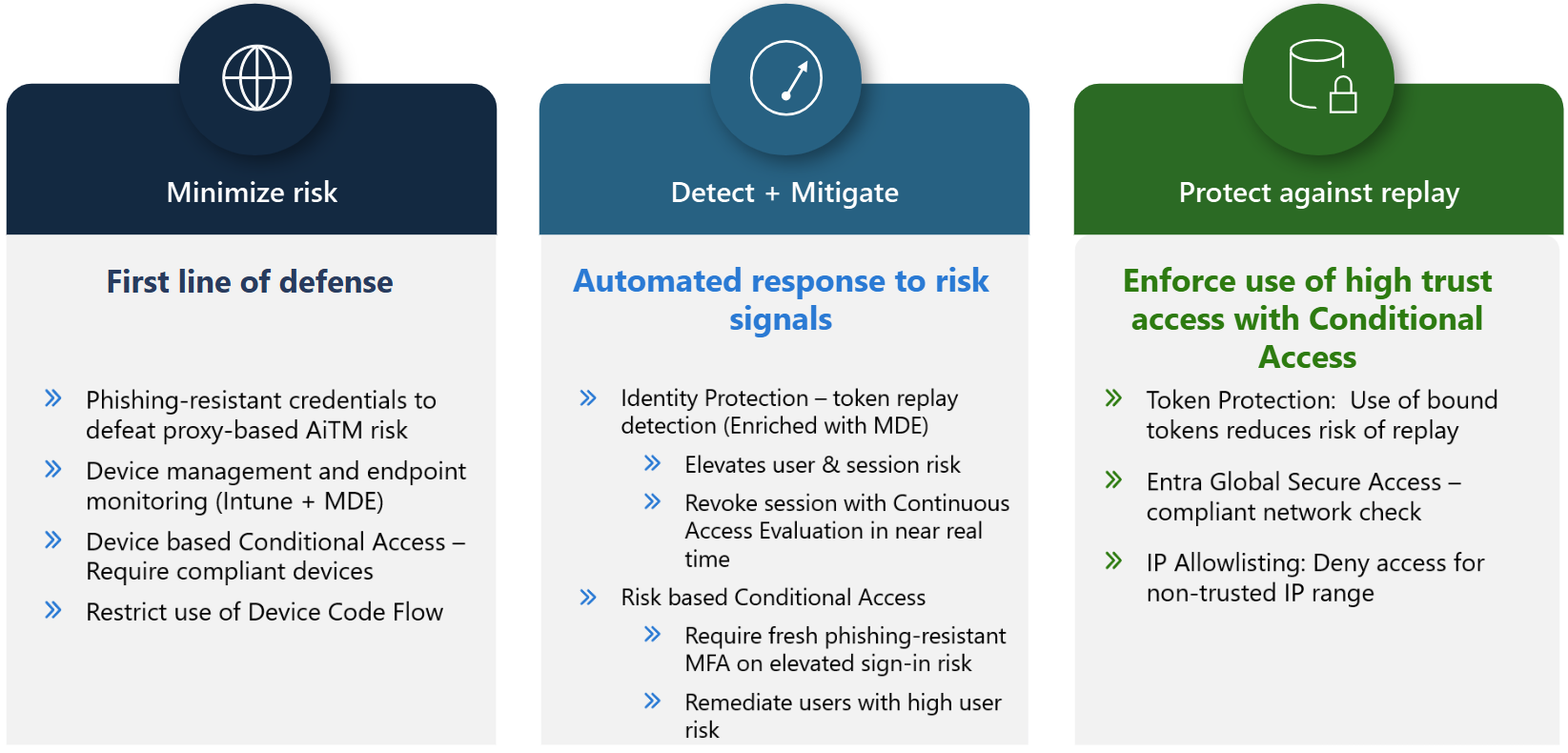
Mapped onto the techniques from the previous section, the picture looks like this:
| Attack | Category | Primary Countermeasure(s) | Minimum License |
|---|---|---|---|
| Direct token theft (disk, browser storage, PRT abuse) | Minimize risk | Device compliance via Intune and endpoint hardening with Microsoft Defender for Endpoint | Entra ID P1 (Conditional Access) + Intune Plan 1 + Defender for Endpoint Plan 1/2 |
| Adversary-in-the-Middle (AiTM) phishing | Minimize risk | Phishing-resistant authentication enforced through Conditional Access authentication strengths | Entra ID Free (registration) / Entra ID P1 (enforcement) |
| Device code phishing | Minimize risk | Restricting or blocking the device code flow via Conditional Access | Entra ID Free, as part of security defaults, otherwise Entra ID P1 for Conditional Access |
| Consent phishing | Not explicitly part of the strategy | Restricting user consent, the admin consent workflow, and restricting user app registrations | Entra ID Free |
| ClickFix and similar variants | Minimize risk | Microsoft Defender SmartScreen, Microsoft Defender for Endpoint | Included with Windows/Edge (SmartScreen) + Defender for Endpoint Plan 1/2 |
| ConsentFix | No prevention in Microsoft’s strategy; Detect and mitigate | Microsoft Defender for Identity alert “Possible Adversary-in-the-Middle (AiTM) attack detected (ConsentFix)” (xdr_PossibleAitMConsentFix) |
Microsoft Defender for Identity (standalone or via Microsoft 365 E5 / EMS E5) |
| Any successful token theft, regardless of technique | Detect and mitigate / Protect against replay | Risk-based Conditional Access, Continuous Access Evaluation, Token Protection | Entra ID P2 (risk-based CA) / Entra ID P1 (Token Protection, CAE location policies) |
ConsentFix is a good illustration of where Microsoft’s official strategy currently falls short: unlike the Device Code flow, blocking the Authorization Code flow itself is neither possible nor a meaningful approach, and the strategy offers no dedicated preventive control beyond the Defender for Identity detection mentioned above. Token Protection and Global Secure Access, both already part of that strategy, happen to help mitigate ConsentFix as a side effect where they’re already enforced, but security researchers have also proposed two mitigations specific to this attack (glueckkanja):
- Require user assignment on the affected first-party service principals, granting only temporary access to CLI tools via Access Packages or PIM for Groups, thereby reducing the attack surface before Conditional Access even evaluates.
- Block or scope access to Microsoft Graph Command Line Tools and the Windows Azure Service Management API through Conditional Access, so tokens are never issued to non-privileged users in the first place.
These come with real trade-offs, though: several of the affected clients, such as the Azure CLI, are widely used for legitimate automation and administration, so restricting them can break business operations. Organizations need to weigh detection-only against the operational cost of prevention on a case-by-case basis.
The Common Thread
None of these techniques defeat MFA on its own terms. Direct token theft and PRT abuse reuse a token or session artifact that already carries the MFA claim from an earlier, legitimate sign-in. AiTM, device code phishing, and ConsentFix instead capture a fresh token the moment a real MFA-verified sign-in completes, riding along on a live authentication rather than breaking it. Either way, the target is never the authentication step itself, it’s the token Entra ID hands out once that step succeeds. That’s the core problem our white paper investigates: what actually happens once that token ends up in the wrong hands? Of the three defense categories above, Continuous Access Evaluation (CAE) and Token Protection are the ones most relevant to this discussion: both are central to Microsoft’s Zero Trust story, and both are the subject of the empirical testing we cover in the rest of this series.
Coming Up in This Series
- Part 2: Continuous Access Evaluation, how fast does Microsoft actually revoke a token after a security-critical event, and which resource providers really support it?
- Part 3: Token Protection, how device binding works, and where it can be bypassed.
- Part 4: Where Entra ID’s implementation deviates from OAuth 2.0 best practices, and what that means for defenders.
Want to go deeper? ERNW instructors are running these trainings:
- Entra ID Security Essentials: September, November and at TROOPERS27.
- Hardening Microsoft Environments: October, December and at TROOPERS27.
If you would like an assessment of your Entra or AD environment, feel free to contact us.