This is the second post in a 4-part blog series that accompanies ERNW White Paper 80: Token Theft in Microsoft Entra ID - An Analysis of Controls. In Part 1, we covered how attackers steal tokens in the first place. This post digs into Continuous Access Evaluation, the event-driven mechanism Entra ID adopted to help close that gap.
The Problem CAE Is Trying to Solve
The Revocation Gap
As we covered in Part 1, Entra ID’s access tokens are used as bearer tokens, and in most cases Entra ID evaluates Conditional Access policies only at issuance. Once a self-contained JWT-based access token has been issued, the resource server it’s presented to validates it entirely locally: it checks the token’s signature against the authorization server’s public key, and reads its lifetime and permissions straight from the signed claims in the payload. No further check against Entra ID takes place, no matter what happens to the underlying account afterward. Practically, this means an access token remains fully usable for its entire lifetime even if security-critical events occur or Conditional Access policies are violated in the meantime.
A concrete example: if an administrator, suspecting a compromised account or an ongoing attack, disables a user’s account in Entra ID and revokes their refresh tokens with the PowerShell cmdlet Revoke-MgUserSignInSession or via the GUI in the Microsoft Entra Admin Center, that action only affects refresh tokens. Any access token the attacker already holds keeps working until it expires on its own, a gap of up to 90 minutes between the moment an admin takes action and the moment the token actually stops working.
Why the Standard Fixes Fall Short
Microsoft’s first attempt at closing that gap was simply shortening access token lifetimes further, forcing clients to fetch new tokens (and re-trigger Conditional Access) more often via their refresh tokens. Per Microsoft’s own CAE documentation, the company “experimented with the ‘blunt object’ approach of reduced token lifetimes but found they degrade user experiences and reliability without eliminating risks”, so it was abandoned as a general-purpose fix.
OAuth 2.0 does define a standardized way for a resource server to ask the authorization server about a token’s live status: the Token Introspection endpoint (/introspect). Per the OAuth 2.0 Authorization Server Metadata standard, an authorization server that supports it has to advertise the endpoint as introspection_endpoint in its OpenID Provider configuration (the OIDC discovery document at .well-known/openid-configuration). Entra ID doesn’t implement it and Microsoft’s stated reasoning is that requiring every API call to make an extra round trip to the authorization server just to check token status doesn’t scale and is too expensive.
There’s also the OAuth 2.0 Token Revocation standard (/revoke), which Entra ID doesn’t support either. Per OAuth 2.0 Authorization Server Metadata, an authorization server that implements the /revoke endpoint is supposed to advertise it as revocation_endpoint in its OpenID Provider configuration. Entra ID lists no such field. But even if Entra ID implemented it, the mechanism has a structural limitation that’s worth understanding: a /revoke call only ever informs the authorization server, never the resource servers actually enforcing access, so whether revocation actually takes effect depends entirely on whether the resource server would have asked the authorization server anyway. Access tokens fall into two cases depending on format. A reference (opaque) access token is meaningless to a resource server on its own, so the resource server has to call the authorization server’s introspection endpoint to find out what it authorizes, which is how a revocation gets picked up. A self-contained JWT access token, the format Entra ID uses, is the opposite: the resource server validates it entirely from its signature and signed payload claims and never calls back to the authorization server at all, so a revocation recorded there stays invisible to the resource server.
A third option existed on paper: an Internet-Draft for an OAuth 2.0 Token Revocation List, conceptually a CRL for tokens, that resource servers could poll to learn which access tokens had been revoked. It expired without ever being adopted as a standard.
How CAE Closes the Gap
Continuous Access Evaluation (CAE) is based on the OpenID Continuous Access Evaluation Profile (CAEP) of the Shared Signals Framework. Rather than resource servers asking for token status (introspection) or authorization servers only hearing about revocations from clients (/revoke), CAE has Entra ID, as the authorization server, and the resource servers exchange security-relevant changes with each other directly, in an event-driven manner and in near real time. This allows access to resources to be revoked immediately, even if a token is formally still valid based on its signature and lifetime. Entra ID shipped CAE as a Public Preview in October 2020 and made it Generally Available in January 2022.
Microsoft names the following security-critical events, for which Entra ID informs the resource servers:
- User account is deleted or disabled
- Password for a user is changed or reset
- Multifactor authentication is enabled for the user
- Administrator explicitly revokes all refresh tokens for a user
- High user risk detected by Microsoft Entra ID Protection
Resource servers can also inform Entra ID when properties of the client change. Specifically, in the case of Conditional Access policies, this concerns the network assignment, whereby resource servers report changes in network location, based on the IP address, back to Entra ID, making it possible to detect whether an access token is being used outside a permitted IP range or in an untrusted network.
That backchannel is also exactly why this mechanism is hard to study from the outside: as a resource owner or client, you simply can’t observe it directly. There’s no public API to register a custom resource server for CAE. Everything in our testing had to be inferred indirectly, from token claims and from how resource servers actually respond to a token after an event fires.
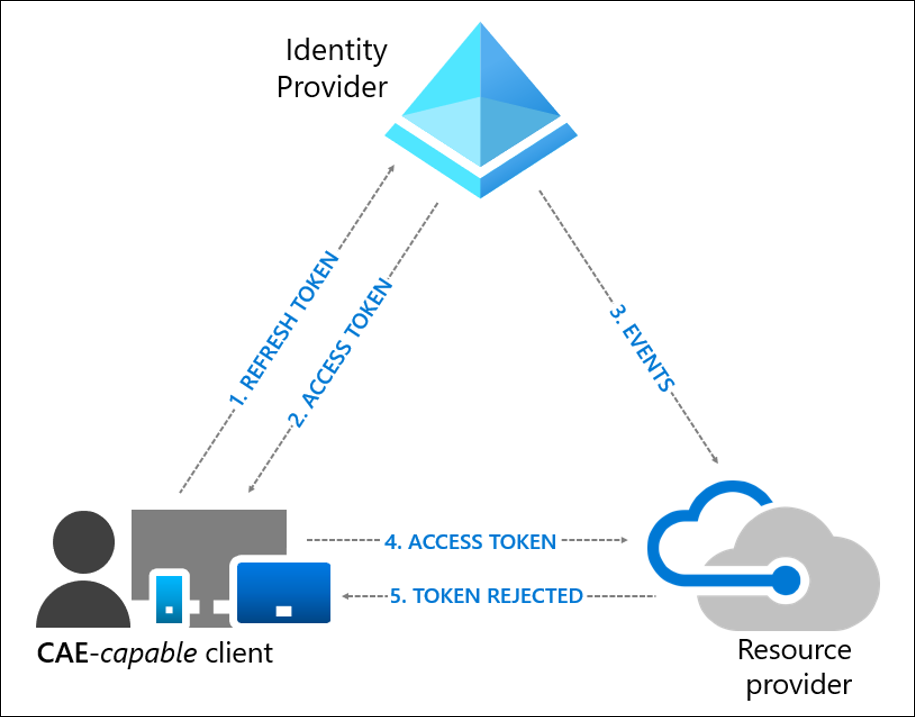
Figure 1: “User revocation event flow” by Microsoft, from Continuous access evaluation in Microsoft Entra, licensed under CC BY 4.0, as stated under ThirdPartyNotice.
Related Work
Related work has already been conducted by German Microsoft MVP Fabian Bader, who tested Continuous Access Evaluation (CAE) on the Microsoft Graph resource using 15 scenarios. For each event, he measured the revocation time of a CAE token as well as that of a non-CAE token, although he only conducted a single measurement series overall. His results showed that non-CAE tokens were in some cases also invalidated, for instance in the events user account is deleted or user account is disabled. He further found that not every type of added or activated MFA method counts as an event for CAE, and that the extended CAE access token lifetime can be reset to the default short lifetime through the use of the Sign-in Frequency session control of a Conditional Access policy. He also formulated hypotheses on how the CAE events might be implemented in the backchannel between Microsoft Entra ID and the resource servers. Finally, in the course of his CAE research, he forked the tool TokenTactics to extend CAE support and released it as TokenTacticsV2.
How We Tested CAE Support
Microsoft’s CAE documentation names four CAE-capable resource servers: Exchange Online, SharePoint Online, Microsoft Teams, and Microsoft Graph. That’s quite a short list for a feature marketed as central to Zero Trust, so we set out to check it empirically.
The trick is a specific claim. A CAE-capable client signals support to Entra ID by adding {"access_token":{"xms_cc":{"values":["cp1"]}}} to the claims parameter of the token request. If the resulting access token comes with the claim "xms_cc": ["cp1"], the resource server on the other end understood the request and supports CAE. If it’s absent, it doesn’t.
POST /common/oauth2/v2.0/token HTTP/2
Host: login.microsoftonline.com
Content-Type: application/x-www-form-urlencoded

grant_type=refresh_token&
client_id=d3590ed6-52b3-4102-aeff-aad2292ab01c&
scope=00000002-0000-0ff1-ce00-000000000000/.default&
claims={"access_token":{"xms_cc":{"values":["cp1"]}}}&
refresh_token=1.AYEApMXoHC1470uzpW5-[...]
We picked five public clients with broad resource access (Microsoft Office, Azure CLI, Azure PowerShell, the Device Management Client, and the Microsoft Authentication Broker, between 376 and 1,591 resources each, per Entrascopes) and obtained a refresh token for each via the Device Authorization Grant using TokenTacticsV2.
From there, a PowerShell script automated the rest (the full script is included in the white paper’s appendix): for every resource, it requests an access token at the token endpoint using that refresh token via the OAuth 2.0 Refresh Token Grant (grant_type=refresh_token), with scope set to the target resource’s app ID. For the list of app IDs to iterate over, we used this CSV file from a GitHub repository maintained by Merill Fernando, Microsoft Entra’s former Principal Product Manager, that pulls together every known Microsoft first-party app ID from various sources and republishes it daily as CSV and JSON. Each JWT access token that came back was then Base64-decoded, and the script exported the relevant claims, alongside both the decoded and the original raw token, to a CSV file for analysis, which included checking each one for the CAE claim.
The Coverage Numbers
We got access tokens back for 780 resources. 40 came back as encrypted JWEs and couldn’t be inspected for the claim. Of the remaining 740 JWT tokens, exactly 33 carried the CAE claim, about 4.5%.
Put against the 740 resources we could actually check, 33 is still a small slice. None of the 29 beyond the four officially documented services are called out in the central CAE documentation itself, though some are mentioned, if you know to look, in the documentation specific to that individual resource. The legacy Azure AD Graph API, Dataverse, Power BI Service, and Azure DevOps all turned out to support CAE this way. Major surfaces like Azure Resource Manager, Azure Key Vault, Azure Storage, and Microsoft Intune showed no sign of support at all. Microsoft Graph’s push to become the universal API does extend some indirect coverage (resources reached through Graph benefit when a Graph CAE token is revoked), but for everything outside that umbrella, coverage stays thin.
There’s a second, more concerning finding underneath the raw number: CAE support at the resource server is necessary but not sufficient. Manual traffic analysis showed Microsoft’s own first-party clients regularly requesting plain, non-CAE tokens against resources that do support CAE. CAE is opt-in per request, not enforced server-side, presumably to avoid breaking clients that aren’t prepared to handle claim challenges. In practice, that means a resource being “CAE-capable” tells you nothing about whether the token in front of you is actually protected by it.
Third-party resource servers fare worse still: there’s currently no public API for a third party to implement CAE support at all. The only path is Global Secure Access’s “Universal” CAE, which protects the token used to reach Microsoft’s Security Service Edge, indirectly extending some benefit to whatever sits behind it, but only for organizations that adopt Global Secure Access in the first place.
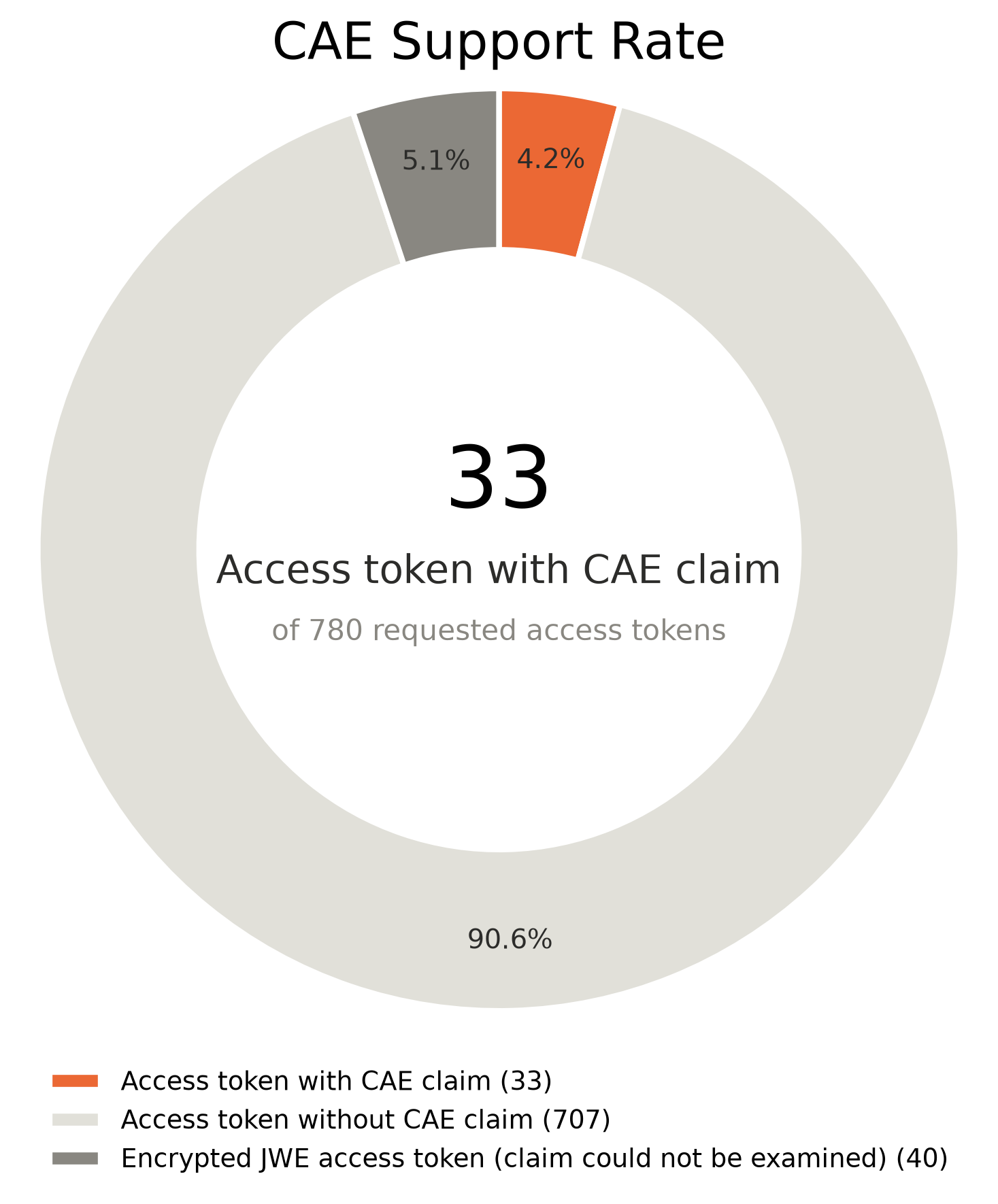
Figure 2: Visualization of the CAE support results as a donut chart
The full list of all 33 resources that came back with the CAE claim, along with the access token validity period we observed for each, is in the white paper’s appendix.
How Fast Is “Near Real Time” Actually?
Coverage is one question, speed is another. We tested the four documented resources (Microsoft Graph, Exchange Online, SharePoint Online, and Microsoft Teams) against all eight documented CAE events, three measurements each, polling every 10 seconds until a request came back 401 Unauthorized.
The results showed inconsistencies in revocation time between resources and events:
- SharePoint Online and Microsoft Teams were consistently fast: most revocations landed in 10–40 seconds across nearly every event.
- Exchange Online was consistently the slowest, frequently taking up to 5 minutes, even for events you’d want revoked instantly, like a password reset or an explicit admin-triggered token revocation.
- Microsoft Graph was the least predictable: anywhere from a few seconds to several minutes for the same event across repeated runs.
- Network-location-based Conditional Access policies were the one clean exception: enforcement was instantaneous, 0 seconds, in every single measurement, across every resource.
- High user risk detection was consistently the slowest category across the board, since Entra ID Protection first has to compute the risk score before anything gets pushed to resource servers, often landing in the 2–5 minute range even at the “fast” resources.
It was also observed that the “MFA is enabled for the user” event is only triggered by the legacy Per-user multifactor authentication setting, not by enabling MFA via a Conditional Access policy, and not by a user registering or changing their own MFA method. If your organization enforces MFA exclusively through Conditional Access (the modern, recommended approach), this particular CAE event essentially never occurs for you.
These revocation times are based on only three measurements per resource/event pair, taken at a 10-second polling granularity, so they don’t amount to a statistically rigorous sample. They should be read as directional indicators of typical revocation behavior, not as precise or guaranteed values. The full measurement table is in the white paper’s appendix.
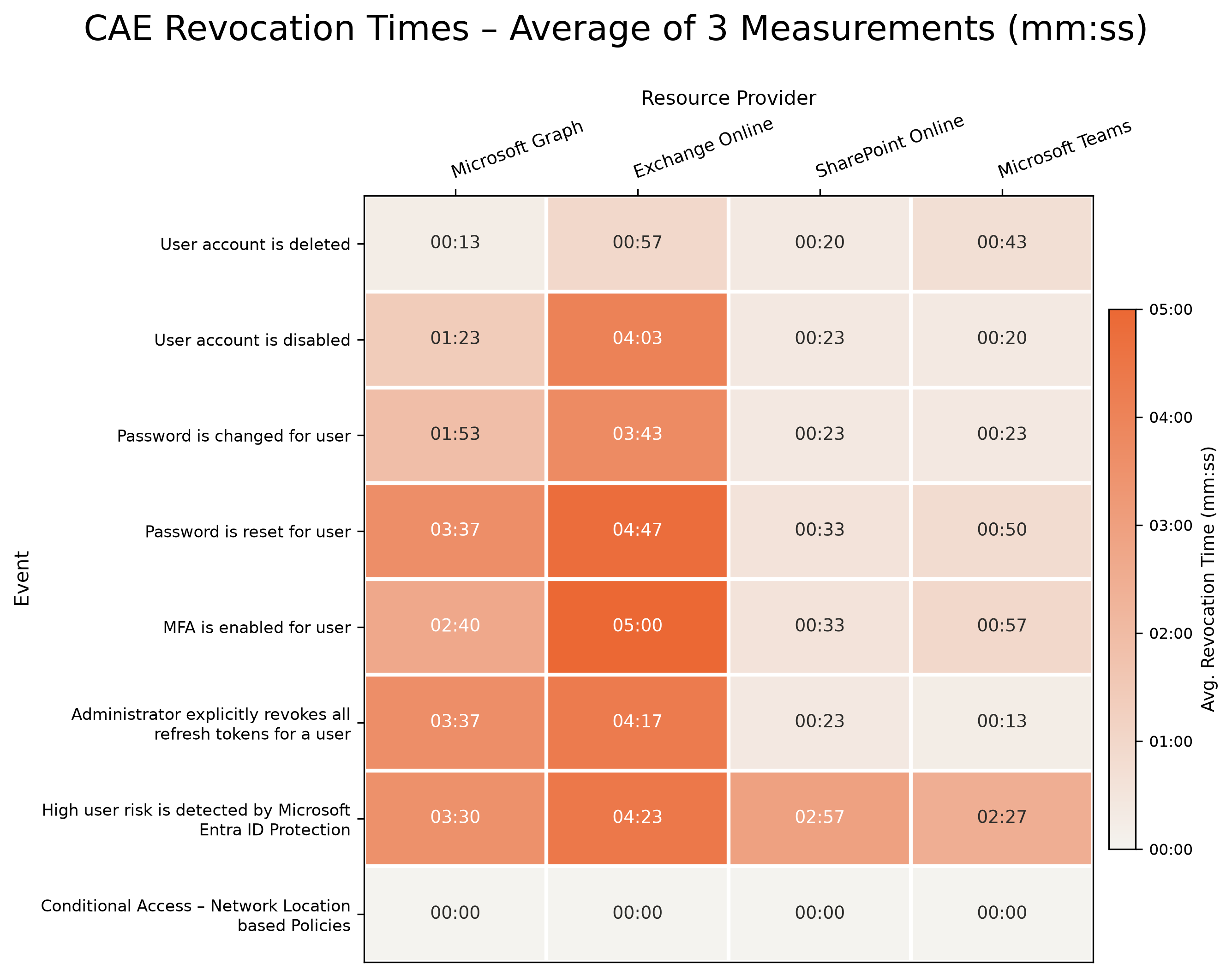
Figure 3: Visualization of the CAE revocation time results as a heatmap
The 28-Hour Token Problem
One aspect stands in tension with CAE’s own value proposition: CAE-capable access tokens are allowed to live for up to 28 hours, compared to the usual 60–90 minutes. Microsoft’s reasoning is that token lifetime no longer needs to be the primary safety net once revocation is event-driven and near-real-time, so a longer-lived token trades stability for a security posture that supposedly doesn’t depend on expiry anymore.
In practice, that argument only holds if every relevant event is actually covered and revocation is genuinely instant, and we’ve just shown neither is fully true. A stolen CAE token could remain valid for up to 28 hours instead of 90 minutes, for as long as its use doesn’t trigger any of the documented CAE events. In our token sample, only 7 of the 33 CAE-capable resources actually issued tokens with the extended lifetime (most stuck to the standard duration regardless), but where it does apply, it meaningfully extends the exposure window.
One mitigation is available: configuring the Sign-in frequency session control on a Conditional Access policy, regardless of the value you set, silently caps the resulting CAE token back down to the standard 60–90 minute lifetime (a finding we could confirm from Fabian Bader’s earlier research). If you’re relying on CAE, this is worth setting explicitly rather than leaving the 28-hour ceiling in place by default.
Detecting and Monitoring CAE in Practice
On the defensive side, CAE usage is at least visible if you know where to look:
- Sign-in logs in the Entra Admin Center show, per sign-in event, whether a CAE token was involved, and can be filtered directly with Is CAE Token: Yes/No, useful for spotting resources that silently fall back to non-CAE tokens.
- The Continuous Access Evaluation Insights Workbook surfaces specific scenarios, such as a client’s IP address diverging between Entra ID and the resource provider.
- Microsoft Sentinel supports custom KQL queries for deeper, tenant-specific analysis.
Limitations of the Current CAE Implementation
Pulling the findings above together, the current state of CAE has a fairly consistent set of gaps:
- Coverage on the resource side is narrow, and third-party resources are essentially locked out. Only 33 of the 740 checked first-party resources support CAE at all, and there’s no public API for a third-party resource server to implement it. The only path in is Global Secure Access’s “Universal” CAE, and only for organizations that adopt it.
- Coverage on the client side is inconsistent. Even Microsoft’s own first-party clients don’t reliably request CAE tokens against resources that do support it.
- CAE is opt-in per request, not enforced server-side. Whether Entra ID issues a CAE token or a plain one for a request against a CAE-capable resource is a decision the client makes, not something the resource server can require. Even when both the client and the resource support CAE, the client can still choose, on a per-request basis, not to ask for one. A resource being “CAE-capable” tells you nothing about whether the token in front of you is actually covered.
- Without enforcement, CAE only pays off together with Token Protection and device-bound refresh tokens. If an attacker holds a stolen refresh token that isn’t bound to Token Protection, nothing stops them from simply requesting a plain, non-CAE access token instead of a CAE one, since the choice is the client’s to make. That access token isn’t revocable through CAE events at all, which sidesteps the whole mechanism.
- The extended token lifetime introduces a trade-off. A CAE token can live for up to 28 hours instead of the usual 60–90 minutes, which only pays off if the events that would revoke it are reliably covered, even for tenants without Microsoft Entra ID Protection (which requires an Entra ID P2 license), and if that revocation actually happens instantly.
- The MFA event is ambiguous in practice. It only fires for the legacy Per-user MFA setting, not for MFA enforced through Conditional Access, which is how most organizations enforce it today.
- Open question: is the documented event list itself complete enough? Removing a role or group assignment isn’t among the documented CAE events, so it’s unclear whether such a change is picked up before an already-issued token expires on its own. Similarly, the “high user risk” event depends on Microsoft Entra ID Protection, which requires an Entra ID P2 license, so tenants without that license may lose access to a CAE event category entirely rather than just experiencing slower detection. We didn’t test either scenario directly, but they’re worth flagging as open questions for CAE’s event coverage.
Our Takeaways
For the most part, CAE works as designed for the events and resources it covers: the network-location enforcement result alone (0 seconds, every time) shows the backchannel mechanism itself is sound. The gap is coverage and consistency, not the underlying idea: 33 of 740 resources is a small slice of the ecosystem, support at a resource server doesn’t guarantee a given request actually uses CAE, revocation timing varies by minutes depending on resource and event, and the extended token lifetime assumes a level of event coverage that doesn’t yet exist. Microsoft positions CAE as a building block of its Zero Trust identity strategy, yet the gaps above show the implementation still has some way to go before it lives up to that framing.
If you’re relying on CAE as part of your defense against token theft today, three concrete things are worth doing now:
- Set an explicit Sign-in frequency session control so a stolen CAE token can’t ride the 28-hour lifetime ceiling.
- Don’t assume MFA enforced via Conditional Access triggers the “MFA is enabled” CAE event, it doesn’t. Only legacy Per-user MFA does.
- Build monitoring around Is CAE Token, the CAE Insights Workbook, and Sentinel KQL now, rather than assuming CAE silently has your back everywhere.
Coming Up in This Series
- Part 3: Token Protection, how device binding works, and where it can be bypassed.
- Part 4: Where Entra ID’s implementation deviates from OAuth 2.0 best practices, and what that means for defenders.
Want to go deeper? ERNW instructors are running these trainings:
- Entra ID Security Essentials: September, November and at TROOPERS27.
- Hardening Microsoft Environments: October, December and at TROOPERS27.
If you would like an assessment of your Entra or AD environment, feel free to contact us.