Again, Cisco released security advisories for their software-defined networking
(SDN) solution called Application Centric Infrastructure (ACI). As before (see
blog post
here),
the published advisories originated from research performed in our ACI lab.
This is the 3rd post in the series of Autonomic Network (AN), it will dedicated
for discussing the vulnerabilities. I recommend reading the first 2 parts
(part one,
part two) to be
familiar with the technology and how the proprietary protocol is constructed.
Initially we will discuss 2 of the reported CVEs, but later there is more CVEs
to come 😉
Here is a quick overview on how our network looks like for 2 CVEs
This is the second part in the Autonomic Network series. We have introduced
previously in our
first part the
Autonomic Network (AN), took a look about the needed configuration to run it on
Cisco gear and what is the expected communication flow. In this post, we will
dive deeper to have a closer look on the packets and how they are composed.
Cisco’s AN protocol is a proprietary one and as far as I know, the analysis
provided here for the protocol is the first of its kind.
This is a 3-part series which introduces and analyzes Cisco’s implementation for
Autonomic Network. In the 1st part, the technology is introduced and we have an
overview about communication flow. In the
2nd part, Cisco’s
proprietary protocol is reverse engineered ? then finally in the
3rd part,
multiple vulnerabilities will be disclosed for the first time. If you’re aware
of the technology, you can skip directly to part 2 where the action begins!
After seeing
Christopher’s post I
decided to create a proof using GNS3 and Virtualbox.
The aim is to perform the exact attacking using Antonios Atlasis’
Chiron tools and run a Wireshark packet
capture to prove the hop limit drops below 255.
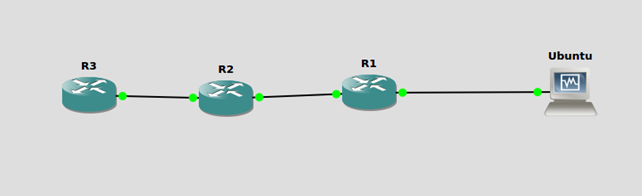
The following topology is used in GNS3:
The
routers used are Cisco C372 and the machine labled Ubuntu is running 14.04 LTS
Ubuntu Desktop, default installation. F0/0 is on the right and F0/1 is on the
left.
As you may have already noticed, Cisco released an urgent
security advisory
describing an IPv6 Neighbor Discovery DoS Vulnerability in several flavors of
Cisco’s operating systems. Currently IOS-XR, XE and NX-OS are affected while ASA
and “classic” IOS are under investigation. At first glance, it might look like
yet another IPv6 DoS vulnerability. Looking closer, Cisco is mentioning an
unauthenticated, remote attacker due to insufficient processing logic for
crafted IPv6 NDP packets that are sent to an affected device. Following the
public discussion about the vulnerability, it seems that these packets will
reach the, probably low rate-limited,
LPTS filter/queue
on IOS XR devices “crowding” out legitimate NDP packets resulting in a DoS for
IPv6 traffic, or in general a high CPU load as these packets will be processed
by the CPU. More details are currently not available, but this might indicate
the affected systems aren’t doing proper message validation checks on NDP
packets (in addition to the LPTS filter/queue problem).
Enno and I spent the first day on Cisco Live Europe in Berlin today attending
the “Advanced Practical Knowledge for Enterprise Deploying IPv6” technical
breakout held by Tim Martin and
Jim Bailey.
It was a good breakout session, and thanks again Tim for the honorable mention
of our work in your slides! We really appreciate it. Like
last year,
we were curious how the Wifi network was setup this year as I face a
corresponding task for Troopers in March,
with some
major changes
in comparison to the last years. The Wifi infastructure in Berlin looked very
similar to the one from last year in Milan, we had the “standard” Cisco Live
SSID as well as an IPv6-only (with NAT64 as translation mechanism) SSID. The
standard SSID looked identical to last year with the exception that now the
RA Throttling
feature on the WLC was active from the beginning! Neither the M nor the O flag
are set which means that my client has to use the legacy protocol to resolve
AAAA records. As I am running Windows, it does not support
RA option 25 but the option wasn’t
included in the RAs anyway. The preference was configured to the default
“medium”. One thing I noticed, but haven’t had a chance to ask
Andrew Yourtchenko, was that for the legacy
(IPv4) connection they use HSRPv2 as an FHRP protocol (indicated by the MAC
address
00:00:0c:9f:f0:01
I received from the gateway) but for IPv6 I received Router Advertisements from
two different MAC addresses (which both belong to Cisco, so I don’t think anyone
sent spoofed RAs). I am curious about the reasoning for this approach 🙂
What i also encountered was that the Peer-to-Peer Blocking feature was
apparently not enabled on the SSID as I was able to enumerate approx. 1600
active clients at the time. No worries, I haven’t done anything else, just was
curious whether the feature was activated or not…
some of you may have seen my last
blog post
about the preparation of the Troopers network. Today I want to give you a little
teaser on what to expect for the
talk
I will present during the IPv6 Security Summit. As the title implies, it’s not
only about building a secure IPv6 WiFi, but also a reliable one. One might think
that there aren’t many differences in comparison to IPv4, but the heavy reliance
on multicast of IPv6 does have implications for Wi-Fi networks in general.
I am currently preparing the Troopers network in a
lab environment to ensure that we all will have a smooth Wi-Fi experience during
Troopers. I wanted to spice things up a little bit for the Wi-Fi deployment
(more on that in a following blogpost) and get rid of IPv4 wherever possible.
Our Wi-Fi infrastructure consists of typical Cisco Access Points (1602) and a
2504 Wireless LAN Controller. Beginning with WLC image 8.0 it is finally
supported to establish the CAPWAP tunnel between the AP and the WLC over IPv6,
which is awesome and I wanted to implement it right away.
this is a short write up about the Maintenance Operation Protocol (MOP), an
ancient remote management protocol from the
DECnet protocol suite. It’s old, rarely
used and in most cases not needed at all. But as we stumbled across this
protocol in some network assessments, it seems like a lot of network admins and
other users don’t know about it. Even various hardening guides we’ve seen don’t
mention MOP at all.
 The
routers used are Cisco C372 and the machine labled Ubuntu is running 14.04 LTS
Ubuntu Desktop, default installation. F0/0 is on the right and F0/1 is on the
left.
The
routers used are Cisco C372 and the machine labled Ubuntu is running 14.04 LTS
Ubuntu Desktop, default installation. F0/0 is on the right and F0/1 is on the
left.