In this post I want to talk about a very essential part of my workflow when dealing with Bluetooth devices, particularly IoT devices with a corresponding mobile app: Live capture of Android Bluetooth traffic with Wireshark.
Before you stop reading because you think you know how to do this already, the method does not involve pulling bug reports off your phone, and it does not require root. And most importantly it gives you a live packet log in Wireshark.
If I got you interested, but you really don’t care for the background, you can jump straight to the recipe for Android before and after 16. If you want to know why there is no solution for Android 16 I’m afraid you have to read the whole thing.
A list of places I checked for the correct solution in vain:
- ChatGPT
- Claude
- Gemini
- The first page of Google results
- The first page of Bing results
- Asked my coworkers
- That one book on Android security I always meant to read
This is not arcane knowledge, and I am pretty sure if you hard-press the LLM of your choice it will give you the answer. But you would have to know there is a better way. With this post I am mainly hoping to make the best answer to the problem also the first one you find, because that’s what people end up doing.
The default
Let’s start with the popular answer first, because it’s actually pretty close to
the correct one. What it gets right is that you need to enable
Enable Bluetooth HCI snoop log in the Android Developer options.
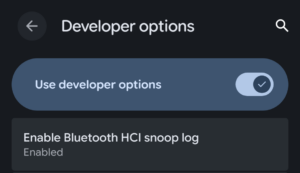
Enable HCI Logs in Android
This will enable an Android mechanism that logs all HCI traffic to a dump file
in the btsnoop format that can actually be read by Wireshark and the like. Now
this sounds great, but the file is normally not readable on non-rooted Android
devices. That is why the popular method goes on to trigger an Android bug report
via ADB, which does not require root privileges. The result is a zip file that
bundles many system logs and configs and among them also a copy of the
aforementioned HCI log. So simply unzip the bug report, open the log file in
Wireshark and you’re done.
Taking a bug report does however take about a minute and what you will get is only a static snapshot of all HCI traffic captured until this point. This is especially inconvenient if you try to match user interactions or other events to corresponding Bluetooth traffic. You would have to rely on timestamps in the log for that. That’s annoying. I like my logs like I like my Gagh: Live and fresh!
Live is always better
Of course the Android developers thought so too and – to my knowledge back with
Android 5 (that was 2014) – introduced a better way. They simply livestreamed
the btsnoop log to a listening socket on localhost. All you needed to do to
get hold of it was use ADB to get a TCP port forwarding from your host PC to the
Android localhost port 8872.
However since Wireshark doesn’t do live decoding of the btsnoop format you
would have to dump everything that comes over this socket in a file and open
that in Wireshark. That’s arguably better than pulling bug reports but still
annoying. Fortunately, Wireshark ships with the androiddump extcap plugin,
that does all the legwork for us. It forwards the port, reads from the socket,
parses the btsnoop PDUs and live streams HCI traffic in our Wireshark packet
log. And all it needs is a working ADB connection.
Recipe
So the correct solution in a nutshell was:
- Setup ADB
- Turn on
Enable Bluetooth HCI snoop login the Android Developer Options - Ensure that
adb-serveris started and everything works e.g. by runningadb shell - Start Wireshark
- Capture on the
Android Bluetooth Btsnoop Netinterface
It’s as simple as that.
So why the heck would people do the bug report dance? Well, I really don’t know why they did so in the past. But more recently this method has had a major caveat; it does not work with Android 16.
Android 16: when it broke
As part of Android’s gradual migration from the old Bluetooth stack Fluoride
to the new Gabeldorsche the btsnoop net functionality was disabled for
Android production builds. To my knowledge, the whole ordeal was not documented
anywhere, but I believe what happened was: At some point the new Gabeldorsche
implementation was adopted but immediately disabled because it hadn’t undergone
a necessary security audit yet. And it remained disabled for all of Android 16’s
releases. Until today I know of no way to use the feature on non-rooted Android
16 installations. I became pretty frustrated with the fact that it just suddenly
broke with an update of my testing phone with no explanation. So I dug around
the AOSP code and adjacent resources. Finally, on the AOSP Gerrit instance, I
found not only a code comment that explained why the socket was disabled, but
also a short
conversation
on the topic. To my surprise I was allowed to write comments as well and even
got a response that promised the feature will be enabled again in a future
release. It would be behind a system property, but that seemed reasonable to me.
Android 17: back again
When Android 17 came along I was more than happy to see that the Android team
had kept their word and the btsnoop socket was indeed back! When I checked the
Developer options I found the newly added sub menu Bluetooth that had the
long-awaited setting Enable Bluetooth HCI snoop log socket. Toggling it
brought back the live logging feature in Wireshark just like it was before
Android 16.
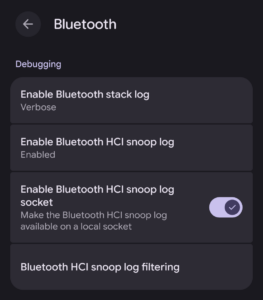
New Android Bluetooth Developer Options
A new Recipe
So for Android 17 the solution just requires you to flip one additional switch:
- Setup ADB
- Turn on
Enable Bluetooth HCI snoop login the AndroidDeveloper OptionsBluetoothsub-menu. - Turn on
Enable Bluetooth HCI snoop log socketin the AndroidDeveloper OptionsBluetoothsub-menu. - Ensure that
adb-serveris started and everything works e.g. by runningadb shell - Start Wireshark
- Capture on the
Android Bluetooth Btsnoop Netinterface
With that I can happily live capture Bluetooth traffic on Android again and no longer have to stand the smug smile on the faces of my colleagues working with iOS and its pretty decent packet logger.
If you are interested in Bluetooth tooling and traffic capture check out my
post
on how to get HCI logs of bumble scripts in Wireshark.
Or if you rather have us look at your Bluetooth devices than doing it yourself,
talk to us.