As TROOPERS15 has come to an end, I’ve finally got the time and energy to give you a deeper insight into the TR15 badge. As most of you have probably heard during the conference, this year’s badge was based on the OpenPCD2. The OpenPCD 2 is a 13.56MHz NFC Reader, Writer and Emulator under the GNU GPL v2. As NFC is, yet again, on an uprise, a badge with NFC simply gives you the chance to fiddle around and hack stacks of stuff in the real world. Adding some TROOPERS spirit and a few little secrets we hope we’ve designed a pretty nice badge!
Continue reading Continue readingBrian Butterly
Riding the Z-Wave, Part 1
Simple everyday work dialog:
“The heater in the basement is still missing a proper thermostat, the ‘binary
solution’ isn’t that effective”
– “Buy one…”
– “Ok”
– “Get one you can break…”
– “Ok, but then I’d like a few tools, too”
– “Go for it.”
(That’s the way work should be!)
Result of the dialog: a
Danfoss Living Connect Z ( 014G0013 )
and a
TI CC1100 Wireless Mini Dev Kit plus
a copy of Z-Force to start with.
Goal: Talk to the thermostat!
(In-)secure SD cards on WP8.1
During our first year of testing Windows Phone 8 applications we had yet another, let’s say: “surprising” finding. It all started with the first approaches on pentesting mobile applications on that new and rather closed platform. Lacking jailbreak, root, and similar approaches we had a closer look at alternate approaches to have a look at an apps interior. We quickly hooked onto using modified firmwares (with deeper system access) and found a perfect solution in a little flaw concerning the handling of SD cards in WP8.1. A flaw that was, sadly for us, fixed silently….
Continue reading Continue readingLTE vs. Darwin @ Hackers to Hackers Conference 11
Hello Everybody and greetings from Sao Paulo,
We’re currently enjoying the Brazilian sunshine, waiting for H2H2 11’s closing
remarks and decided to give you a few details on the past three days. The
conference was opened by a short welcome by our fellow Trooper Rodrigo Rubira
Branco and stuffed with loads of great talks. This year’s keynotes came from
Daniel J. Bernstein and Halvar Flake and gave yet another insight into the ever
changing world of InfoSec. The international lineup also included Travis
Goodspeed, Sergej Bratus and Fernando Gont. H2HC was a great chance for us to
talk to various Hackers from around the world and share our opinions and
knowledge.We can only warmly recommend a visit to next year’s H2HC in Sao
Paulo.
Many many thanks to Rodrigo, Laila and the rest of the team for an awesome
weekend. And a quick hello to all new followers on Insinuator.net, we’re looking
forward to meeting you all again, soon.
Bruting Android Pins
Hi there,
a few weeks ago I held a talk at UnFUCK, a small University con from students for students. I had decided to give a short talk on “Owning Stuff via USB” aka how to use our TR14 Badge! During the preparations and while building my demos, I tested my new USB RubberDucky. One rather “trivial” demo was actually to use it as a keyboard on an Android phone.
Android has been able to use the
USB OTG features for
quite a while now, where most people enjoy being able to connect a USB stick to
a phone, some others might have already used a keyboard on a tablet. OTG enables
a USB device to play master and hence connect two USB devices to each other. For
this the fifth PIN on a micro USB cable is used (it’s simply pulled down to
ground). To be able to use USB OTG you both need a special cable (micro USB to
female USB A) and a master device with all the necessary drivers. Depending on
the Android device and the client (USB stick/HDD, keyboard) you want to connect
you might need a rooted phone.When trying the RubberDucky on Android for the
first time, I had a S3, a Nexus 4, a Nexus 5 and an SE Xperia Z1. All of these
devices detected the Ducky as a keyboard and I was able to write stuff on the
phone. But I hadn’t aimed at “just typing text”, I wanted to type numbers or
rather PINs –> One can use the external keyboard while unlocking the device.
The Ducky’s user guide contains an example script for bruteforcing PINs on
Android. But how?
Just type!
A TROOPER’s Keyboard, part2
Greetings fellow TROOPERs,
TROOPERS14 has come to an end, and it’s finally time to let you have a go at the Badge’s source code. As promised, it was slightly modified and extended, to show you the full potential of your new gadget. I’ve added some nice payloads from Nikhil Mittal and a few own ones. Above that, for those who took their parts for soldering home, I’ve also added a few quick instructions on how to do the soldering.
Continue reading Continue readingA TROOPER’s Keyboard
Greetings from the Print Media Academy in Heidelberg. Just in time for TROOPERS14, I’ve got the great honor to present this years badge!
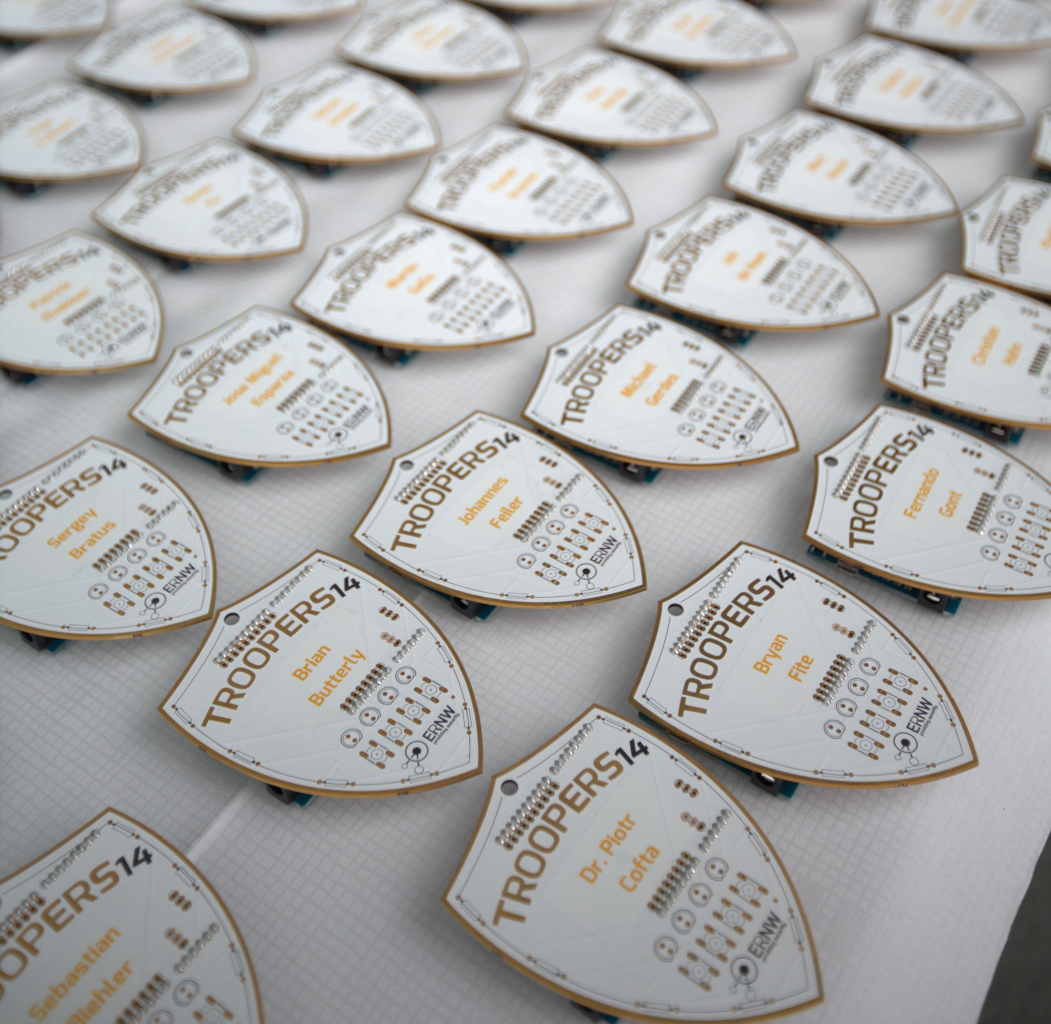
Being a TROOPER is tough: You need to know loads of information, learn even more and be able to work fast.
This year we decided to increase your efficiency and speed when collecting data from computer systems and, let’s say, hacking them! Your newest gadget is based on a plain Arduino Leonardo, modded with one of our famous shields. After adding a few LEDs and buttons, it will power up to full functionality.
Continue reading Continue readingHow to use Intel AMT and have some fun with Mainboards
I recently got in contact with
Intel AMT
for the first time. Surely I had heard about it, knew it was “dangerous”, it was
kind of exploitable and had to be deactivated. But I hadn’t actually seen it
myself. Well, now I have, and I simply love it and you will probably, too (and
don’t forget: love and hate are very very close to each other 😉 )
The following blogpost will be a set of features and instructions on how to own
a device with an unconfigured copy of Intel AMT without using any complicated
hacks or the famous magic!
Microsoft Surface RT, a quick insight
After being on the market for a few months now, Microsoft started quite a large advertising campaign in Germany for its new Surface RT . We had a comprehensive look at the new tablet PC and here are a few thoughts and impressions:
Running a slightly reduced ARM version of Windows 8, I heard somebody calling it “Windows 8 Home”, which in comparison to older versions hits the spot, Microsoft offers an easily usable interface. Software is reduced to market apps (the minimal run level on a plain Windows is 0, any, and 8, Microsoft, on Windows RT), so you can’t just install your favourite app, or can you?
Continue reading Continue reading